Domains
A domain tells the interpreter which requests belong to which project. Without one, a push has nowhere to land.
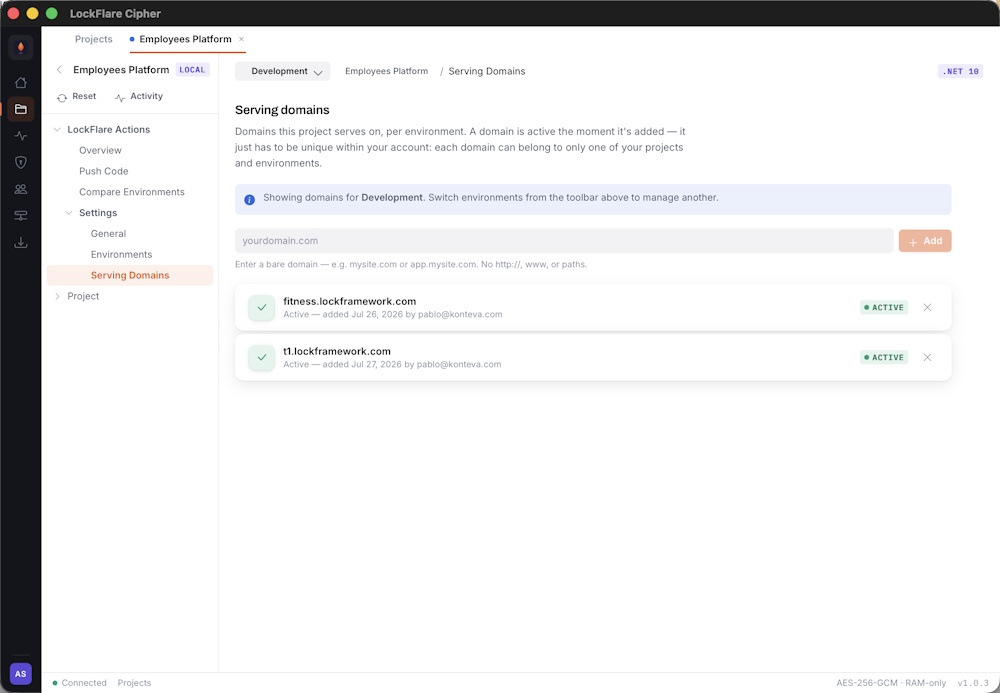
Several domains pointing at one project in one environment. All of them serve the same build.
Adding a domain
Open the project, go to Domains, pick the environment and add the hostname.
Domains are per environment — Development and Live hold different lists, which is what lets the same project
serve staging.example.com and example.com from
different machines.
Several domains, one project
Add as many as you need. Every domain in the list resolves to the same build, so this covers the usual cases: an
apex plus www, a vanity domain, or a per-customer hostname on a multi-tenant
deployment.
DNS
Point the domain’s A record at the server’s IP address — the same IP you registered the server with. If the environment has several servers, point at all of them, or put a load balancer in front.
Per-domain isolation
On the Node runtime each domain runs in its own vm sandbox. One tenant’s code
cannot reach another’s, even on the same server — which is what makes multi-tenant hosting on a single
machine reasonable rather than reckless.
HTTPS
Two options. Terminate TLS in front — a CDN or reverse proxy — and the server only needs port 80. Or let the server terminate it itself, which needs 443 open and a certificate present. The .NET Engine has this built in; see .NET Engine installation.