Activity log
Every action against the account, attributed and timestamped. Nothing that changes state happens without a record.
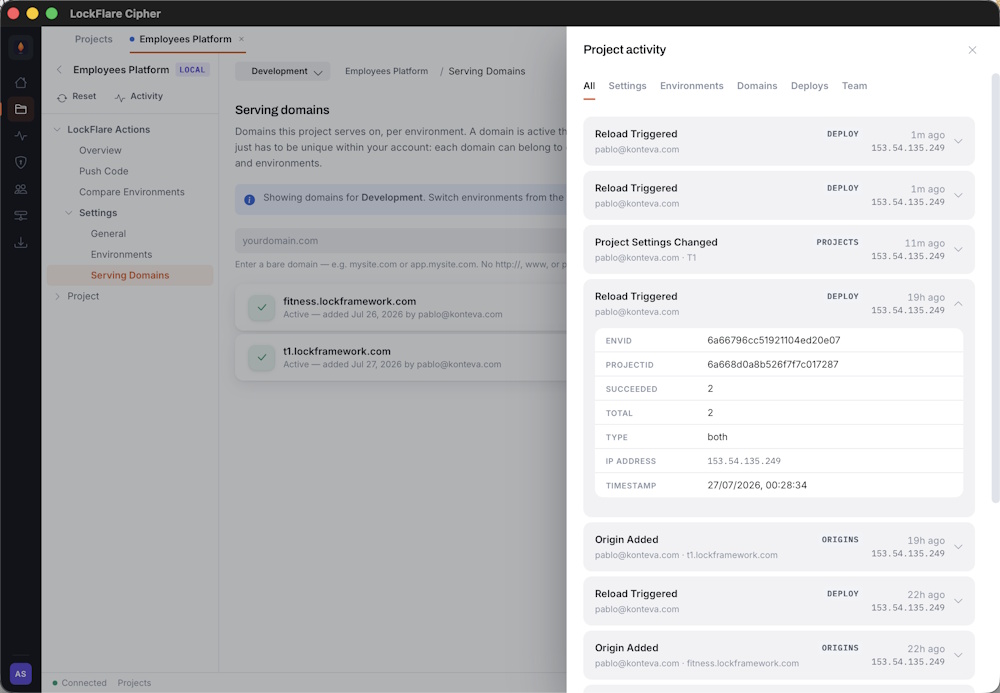
Per-project history: who pushed, when, from where, and which version.
What is recorded
- Pushes and promotions, with the version hash and target environment.
- Project changes — source folder, starting file, worker model, attached frontend.
- Environment and server changes, including resets.
- Seals and unseals.
- Sign-ins, failed sign-ins, and account changes.
- Team changes — members added, permissions altered, accounts disabled or removed.
Each entry carries the actor, the time, and the originating IP address.
Where to find it
Per project, in the project’s Activity pane — scoped to that project, which is usually what you want when working out what changed. Per member, from their row in Team management.
What it is good for
Mostly the ordinary question: something changed, when and by whom. A push you did not expect, an environment that is running an older version than you thought, a setting that is not what it was last week.
It is also the record you hand to an auditor. Deployments to regulated infrastructure usually need to show who changed what and when, and that is exactly what the log holds.