The terminal
A plain SSH terminal. A real terminal in the window, the operator's own credentials, sshd decides and sshd logs — and the pane says so: nothing here consults a policy or writes an audit chain. Host keys are never auto-accepted; the confirmation is the only thing between a session and a machine in the middle. Remote output travels base64 as bytes so a multi-byte character split by a read is put back together.
Logins. Password, a key file (keys found in ~/.ssh are offered so nobody types a path; the OS picker for the rest; passphrase asked and sealed), or the SSH agent, which is always offered and dropped for one server only when a refusal shows the agent burned its attempts. Every non-ephemeral connect saves the login, encrypted under a key only this drive on this machine can produce: Lens is an automation console, and a server with nothing saved is a server nothing unattended can open. Forget removes it by name. A login that came in on the agent alone is flagged as unreliable for unattended runs at the moment it is saved.
The sudo path. Root is normally the saved login's password behind sudo, direct, with no touch. The fallback dialog asks the account's password once when none is on record (a key, an agent) or the login password is not the sudo one; it is kept with the remembered login and the next session is direct from the first click. First login to a box per Lens run raises sshd MaxSessions to 250 through the proven SSH change, because every check is an SSH channel.
Resume. A dropped link — lid closed, Wi-Fi change, VPN falling over — does not end the pane. Lens knows why a session closed ("lost", not "exit"); on lost, with a saved login, the pane keeps its screen and dials again by itself, soon then more slowly, up to twenty tries, with a Stop on the strip. On a server kept alive with tmux the reconnect lands in the same shell. A shell ended by exit is not resumed.
Keep alive (tmux), recording, no history. Per server on Edit: KEEP ALIVE runs every shell inside tmux on the box, so the next connect lands in the same shell with its command still running; RECORD writes every session as a timestamped asciicast (output only — what is typed is never written, so a password at a prompt is not either); NO HISTORY leaves Lens's command-history hooks out of shells to that server. The terminal keepalive ticks every 30 s and waits 45 s before calling a box gone.
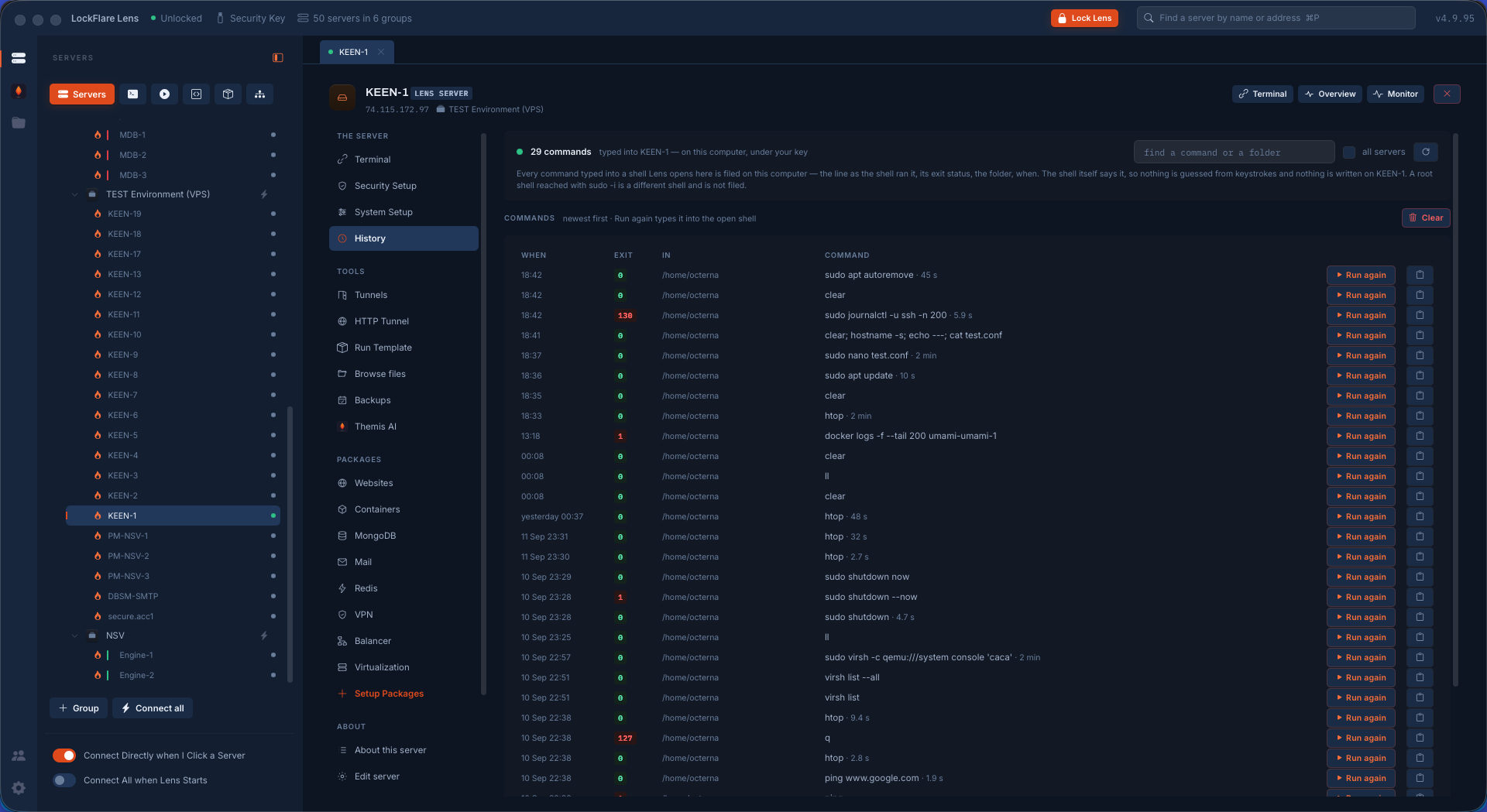
Command history. Every command typed into a shell Lens opened is filed on this computer per server under the key — the whole line as the shell ran it, its exit status, the folder, when, how long — reported by the shell itself through a hook added to bash or zsh at login, invisible on screen. Nothing is written on the box: the hook lives in a temporary folder for the seconds the shell takes to start and the shell removes it. Searchable, across servers if asked. A sudo -i shell is a different shell and is not hooked.
Recordings player. Recordings play inside Lens in a terminal of their own at 1×, 2× or 4× with the resize events shaping the terminal as the session was shaped, or in asciinema from the file.
Snippets menu on the bar. The saved snippets, typed into THIS shell from its own bar; a root snippet is wrapped in sudo sh -c so a && chain stays root all the way, and it is the server's sudo that asks.
On connect line. Per server, a line typed into every new shell the moment it is live — cd /var/www/app, sudo -i, tmux a — under the operator's login.
Find in scrollback, session log, paste. Find across the scrollback; the scrollback as plain text saved wherever the operator says; paste goes straight through and relies on the shell's bracketed paste so a pasted block waits for Return.
Look and feel. Font size and theme remembered globally, not per host: a preference about eyes, not infrastructure. A different cell size re-tells the remote its grid so full-screen programs redraw.
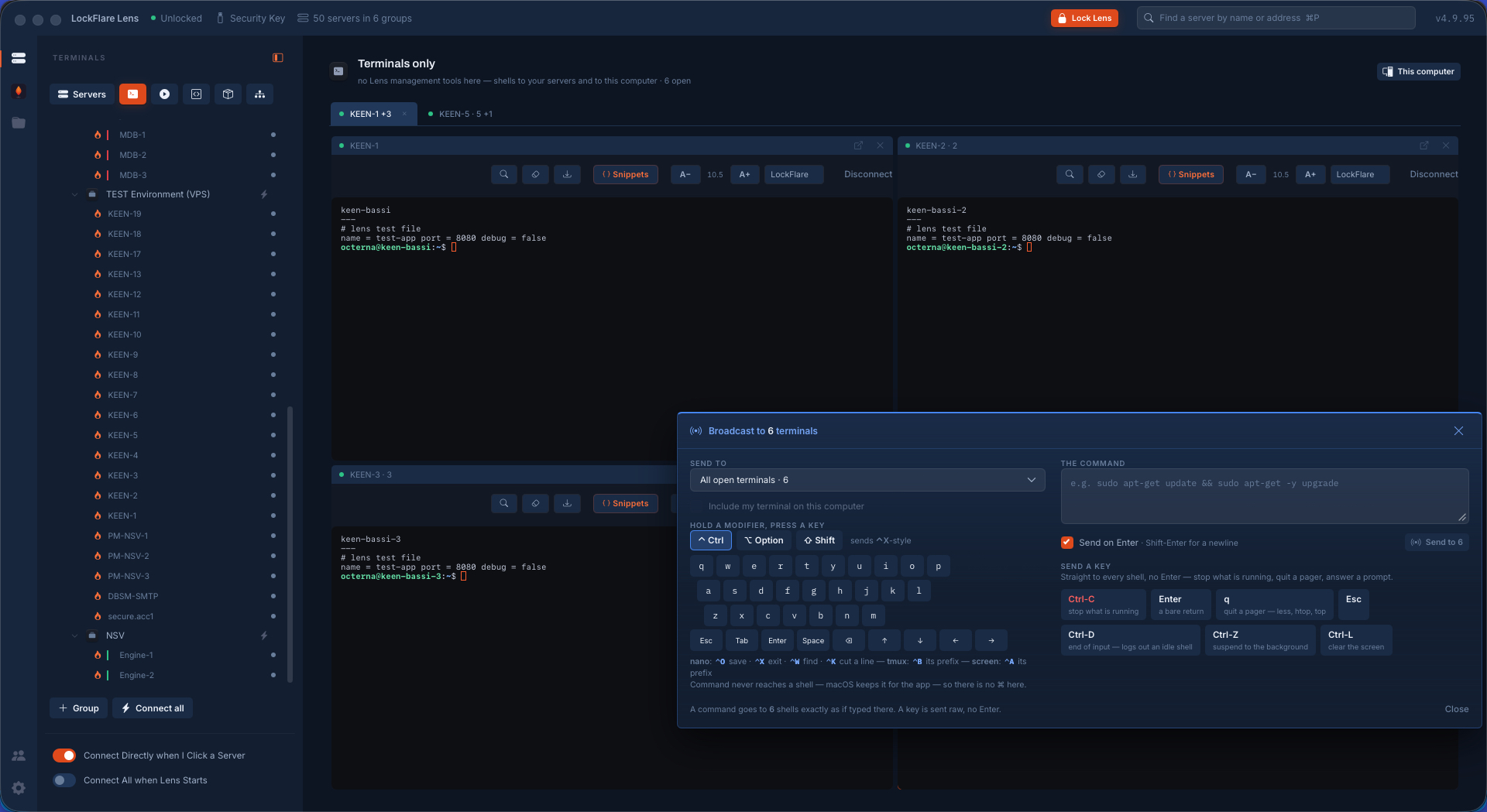
Broadcast commands. One thing typed once, sent into many open shells at once — the live version of Actions › Execute. It writes through the terminals already on screen, so what is sent shows up in each pane as if typed there. Two kinds: a COMMAND (with or without its Enter) and a KEY (Ctrl-C, q, Esc, Ctrl-D, Ctrl-Z, Ctrl-L, Tab, Enter, Space, arrows) because watching htop on ten boxes is only useful if you can quit it on ten. Targets: a split, a group, all; the local shell left out unless ticked. A floating panel dragged anywhere on the screen.
A shell on this computer. The operator's own shell in a pty, in the Terminals chair, on the same wire as an SSH session.