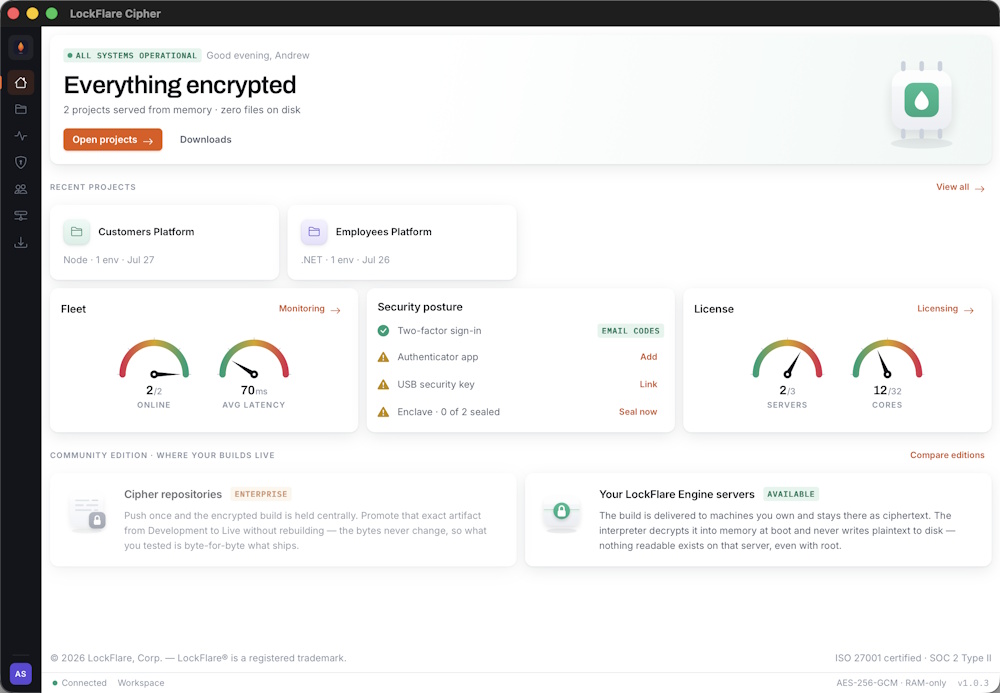
The header states the fleet’s condition and changes colour with it. Below: recent projects, then fleet, security posture and licence.
LockFlare keeps your source code encrypted everywhere it rests — on disk, in transit, and in storage — and decrypts it only into the volatile memory of a server you control. Nothing readable is ever written to that machine’s filesystem.
It is software-only. There is no special hardware, no secure enclave chip, no cloud provider to trust. You install a single binary on an ordinary Linux server — your own, or your client’s — and it serves your application exactly as it would have run natively.
When you deploy software to infrastructure you do not own, you hand over your source. A client with root on their own server can read every file you put there. So can anyone who compromises it, anyone who takes a snapshot of the disk, and anyone who walks out with a backup.
The usual answers are all partial. Obfuscation slows a reader down for an afternoon. Compiling to bytecode moves the problem rather than solving it. Containers isolate processes from each other, not from the host. And a hosted platform means the code sits on someone else’s machine under someone else’s terms.
It is not a build system. LockFlare serves the build you give it — it does not compile, transpile or bundle your code. If your project needs a build step, you run it as you always have, and LockFlare deploys the output.
It is not a hosting provider. The servers are yours. LockFlare never runs your application on infrastructure it controls, which is the whole point — your deployment target can be a client’s datacentre, an air-gapped network, or a rack in your own office.
And it is not a DRM wrapper. There is no phone-home licence check that breaks your app when a network blips. The Engine holds a licence bound to its server, but your application’s availability does not depend on reaching us.
You ship an application that runs on a customer’s infrastructure and you would rather not ship the source with it. On-premise delivery without handing over the product.
Data residency or sovereignty rules put the servers somewhere specific. LockFlare lets the code run there without being readable there.
You build and host for clients who own their infrastructure. The client gets a running system; you keep the source you wrote.
One fleet, many customers, per-domain isolation — and every tenant’s code encrypted separately from every other.
The rest of this section is what to know before you install anything. How it works covers the mechanism, and The three pieces covers what runs where.
Four stages: pack, encrypt, deliver, execute. The only one that produces readable code is the last, and it happens in memory on a machine you own.
LockFlare Cipher reads the project folder on your machine — the same folder you develop in — and packs it in memory. Nothing is written to a temp directory. The pack is deterministic, so an unchanged project produces an identical archive and an identical version hash.
What gets packed is your build output as it stands. LockFlare does not run your bundler, compiler or package
manager. If your project needs npm run build or dotnet
publish, you run it first, exactly as you do today.
The archive is encrypted with AES-256-GCM before it leaves your machine. GCM is authenticated encryption: it protects confidentiality and integrity together, so a modified ciphertext fails to decrypt rather than executing something you did not write.
The ciphertext is uploaded to the Cipher Encrypted CDN and recorded against a version. Promoting a build from one environment to another moves that exact artifact — the bytes do not change between Development and Live, so what you tested is byte-for-byte what ships.
Each of your servers holds a licence bound to its own IP address. When the Engine fetches a build it authenticates with that licence, and the payload is keyed so that a build for one server is not usable on another.
The Engine decrypts the build into volatile memory and executes it there. On the Node runtime that means loading
modules through Node’s native vm sandbox with per-domain isolation; on .NET it
means Roslyn in-memory compilation into a collectible AssemblyLoadContext.
Either way, the filesystem never receives plaintext. There is no extraction step, no staging directory, and nothing left behind when the process stops.
| They do this | They get |
|---|---|
| Read the filesystem | The Engine binary. No application source. |
| Snapshot the disk | The same. Ciphertext at most, and only if the build is stored locally. |
| Restart the server | The Engine re-fetches and re-decrypts into RAM. Still nothing on disk. |
| Attach a debugger | Nothing — the Engine refuses to run with strace, gdb or ltrace present. |
| Read process memory | The plaintext, if they have root and the process is running. This is the honest limit. |
Three pieces, with a deliberate split of knowledge between them. Each one holds what it needs and nothing more.
A native application for macOS and Windows. It is where you import projects, manage environments and servers, push builds, watch fleet health and administer your team. It is also the only place your source is ever read in plaintext by LockFlare software.
Cipher runs on your machine, next to your code. It packs and encrypts locally, then talks to the control plane over an authenticated channel. It never uploads anything readable.
The coordination layer. It holds accounts, permissions, environments, server registrations, licences, deployment manifests and the activity log — and it holds your builds as ciphertext.
What it does not hold is a way to read them. Build artifacts arrive encrypted and are stored exactly as received. The control plane orchestrates which version belongs on which server; it is not a party to the contents.
A single binary installed as a system service on each of your servers. It registers with its licence, fetches the builds assigned to it, decrypts them into memory and serves traffic.
It is deliberately the only thing on the machine. A LockFlare server is an appliance, not a general-purpose host — no database alongside it, no second application, no files that matter. That constraint is what makes it disposable: if the box is lost, corrupted or sealed shut, you install the Engine on a fresh one and push every project back. Minutes, not a recovery project.
Hosts JavaScript projects. Per-domain isolation through Node’s native vm
module, so one tenant’s code cannot reach another’s. Requires Node.js 24.
Hosts ASP.NET Core projects. Roslyn compiles in memory into a collectible
AssemblyLoadContext, so a reload frees the old assembly cleanly. Requires .NET 10.
| Cipher | Control plane | Engine | |
|---|---|---|---|
| Runs on | Your laptop | LockFlare | Your servers |
| Sees plaintext source | Yes — it is your machine | Never | In RAM only |
| Holds encryption keys | Yes | Yes, per account | For its own builds |
| Knows your topology | Yes | Yes | Only itself |
| Writes plaintext to disk | No | No | No |
One more consequence worth naming: because the Engine only knows about itself, compromising one server tells an attacker nothing about the rest of your fleet. There is no shared secret sitting on every box.
# Understanding a LockFlare server # Understanding a LockFlare serverA LockFlare server is an appliance, not a computer you keep. Treat it as disposable from the day you register it — because the moment you seal one, disposability stops being a convenience and becomes the only recovery path that exists.
It is not a limitation of the implementation. It follows directly from what the product is for.
LockFlare’s central claim is that your source is unreadable on the server. RAM-only execution gets most of the way there: nothing readable is written to disk. What it cannot stop is someone with root on a running machine attaching to the process and reading its memory. That is the honest ceiling of every software-only approach.
Enclave closes that gap by removing every interactive login path — SSH, console, KVM, IPMI, an attached keyboard. There is no shell to get root in, so there is no session from which to dump memory. That is the whole point, and it works.
But a machine with no way in has no way in for you either. A recovery channel that survived sealing would be a recovery channel an attacker could use, so it does not exist. The security property and the lockout are the same property, seen from two sides.
| Situation | Can you get back in? |
|---|---|
| Sealed, engine healthy | Yes. Unseal from Cipher — it is authorized through the engine, which is running. |
| Sealed, engine crashed but the service manager restarts it | Yes. The engine comes back and the unseal path comes back with it. This is why a managed service is mandatory. |
| Sealed, engine dead and nothing restarts it | No. No SSH, no console, no rescue boot. Rebuild the server. |
| Sealed, a service the engine depends on has failed | No. Same outcome — unsealing needs the engine responding. |
| Not sealed, anything at all | Yes. SSH still works. This is the state to be in while you are still setting things up. |
Losing a server sounds severe until you look at what is actually on it. A LockFlare host holds the engine binary, a licence file, and encrypted artifacts it can fetch again. There is no application source, no build output, no database, no writable web root, no state that exists only there.
So the recovery is: provision a machine, install the engine, apply a licence, push. Every project is back and serving within minutes, and nothing was restored because nothing was lost.
Registering a server asks you to acknowledge five things. They are not boilerplate — each one is a precondition for the paragraph above being true.
| You confirm | Because |
|---|---|
| This will be a dedicated LockFlare server. It runs the engine and nothing else — no second application, no web server of your own, no background workloads. | Anything else on the box is something you would lose, and something you would need a shell to fix. |
| This server does not contain any database engine. MongoDB, PostgreSQL, MySQL, Redis and anything comparable live on separate machines. | A database is state that exists only there. Rebuilding the host would destroy it. |
| Nothing irreplaceable is stored on its disk. Uploads, backups and generated files belong elsewhere. This disk is never the source of truth for anything. | The disk is not backed up, because there is supposed to be nothing on it worth backing up. |
| I can wipe and rebuild this server at any time. A fresh machine, the engine binary, and a push — every project is back and serving within minutes. | This is the recovery plan. If it is not true for this machine, there is no recovery plan. |
| I understand a sealed server can lock me out permanently. | Because it can, and the consequence lands on whoever sealed it. |
The appliance discipline is still the right way to run a LockFlare host — it is what makes a lost server cheap — but the stakes are lower. An unsealed server still has SSH, so a mistake is recoverable in the ordinary way.
Sealing is what converts every one of those acknowledgements from good practice into a hard precondition. A server that breaks the contract and is never sealed is untidy. The same server sealed is a machine you will one day be unable to open.
The engine has to be under a service manager — systemd or PM2, as root. Not for convenience: it is the difference between a crash that self-heals and a crash that ends the machine.
Cipher asks you to confirm this again in the seal dialog, separately from the registration acknowledgements, because it is the single condition most likely to be true at registration and false by the time someone seals.
See Node Engine installation or .NET Engine installation for the service setup.
# Editions # EditionsOne runtime, one encryption model, one set of features. The difference between the editions is where the encrypted build is stored — not how strongly it is protected.
Once a server confirms it holds a verified copy of a build, the central copy is dropped. The AES-256-GCM encrypted artifact then lives on your own machine and nowhere else.
LockFlare holds no copy of your build. That is a stronger privacy position, not a weaker one.
The AES-256-GCM encrypted artifact is retained centrally and versioned, in addition to being delivered to your servers.
A server can be rebuilt from that copy at any time, and a build can be promoted between environments without being pushed again.
| Free | Enterprise | |
|---|---|---|
| Encryption of the build | AES-256-GCM | AES-256-GCM |
| Plaintext written to disk | Never | Never |
| Runtime, isolation, Enclave | Identical | Identical |
| Where the ciphertext rests | Your server only | Cipher Encrypted CDN + your servers |
| Promote a build between environments | Push again | Repoint — no bytes move |
| Rebuild a lost server from a stored copy | Push again from your source | Pulls its artifacts and resumes |
The two consequences at the bottom of that table both follow from the same fact: on the free tier there is no central artifact to promote or to restore from, because it was deliberately dropped once your server confirmed it had one.
Separate from storage, and metered on four axes.
1 server · 8 cores, split any way you want. No clock, no card, no trial period, no feature restrictions.
Servers, cores, seats and environments to whatever scale you need. Add capacity from your LockFlare account; changes appear in Cipher the next time it loads.
Cipher shows all four as live gauges on the Licensing screen, so you can see how close to a ceiling you are before you hit it.
Four axes, each licensed independently and billed only when it changes. Start on the free plan and stay there for as long as it fits — there is no trial clock.
| Axis | From | What it is |
|---|---|---|
| Per server | $180 | An engine instance on your infrastructure — cloud, bare metal, or air-gapped. |
| Per core | $55 | CPU cores the runtime may use. Your first 8 are free, forever. |
| Per developer seat | $30 | A named account in Cipher with its own permissions, login rules and audit trail. |
| Per environment | $22 | Dev, staging, production — each isolated, each with its own servers and push rules. |
Server and core rates step down with scale, applied automatically as you grow. Current rates are on the licensing page; this page is about how the model behaves.
This is the part worth understanding, because it is not how most per-core licensing works.
Licensed cores are not bound to any single machine. They are a pool. The runtime assigns them across active workloads, and you decide the split per server when you register or edit one.
Practically: capacity added for a launch can be removed afterwards. A fleet that needs 24 cores in December and 8 in February pays for what it holds, not for its peak.
Going paid does not forfeit them. The eight free cores stay yours and join the pool, to split across as many servers as you like. A paid account with 16 licensed cores has 24 in total.
1 server · 8 cores, free forever. No card, no expiry, no feature restrictions — same encryption, same runtime, same deployment pipeline as every paid plan. Create the account inside Cipher and start deploying.
The only architectural difference is where your encrypted build is stored. See Editions.
On the free plan the AES-256-GCM encrypted build lives on each LockFlare Engine server — the machines you install the engine on. LockFlare retains no copy.
Enterprise adds Cipher repositories, so a build is also held centrally and can be promoted to any environment without being pushed again. It is encrypted identically in both cases; only the location differs.
Cipher’s Licensing screen shows all four axes as live gauges — servers, cores, endpoints and seats — against what your plan allows. A gauge turns red at the ceiling, so you can see you are about to run out before an action fails.
Capacity is added from your LockFlare account on the web, not inside the app. Manage licences on that screen hands off to it, and changes appear the next time Cipher loads.
Beyond the published axes, enterprise agreements cover unlimited servers and cores, dedicated infrastructure, custom service levels, air-gapped and government deployments, and priority support.
Self-hosted artifact storage — which removes LockFlare from artifact custody entirely — is available on request, and is the recommended configuration for regulated workloads.
# Server requirements # Server requirementsA LockFlare server is an appliance. It should run the Engine and nothing else — no database, no second application, no files that matter.
Linux x86-64 with systemd. The Engine installs as a system service and runs as
root. Any mainstream distribution works — Ubuntu, Debian, Rocky, Alma.
Both runtimes need their platform present: Node.js 24 for the Node Engine, the ASP.NET Core 10 runtime for the .NET Engine.
| Port | Required | Why |
|---|---|---|
80 |
Always | The control plane reaches the server by IP over HTTP for reloads, health checks and Enclave operations. Certificate renewal depends on it too. |
443 |
Conditional | Only if the server terminates TLS itself. Not needed behind a CDN or reverse proxy. |
The Engine refuses to seal on a machine with strace,
gdb or ltrace installed. Those tools attach to a running
process and read its memory, which is precisely the attack that RAM-only execution exists to make expensive.
which strace gdb ltrace
# no output means you are clear

# if any are present:
apt remove --purge strace gdb ltrace     # Debian / Ubuntu
dnf remove strace gdb ltrace             # Rocky / Alma
Cores are what you licence, so allocate them per server according to the traffic that server takes. A single core is enough for a low-traffic site; a busy API benefits from more. You can change the allocation later without reinstalling.
Memory is the resource to watch, because your application is decrypted into it. Budget for your normal working set plus the decrypted build — in practice this is close to what the same application would use running natively, since it is the same code doing the same work.
The appliance constraint is not arbitrary. It is what makes a server replaceable: if the box is lost, corrupted or sealed shut, you install the Engine on a fresh one and push every project back encrypted. Minutes, not a recovery project.
That only holds while the server stays dedicated. Put a database on it and you have created something you have to back up, restore and care about — and the whole recovery story goes with it.
# Installation # InstallationThe whole path, once: install Cipher, create an environment, register a server, install the Engine on it, import a project, push. Fifteen minutes if the server is already up.
Download the desktop app for macOS or Windows and open it. Create an account, or sign in if you have one. Every account starts free and stays free — one server, eight cores, no expiry.
An environment is a deployment target — Development, Staging, Live, or whatever your process calls them. Open Environments and add one. It is just a name and a colour at this point; the servers come next.
Add a server to that environment: give it a label, its public IP address, and the number of cores to allocate. LockFlare issues a licence key bound to that IP.
Copy the key — you need it in the next step, and it is the only thing that ties the Engine on that machine to your account.
Download the interpreter for your runtime from the Downloads screen in Cipher, copy it to the server, and follow the guide for that runtime. The two differ in more than the binary name — Node runs behind a web server on port 3000, .NET binds port 80 directly — so use the right one.
Node.js 24, nginx in front, then PM2 or systemd to keep it running.
Installation guide →ASP.NET Core 10, no reverse proxy, systemd required. Optional TLS on 443.
Installation guide →
Both end the same way: you run the engine once by hand, it prompts for the licence key you copied in step 3,
validates it and writes it to .env. After that you put it under a service manager so
it survives a reboot.
Within a few seconds the server should appear as online in Monitoring. If it does not, the cause is almost always port 80 — see Server requirements.
Back in Cipher, open Projects and add one. Point it at the folder on your disk,
name it, choose the runtime, and set the starting file — the file the interpreter loads and runs, typically
server.js for Node.
Attach the environment you created in step 2, and add the domain the project should answer on.
Open the project and press Push. Cipher packs the folder in memory, encrypts it, uploads the ciphertext, and signals the Engine to load it. The chain on screen shows each stage as it completes.
Point your DNS at the server and the project is live. Subsequent deploys are the same single action.
Most applications deploy unchanged. The ones that need work usually need one adjustment, and it is nearly always the same one — something writing to the local filesystem.
Run these against your source. Each hit is something to look at, not necessarily something to change.
# writes to the local filesystem — the most common blocker
grep -rn "writeFile\|createWriteStream\|mkdir" --include=*.js src/

# a local file-backed database
grep -rn "sqlite\|better-sqlite3\|\.db'" --include=*.js src/

# schedulers — check the worker model before you push
grep -rn "setInterval\|node-cron\|cron.schedule" --include=*.js src/

# in-process state that assumes a single process
grep -rn "MemoryStore\|new Map()" --include=*.js src/
| Pattern | Change to |
|---|---|
| Uploads written to a local folder | Object storage — S3, R2, Azure Blob — or a database blob column. |
| SQLite or any file-backed store | A network database. There is nowhere for the file to live, and it would not survive a rebuild. |
| Logs written to a file | Write to stdout. The engine captures it and it reaches journalctl or PM2. |
| Sessions or caches in process memory | Redis, or the database — or pick Single instance as the worker model if you cannot change it yet. |
All four are things you would have had to fix to run more than one instance anyway. LockFlare surfaces them earlier, not additionally.
Dependencies must be in the fleet package set or bundled into the artifact. Pick a worker model — Standard unless you have an unguarded scheduler.
Enable outbound network for the environment if you talk to a database. Precompile Razor views, and check
nothing reads Assembly.Location.
Both are covered in detail under Known Limitations.
Source control, CI, build tooling, test suites, code review, release approvals. LockFlare consumes the output of that process rather than replacing any part of it, which is why adoption does not require re-certifying a pipeline.
# LockFlare Cipher # LockFlare CipherCipher is the desktop app you deploy from. It is also the only piece of LockFlare software that ever reads your source in plaintext — and it runs on your machine, not ours.
Everything you do to a deployment happens here: importing projects, defining environments, registering servers, pushing builds, watching fleet health, sealing machines and administering your team.
macOS (Apple Silicon and Intel) and Windows. Download either from lockflare.com/download, or from inside the app when an update is available.
The pages that follow track the order you will actually do things in: sign in, look around the home screen, create an environment, register a server, import a project, push it, point a domain at it. Monitoring, Enclave, team management and the activity log come after, because they matter once something is running.
Two-factor is required on every account. Which second factor you use is your choice, and you can register more than one.
Enter your username and password. Cipher then asks for a second factor before it will open the workspace.
A six-digit code to your inbox. Always available with no setup — this is the floor, and the fallback if another factor fails.
Your fingerprint on this Mac. Nothing to carry or type, and the fastest option when the hardware is there.
Google Authenticator, Authy, 1Password and similar. Works offline and moves with you between machines.
Turns a USB drive into a hardware key. The drive must stay plugged in — pulling it locks the app immediately.
Register as many as you like under My account → Two-factor authentication. One is marked in use; the rest stay registered as backups you can switch to.
Forgot your password? on the sign-in screen sends a verification code to your registered email and lets you set a new one. Changing your password signs out every other session immediately.
Administrators can restrict a member to specific IP addresses or time windows — useful for contractors, or for accounts that should only be used from an office network. See Team management.
# The home screen # The home screenThe home screen answers one question before you read a word: is anything wrong right now?
The header states the fleet’s condition and changes colour with it. Below: recent projects, then fleet, security posture and licence.
The status chip and the headline are driven by live state, not by a greeting. Everything encrypted with a green wash means every server is serving. If servers are unreachable it says so, turns amber, and the primary action changes to take you to Monitoring.
The mark on the right follows the same state, so the screen reads as healthy or unhealthy from across the room.
The projects you touched most recently, with their runtime, environment count and last change. Click through to open one directly.
Two gauges: servers online and average latency across the fleet. The online gauge runs backwards from the others — full is good, and it walks left into amber and red as servers drop.
A checklist of the account’s security state: two-factor method, whether a USB key is linked, and how many servers are sealed. Anything unresolved shows an amber triangle and a link straight to the screen that fixes it.
Servers and cores as gauges against your plan. These run the usual direction: full is bad, because full means you cannot add another server without more capacity. At the ceiling the gauge turns red.
Two cards at the bottom state which storage options this account has — the Cipher Encrypted CDN, and your own Engine servers. On the free tier the first is marked Enterprise and dimmed, which means the encrypted build lives on your server rather than centrally. It is AES-256-GCM encrypted in both cases. See Editions.
# Projects # ProjectsA project is a folder on your disk plus the settings that describe how to run it. LockFlare serves the build you give it — it does not compile, transpile or bundle your code.
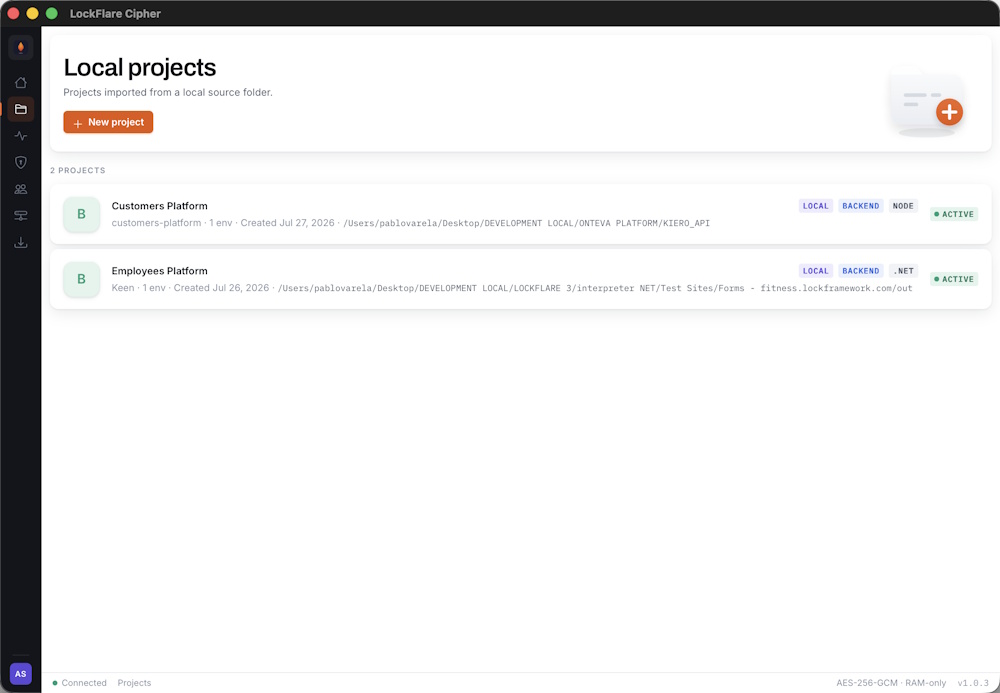
Every project on the account, with its runtime, type, environment count and status.
Press New project. The first screen asks what you are deploying and where it lives on disk.
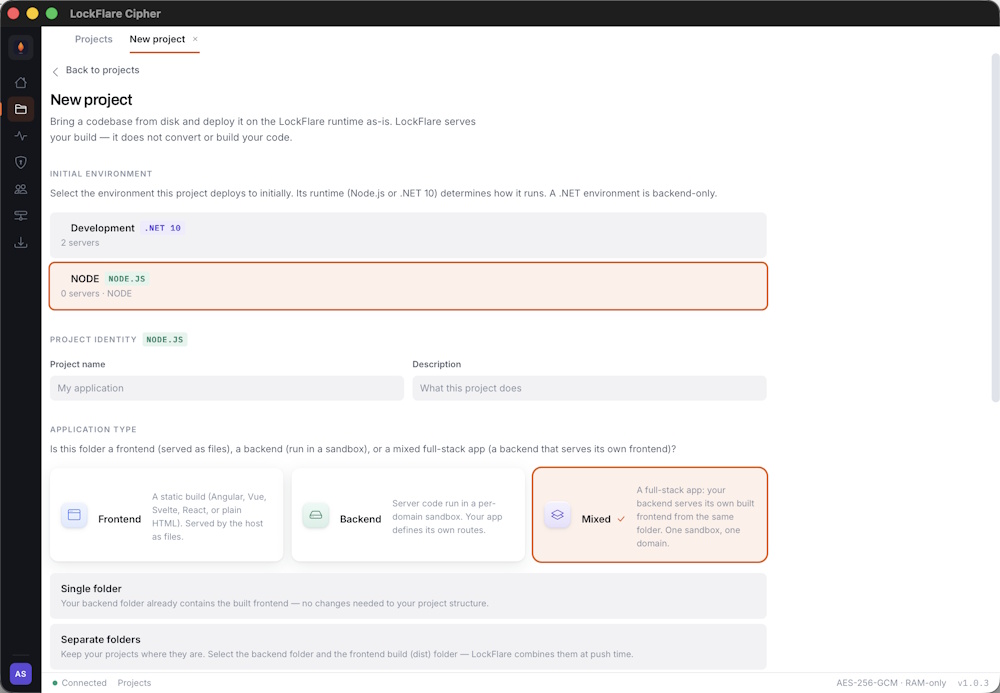
Name, runtime and source folder. The folder is the one you develop in — there is no export or copy step.
| Field | What it is |
|---|---|
| Name | What you call it. Shown everywhere in the app. |
| Slug | Derived from the name. Used internally to identify the project. |
| Type | Backend, frontend, or a backend with a frontend attached. |
| Runtime | Node or .NET. Must match the Engine installed on the target servers. |
| Source folder | The directory on your machine. Read at push time, never copied. |
| Starting file | The file the interpreter loads and runs — typically server.js. |
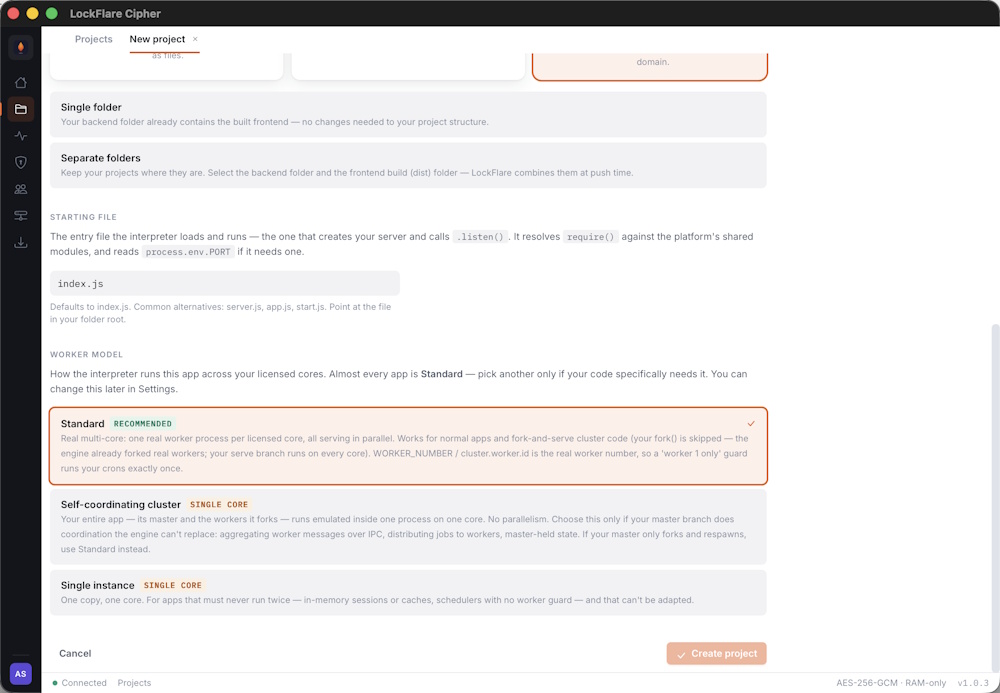
The second screen attaches environments and sets the worker model.
This is the one people get wrong. It is the entry point the interpreter executes — the file that creates your
server and starts listening. For an Express app that is usually
server.js or app.js. If your framework has a different
entry point, name that instead.
node <file> on your own machine, would start the server.
If your project needs a build step, run it as you always have. LockFlare deploys what is in the folder at the
moment you push. It will not run npm run build for you, and a stale
dist/ will deploy exactly as stale as it is.
A backend project can carry a frontend build alongside it — a Vue, React, Angular, Svelte or plain static bundle. Point the frontend folder at your build output and choose the path it serves from. Both are packed and encrypted together, and a push deploys them as one artifact.
Everything above is changeable from the project’s General pane — source folder, starting file, worker model, attached frontend. Changes take effect on the next push.
Every project picks a worker model, and the choice has real consequences. Get it wrong and a scheduled job can run once per core instead of once.
One real worker process per licensed core, all serving in parallel. This is real multi-core — four licensed cores means four workers handling requests simultaneously.
It works for ordinary applications and for fork-and-serve cluster code alike. If your application calls
cluster.fork(), that call is skipped, because the engine has already forked real
workers for you.
WORKER_NUMBER and cluster.worker.id are the
real worker number under Standard. A guard like
if (cluster.worker.id === 1) runs your cron exactly once, on one worker —
which is the pattern you want.
Your entire application — its master and the workers it forks — runs emulated inside one process on one core. There is no parallelism.
Choose it only when your master does coordination the engine cannot replace: aggregating messages from workers over IPC, distributing jobs, holding state the workers ask it for.
If your master only forks and respawns, use Standard instead. That is the common case, and Standard gives you the cores you are paying for.
One copy, one core. For applications that must never run twice and cannot be adapted — in-memory sessions or caches with no shared store, or a scheduler with no worker guard.
It is the safe answer when you are unsure and cannot change the code. It is also the slowest, so treat it as a stopgap rather than a destination.
| Your application | Model |
|---|---|
| An ordinary web app or API | Standard |
Uses cluster.fork() just to spread load | Standard — your fork is skipped, the engine already did it |
| Runs a cron guarded by a worker check | Standard — the guard works as written |
| Runs a cron with no guard | Single instance, or add a guard and use Standard |
| Keeps sessions or a cache in process memory | Single instance, or move state to Redis and use Standard |
| Master aggregates worker messages over IPC | Self-coordinating cluster |
setInterval or cron under Standard
runs in every worker. Four cores means four invoices emailed, four cleanup jobs, four webhook retries.
Nothing errors — it just happens four times, which is worse.
The fix is one line, and it is the same line you would want on any clustered Node deployment:
const cluster = require('cluster')

if (cluster.worker.id === 1) {
  startScheduler()
}The worker model is on the project’s General pane and can be changed at any time. It takes effect on the next push or reload.
# Frontend projects # Frontend projectsA static build from any toolchain that emits a folder with an entry document can be deployed on its own — no backend required, served from memory like everything else.
| Framework | Build output |
|---|---|
| Vue | dist/ |
| React | build/ or dist/ |
| Angular | dist/<project>/ |
| Svelte / SvelteKit static | build/ |
| Astro | dist/ |
| SolidJS | dist/ |
| Preact | build/ |
| Next.js static export | out/ |
| Nuxt generate | .output/public/ |
| Plain HTML | the folder itself |
next export or nuxt
generate. An SSR build expects a Node server at runtime; deploy that as a backend project instead.
In New project, choose Frontend as the type
and point the source folder at your build output — the folder containing
index.html, not the project root.
There is no starting file to set: a static project has no entry point to execute, only an entry document to serve.
dist/ deploys exactly as out-of-date as it is.
Single-page applications route in the browser, so a deep link like /settings/profile
has to resolve to your entry document rather than 404. The runtime serves the entry document for unmatched paths,
which is what a static host has to do for SPA routing to work.
Hash routing works without any of this, since the path never leaves the browser.
The other shape. A backend project can carry a frontend build alongside it, grafted in at a path you choose and served by your own server code.
Point the frontend folder at your build output and set the destination path. Both are packed and encrypted together, and a push deploys them as one artifact — so the API and the UI can never be out of step with each other.
| Frontend project | Backend with frontend | |
|---|---|---|
| Runs code | No | Yes — your server |
| Starting file | Not used | Required |
| Serves the UI | The runtime | Your own server code |
| Deployed together with an API | No — separate project | Yes — one artifact |
A static project is encrypted, delivered and served exactly like a backend one: AES-256-GCM at rest, decrypted into memory, never written to disk as readable files. There is no reduced mode for frontends.
# Environments # EnvironmentsAn environment is a deployment target with servers behind it. Development, Staging, Live — or whatever your process calls them.
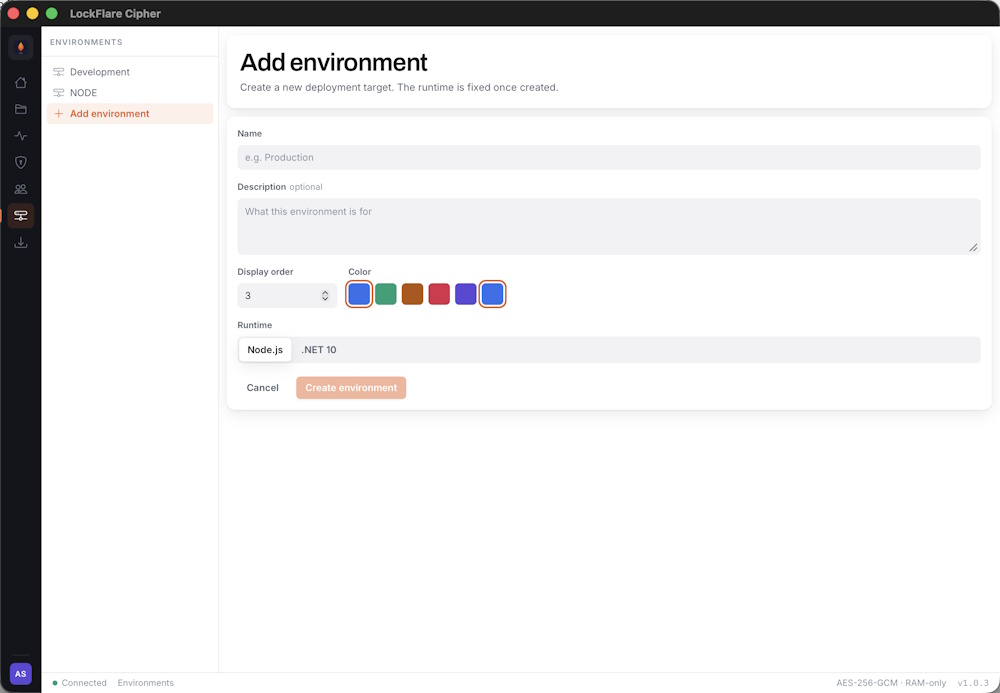
An environment is a name, a colour and a set of servers. The colour is how you tell them apart at a glance everywhere else in the app.
Open Environments and add one. At this point it is just a label — servers come next, and projects attach to it after that.
Environments are metered against your plan, so each one consumes an environment licence. Cipher tells you before you run out.
An environment can hold one server or many. A push fans out to every server in the environment, so adding a second machine is how you get redundancy — there is nothing else to configure.
See Servers and licences for registering machines.
A reset tells every server in the environment to reload — drop what it is running and fetch its assigned build again. It is the first thing to try when a server is serving something unexpected.
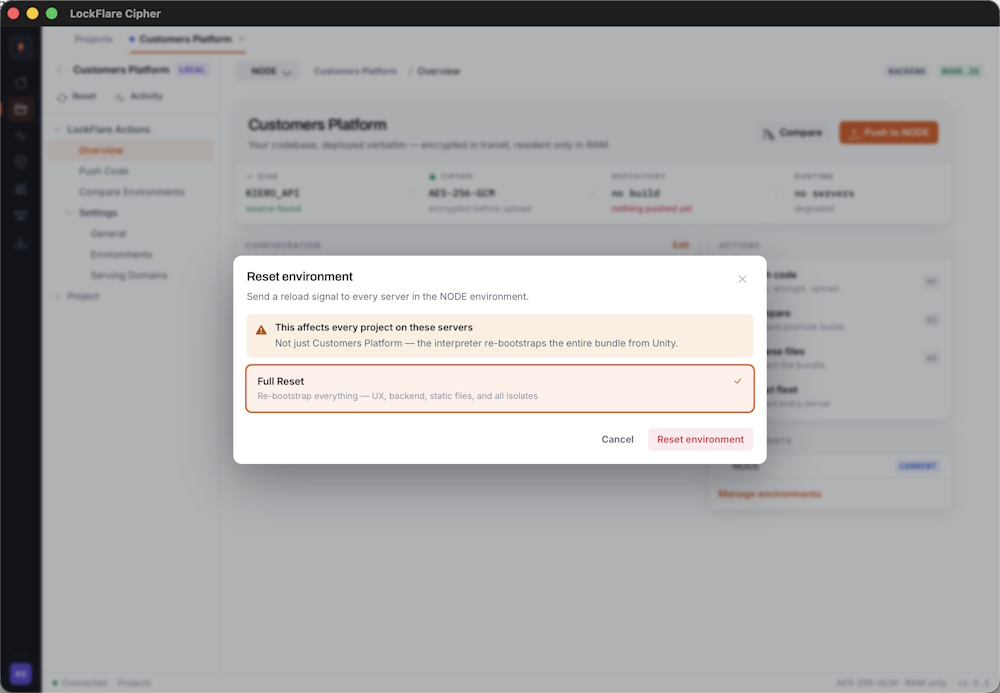
The reset is sent to every server in the environment at once.
Each server confirms independently, so you see the result per machine rather than a single success or failure for the whole operation.
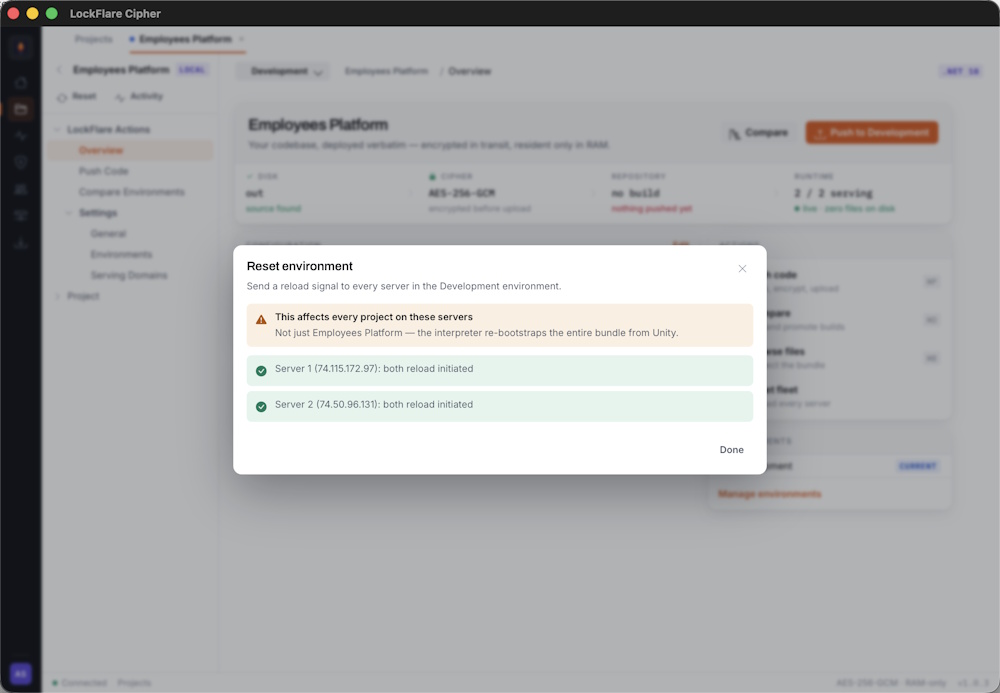
All three confirmed — every server reloaded and is serving again.
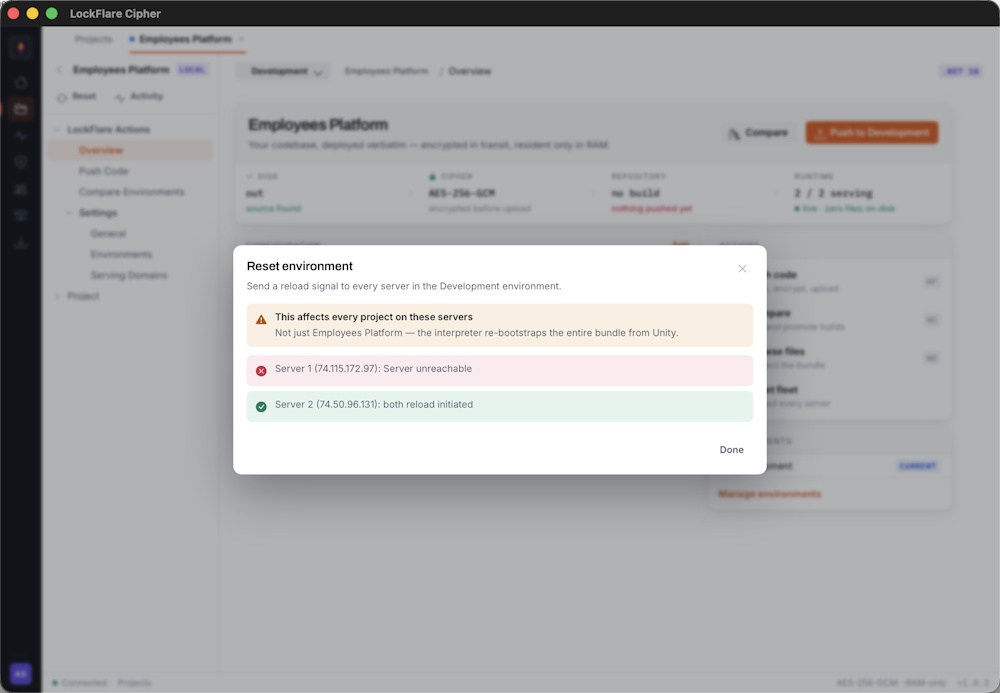
Two confirmed, one failed. The environment is now in a mixed state — two machines reloaded, one did not.
A project attaches to one or more environments from its Environments pane. Only attached environments appear as push targets, and detaching one does not remove what is already deployed — it stops future pushes reaching it.
# Servers and licences # Servers and licencesRegistering a server issues a licence key bound to that machine’s IP address. The Engine uses that key to prove which account it belongs to.
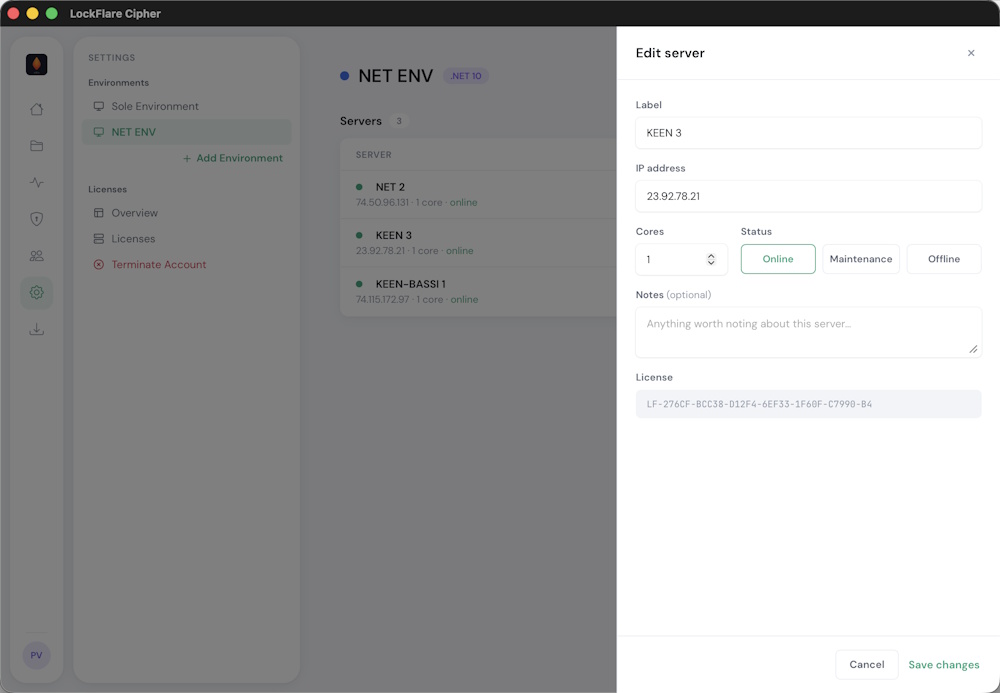
Label, public IP address and core allocation. The label is for you; the IP is what the licence binds to.
| Field | What it is |
|---|---|
| Label | A name you will recognise in Monitoring. Not used by the Engine. |
| IP address | The server’s public IP. The licence is bound to it — a typo produces a machine that never comes online. |
| Cores | How many CPU cores to allocate here, counted against your plan. |
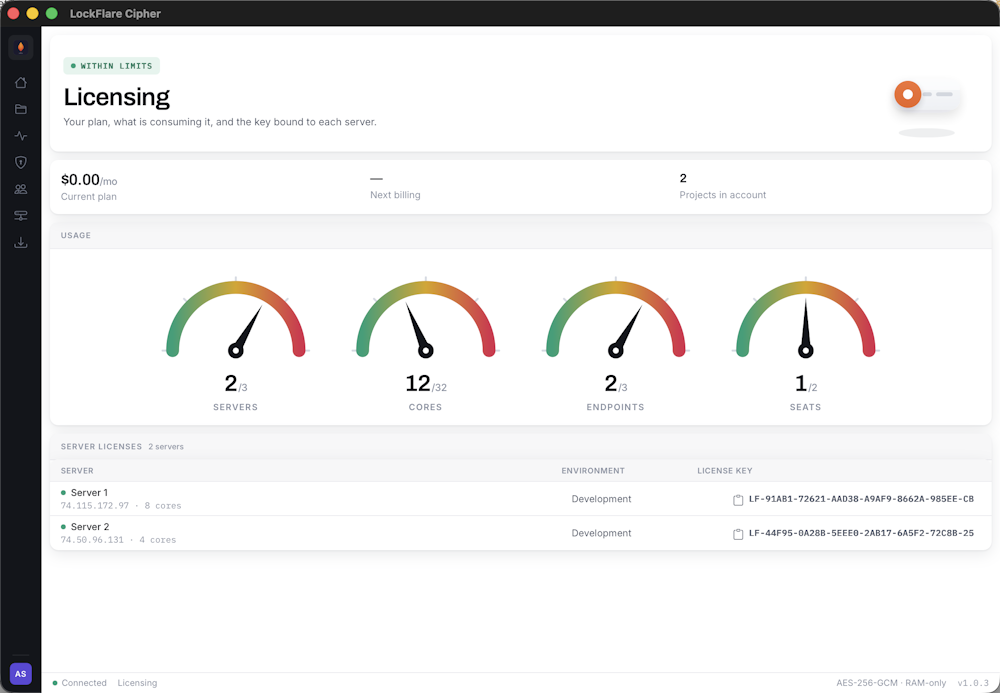
Every server’s key, on the Licensing screen. Click to copy.
You need this in a moment. It is the only thing tying the Engine on that machine to your account, and it will not work on a different IP.
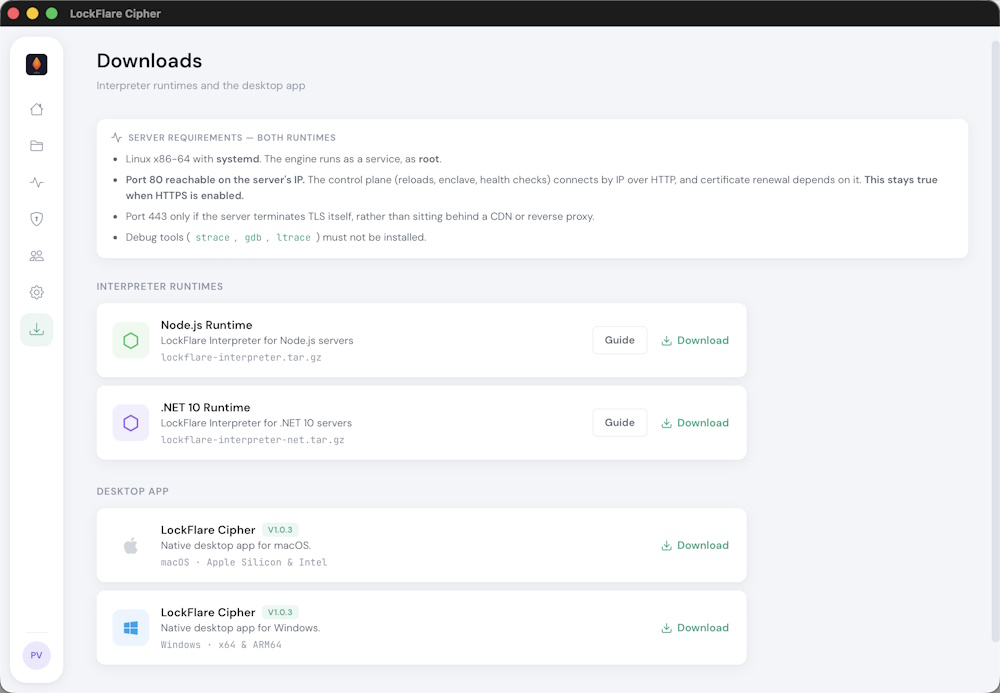
Two runtimes. Pick the one matching your project — a Node project needs the Node Engine.
Each card carries an Installation guide with the exact commands, including the Node.js or .NET prerequisites. The same content lives here: Node Engine and .NET Engine.
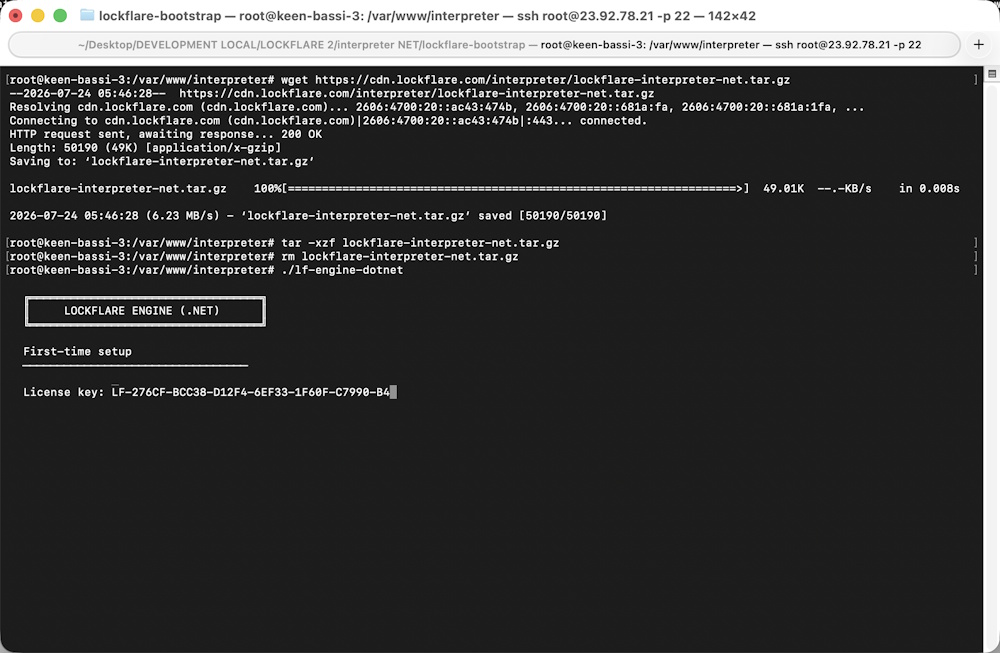
Extract the interpreter and start it once by hand.
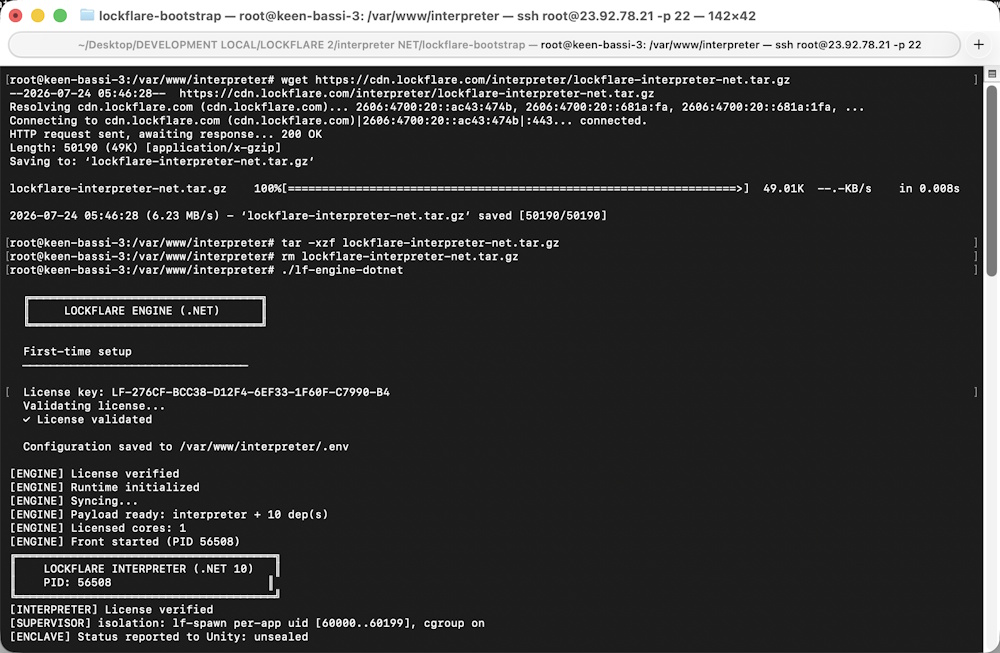
On first run it prompts for the licence key, validates it and writes it to .env.
Subsequent starts do not prompt.
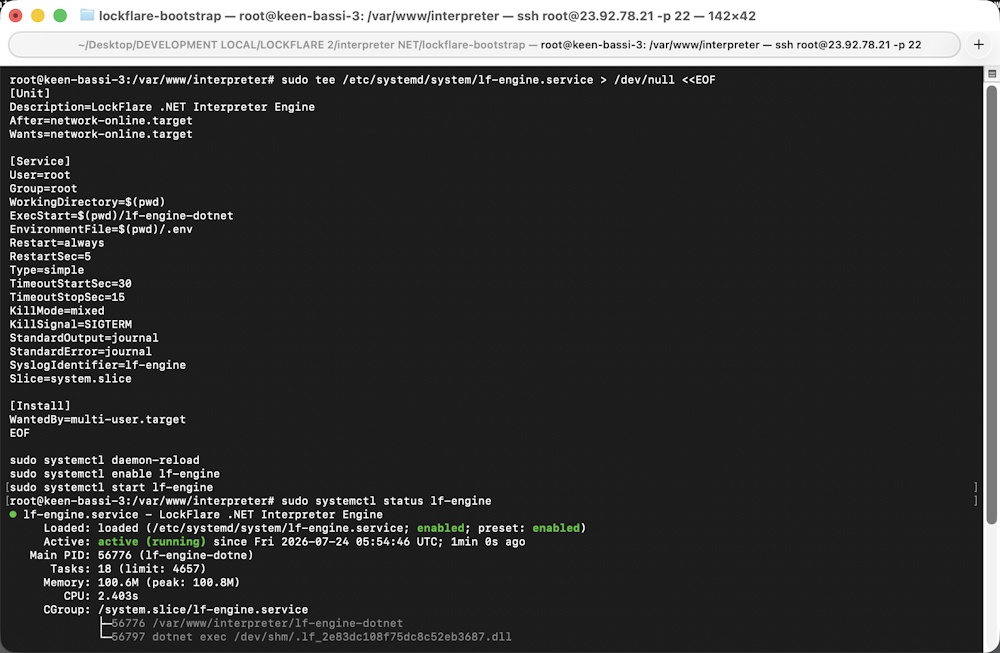
Install it under a service manager and confirm it is running.
Cores are what you licence, and you decide the split. A low-traffic site is fine on one; a busy API benefits from more. The allocation is changeable later without reinstalling anything.
The Licensing screen shows cores used against cores available as a live gauge, so you can see the headroom before you add a machine.
Because a LockFlare server holds nothing but the Engine, replacing one is quick: register the new machine, install the Engine with its new licence, push. There is no state to migrate.
That is the whole point of keeping the box dedicated — and it stops being true the moment you put a database on it.
# Pushing code # Pushing codeOne action: pack, encrypt, upload, serve. The chain on screen shows each stage as it completes.
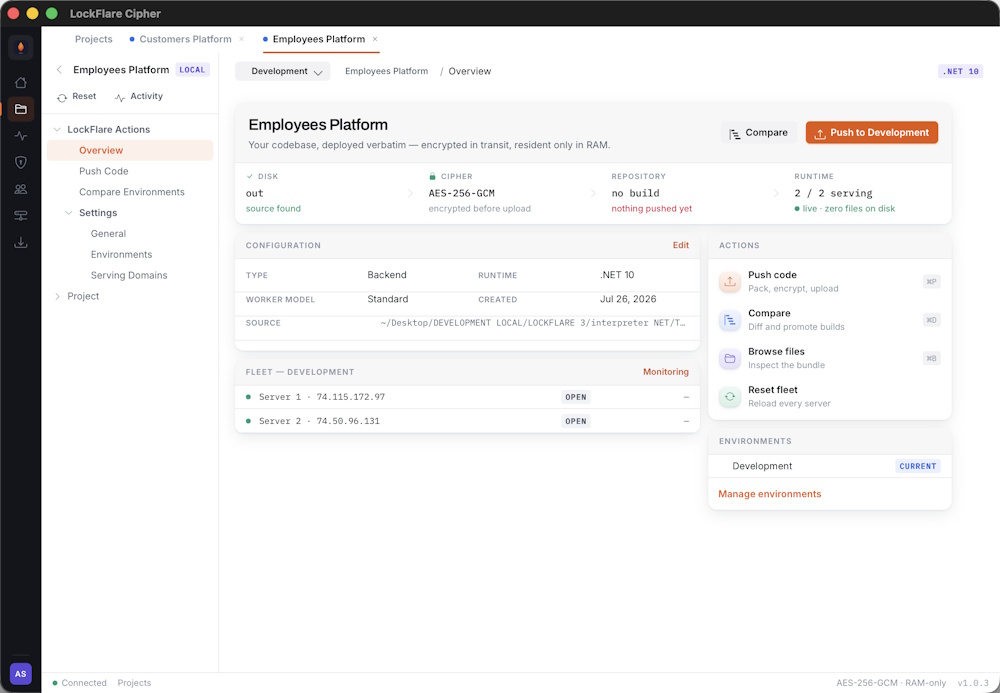
DISK → CIPHER → REPOSITORY → RUNTIME. Each link lights as that stage finishes.
| Stage | Where | What |
|---|---|---|
| Disk | Your machine | The source folder is read as it stands right now. |
| Cipher | Your machine | Packed in memory, then AES-256-GCM encrypted. |
| Repository | Encrypted CDN | Ciphertext uploaded and recorded against a version hash. |
| Runtime | Your servers | Every server in the environment fetches, decrypts into RAM, and serves. |
Cipher checks four things and will not let the push start until all of them hold:
Each is reported specifically, so a blocked push tells you which one rather than failing generically.
dist/ deploys exactly as stale as it is.
Every push produces a version hash derived from the content. An unchanged project produces the same hash, so you can tell at a glance whether two environments are running identical code.
The push result reports file count, total size and that hash.
On Enterprise you can promote an existing build from one environment to another. It moves that exact artifact — the bytes do not change between Development and Live, so what you tested is byte-for-byte what ships.
On the free tier there is nothing central to promote, because the encrypted build retires to your own server once it confirms it holds a copy. Push again instead — the artifact is AES-256-GCM encrypted either way, only its location differs. See Editions.
The Compare pane shows which version each environment is running, when it was pushed and by whom. It is the fastest way to answer “is Live actually running what we tested?”
A push fans out to every server in the environment. There is no per-server step and no staggering to configure — each machine fetches the same artifact and reloads.
# Comparing environments # Comparing environmentsWhich build is each environment actually running, and is Live what you tested? The Compare pane answers both, and promotes between them without rebuilding.
One card per environment: the version hash it points at, when that build was pushed and by whom. A version hash is derived from content, so identical hashes mean byte-identical builds — which is the only way to answer the question with certainty.
Promotion repoints an environment at a build that already exists. No bytes move, nothing is re-encrypted, and no rebuild happens — which is why what you tested in Staging is exactly what ships.
Pick the source environment, pick the target, promote. It is also how you roll back: promote the previous build and the environment returns to it.
Promotion needs a centrally-held artifact to repoint at, and on the free tier there is not one — the encrypted build retires to your own server once it confirms it holds a copy. Push again to the target environment instead.
See Editions for why that trade exists.
Worth knowing, because it is not what most pipelines do. A push uploads a build and moves the environment’s pointer; the fleet keeps serving the previous build until it is reloaded.
So deploying and rolling out are two deliberate acts. You can push at any time and choose when it goes live.
# Domains # DomainsA domain tells the interpreter which requests belong to which project. Without one, a push has nowhere to land.
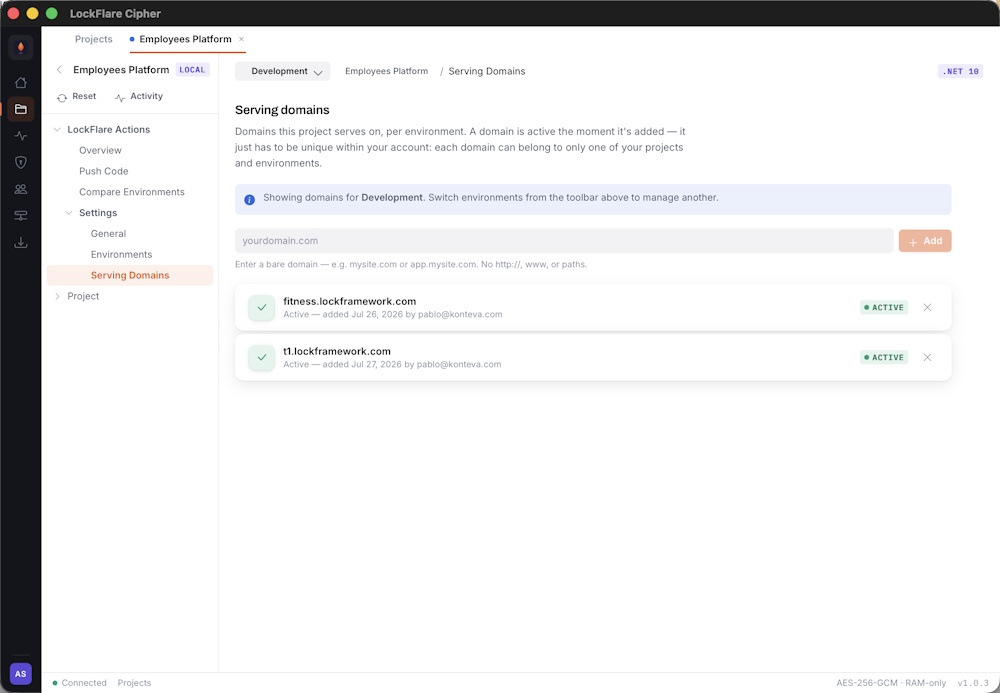
Several domains pointing at one project in one environment. All of them serve the same build.
Open the project, go to Domains, pick the environment and add the hostname.
Domains are per environment — Development and Live hold different lists, which is what lets the same project
serve staging.example.com and example.com from
different machines.
Add as many as you need. Every domain in the list resolves to the same build, so this covers the usual cases: an
apex plus www, a vanity domain, or a per-customer hostname on a multi-tenant
deployment.
Point the domain’s A record at the server’s IP address — the same IP you registered the server with. If the environment has several servers, point at all of them, or put a load balancer in front.
On the Node runtime each domain runs in its own vm sandbox. One tenant’s code
cannot reach another’s, even on the same server — which is what makes multi-tenant hosting on a single
machine reasonable rather than reckless.
Two options. Terminate TLS in front — a CDN or reverse proxy — and the server only needs port 80. Or let the server terminate it itself, which needs 443 open and a certificate present. The .NET Engine has this built in; see .NET Engine installation.
Configuration for your application, held encrypted and injected into the process at start. Nothing is written to a file on the server.
Variables are set per environment on the project’s Environment variables pane. Development and Live hold separate sets, which is the point — a staging database URL should not follow a build into production.
They are encrypted at rest alongside your build and delivered into the process environment in memory. There is no
.env on the host to read, and no plaintext configuration anywhere on that machine.
Ordinarily — process.env.DATABASE_URL on Node,
Environment.GetEnvironmentVariable or the standard configuration providers on .NET.
Nothing LockFlare-specific.
dotenv still works. The runtime parses your uploaded
.env and injects it before your code runs, then shims
dotenv so config().parsed returns those values without
touching the filesystem. You do not have to remove it.
| Source | Behaviour |
|---|---|
The .env inside your pushed artifact |
Travels with the build. Same values in every environment you deploy it to. |
| Variables set in Cipher | Per environment. What you want for anything that differs between staging and production. |
Applications also receive a small OS baseline — PATH,
HOME, TZ, LANG,
TMPDIR and NODE_ENV, which defaults to
production.
.env returns
ENOENT — so a compromised application cannot lift the credential that
identifies the server.
Variables are read when the application starts, so a change needs a reload of that environment to take effect. Save them, then reload — there is no need to push again if the code has not changed.
.env on the server.Changes are recorded in the activity log with the actor and the time — the fact of the change, not the value.
# Monitoring # MonitoringLive interpreter health across every environment, polled continuously while the window is in front of you.
One card per server: hostname, IP, uptime, and two gauges — latency and heap. Both run against fixed scales rather than each server’s own numbers, so you can compare machines at a glance instead of decoding four different axes.
| Gauge | Green | Amber | Red |
|---|---|---|---|
| Latency | under 100 ms | 100–200 ms | over 200 ms |
| Heap | under ~280 MB | ~280–420 MB | over ~420 MB |
An unreachable server shows a greyed dial and a dash rather than a needle at zero — a needle parked in the green would read as “healthy and fast”, which is the opposite of true.
The control at the top filters to one environment. Everything follows it: the verdict chip, the online count, the averages and the grid. Cards name their environment only when you are looking at all of them.
Click a card for the full health payload in a side panel — PID, Node or .NET version, platform and architecture, cores, heap used and total, RSS, external memory, uptime, and the domains that server is answering on.
It opens beside the grid rather than expanding in place, so the other servers do not move while you are comparing them.
Every ten seconds. Polling stops when the window is hidden or loses focus, and does one immediate refresh when you come back — so what you see on return is current rather than minutes stale.
Sealing a server disables every login on it — SSH, console, direct access. After that only LockFlare reaches the machine, and the only way back in is unsealing from Cipher.
RAM-only execution stops your source being readable on disk. It does not stop someone with root on a running machine from inspecting that machine’s memory — we say so plainly in How it works.
Enclave closes that gap by removing interactive access entirely. There is no shell to get root in, because there is no login. The Engine keeps serving; nothing else can happen on the box.
strace, gdb and ltrace must not be installed.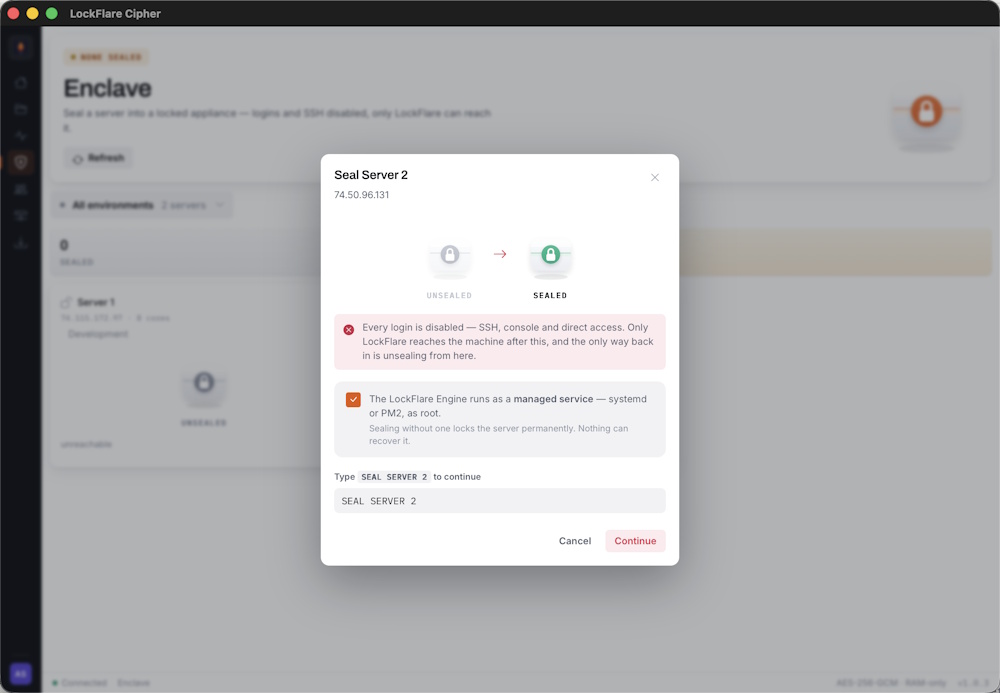
The state change is shown before you commit: unsealed on the left, sealed on the right. Below it, the acknowledgement and the typed confirmation.
You confirm the managed service, then type the server’s name to continue. Both are deliberate friction on an action that cannot be undone from the machine itself.
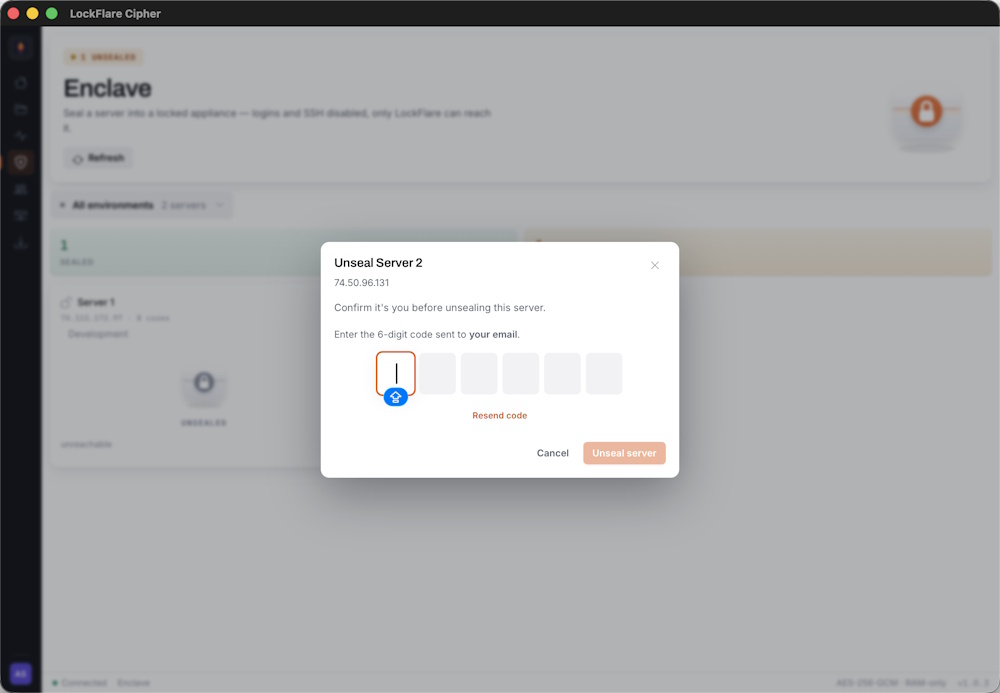
A second factor is required. Email or authenticator only — Touch ID is not offered.
| Before | After sealing | |
|---|---|---|
| SSH | Available | Disabled |
| Console login | Available | Disabled |
| Serving traffic | Yes | Yes — unchanged |
| Push and reload | Yes | Yes — unchanged |
| Health reporting | Yes | Yes — unchanged |
Deployment is unaffected. You still push, still reload, still see it in Monitoring. What you lose is the ability to log in and do anything else.
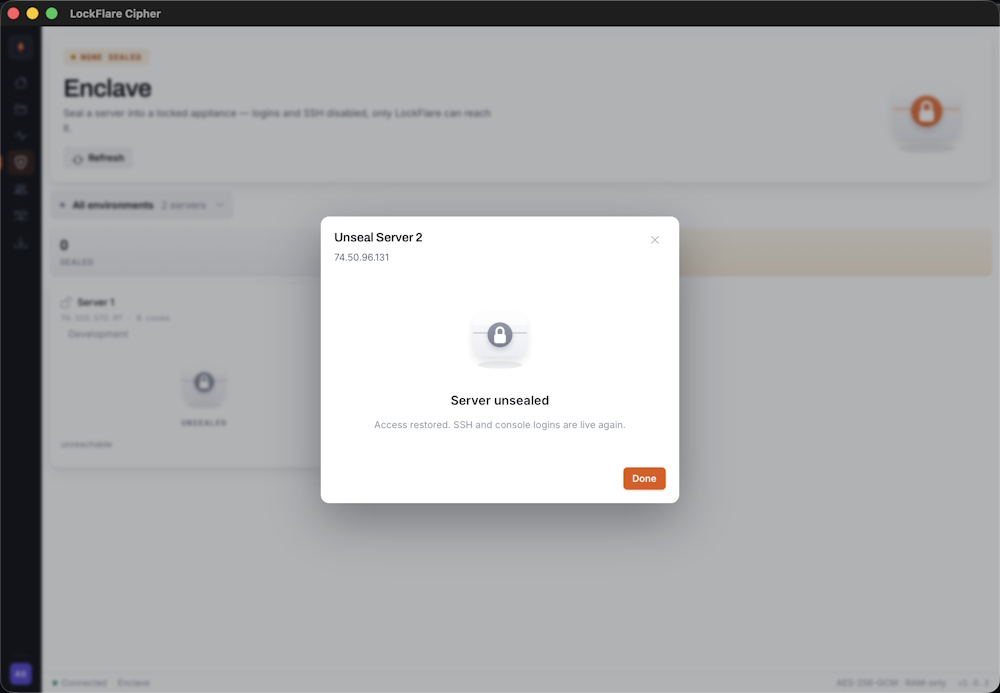
Unsealing restores normal access. Same verification, opposite direction.
SSH and console logins are re-enabled and the machine behaves as it did before. Unsealing is done from Cipher — it is the only channel that still reaches a sealed box.
The server keeps serving until the Engine stops. When it does — a reboot, a crash — nothing restarts it, and there is no login to do it by hand. That machine is finished.
The recovery is the same as any lost server: install the Engine on a fresh box, register it, push. Minutes, because a LockFlare server holds nothing but the Engine. That is the appliance model doing its job.
# Team management # Team managementEveryone who can sign in to this account, and what each of them can reach. Seats are metered against your plan.
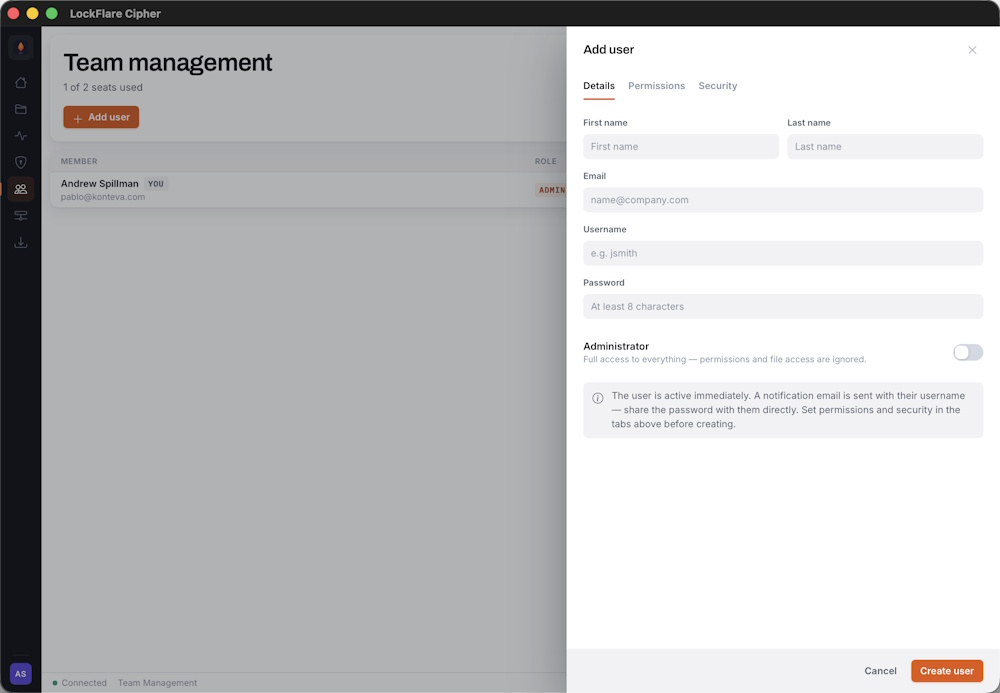
Name, email and username. They can sign in immediately — you set what they can reach before that matters.
New members are prompted to set up two-factor on first sign-in, the same as any account. There is no way to opt a member out of it.
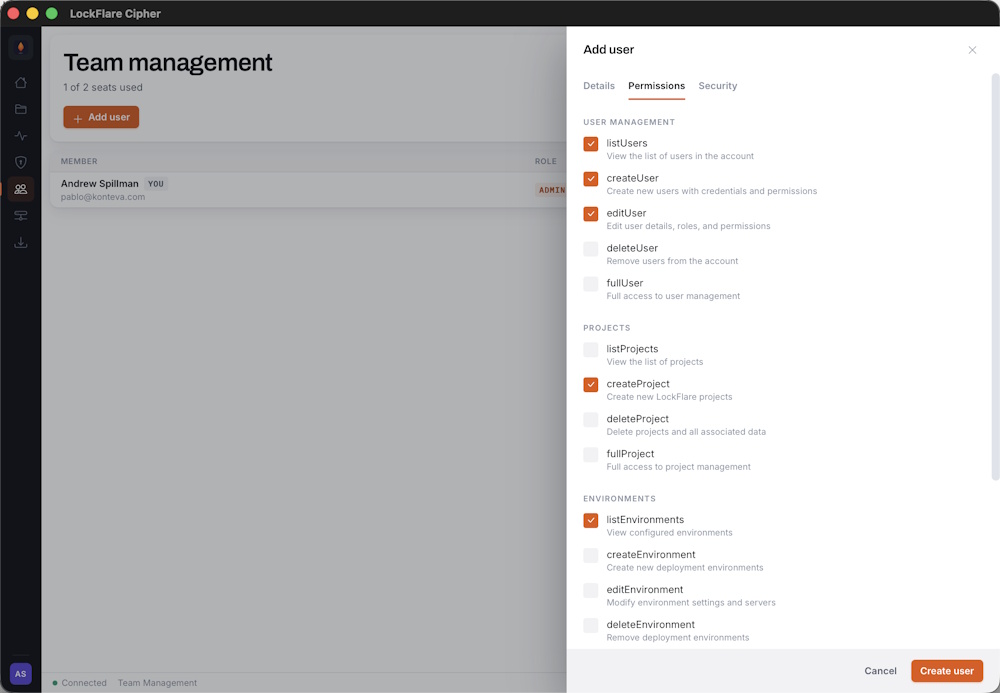
Permissions are per area. Grant only what the person needs.
Permissions gate both the interface and the API. A member without project-create permission does not see Push, Delete or the source-configuration controls — and the server rejects those calls independently, so hiding a button is never the only thing standing between someone and an action.
| Area | Covers |
|---|---|
| Projects | Listing, creating, editing and deleting projects; pushing and promoting builds. |
| Environments | Creating environments, registering servers, resetting. |
| Users | Adding members, changing permissions, removing accounts. |
| Settings | Account configuration and licensing. |
| Full admin | Everything, including Enclave and account termination. |
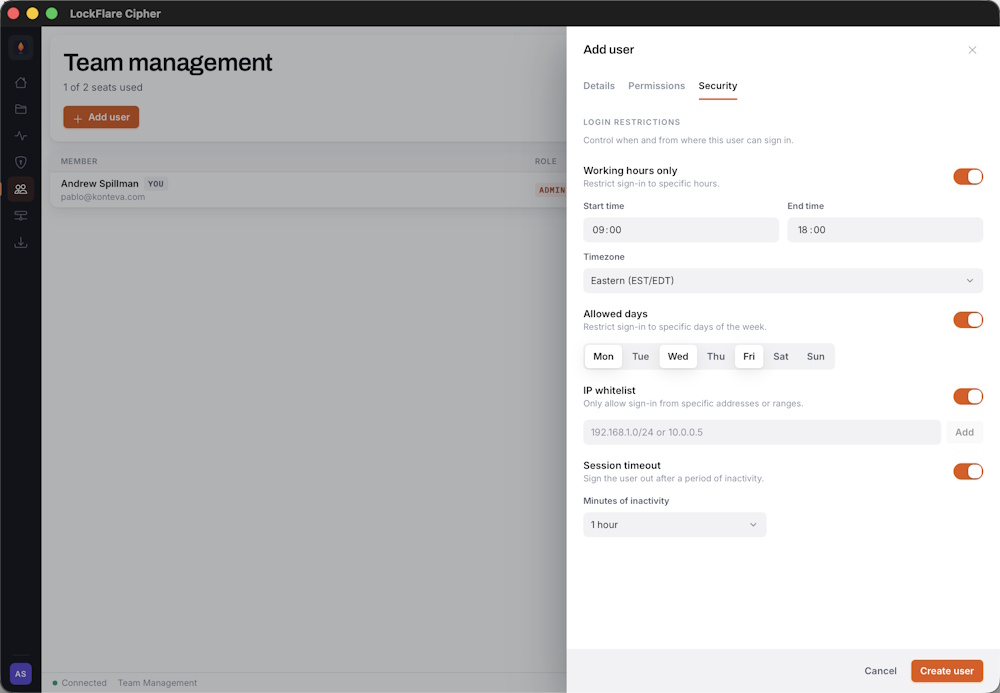
Restrict a member to specific addresses or times, on top of their permissions.
Useful for contractors who should only reach the account during an engagement, or for accounts that should only be used from an office network. Restrictions are evaluated at sign-in and are independent of what the member is allowed to do once inside.
Each member consumes a seat. At the ceiling, Add user hands off to your LockFlare account to add more — and points out that removing a member frees a seat immediately, which is often the faster fix.
A disabled member cannot sign in, and existing sessions are rejected mid-flight rather than surviving until they expire. Their history stays in the activity log. Removing them frees the seat; disabling them does not.
# Activity log # Activity logEvery action against the account, attributed and timestamped. Nothing that changes state happens without a record.
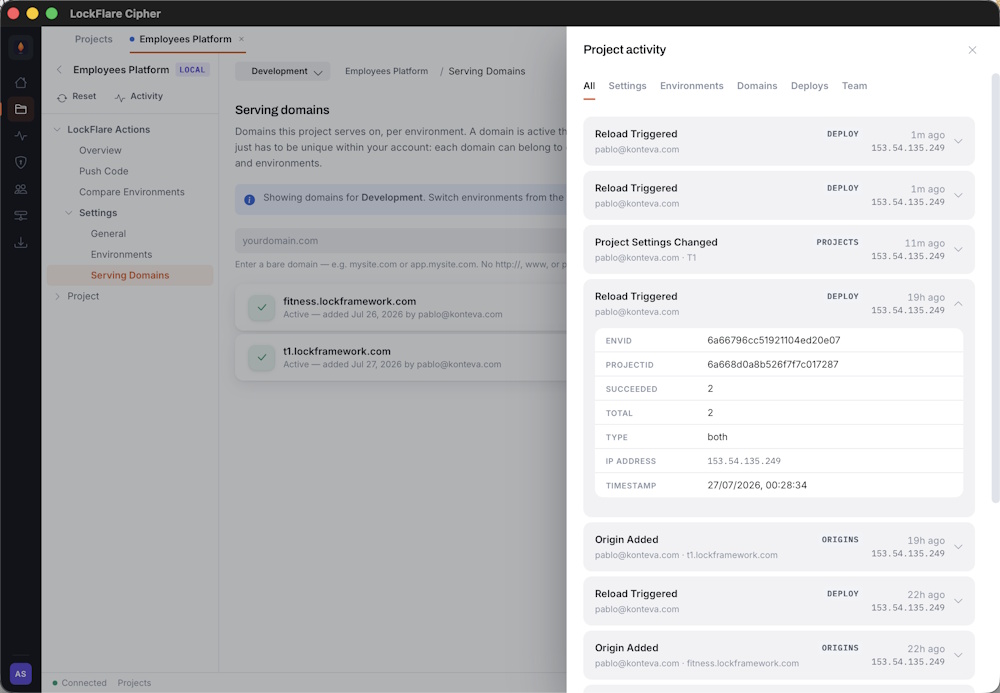
Per-project history: who pushed, when, from where, and which version.
Each entry carries the actor, the time, and the originating IP address.
Per project, in the project’s Activity pane — scoped to that project, which is usually what you want when working out what changed. Per member, from their row in Team management.
Mostly the ordinary question: something changed, when and by whom. A push you did not expect, an environment that is running an older version than you thought, a setting that is not what it was last week.
It is also the record you hand to an auditor. Deployments to regulated infrastructure usually need to show who changed what and when, and that is exactly what the log holds.
The Node Engine runs behind a web server on port 3000. Everything below assumes a fresh Linux x86-64 box with systemd and root access.
The interpreter requires Node.js 24. Install it with NVM before anything else.
curl -o- https://raw.githubusercontent.com/nvm-sh/nvm/v0.40.1/install.sh | bash
export NVM_DIR="$HOME/.nvm"
[ -s "$NVM_DIR/nvm.sh" ] && \. "$NVM_DIR/nvm.sh"
[ -s "$NVM_DIR/bash_completion" ] && \. "$NVM_DIR/bash_completion"
nvm install 24
node -v
npm -v
Verify the output shows v24.x.x for node and 11.x.x for npm before continuing.
The Node interpreter listens on port 3000, so a web server sits in front of it on port 80. nginx below; Apache works equally well.
sudo apt install nginx -y
sudo nano /etc/nginx/sites-available/default
Delete everything in that file and paste this:
server {
    listen 80;
    server_name _;
    client_max_body_size 20M;

    location / {
        proxy_pass http://127.0.0.1:3000;
        proxy_http_version 1.1;
        proxy_set_header Upgrade $http_upgrade;
        proxy_set_header Connection 'upgrade';
        proxy_set_header Host $host;
        proxy_set_header X-Real-IP $remote_addr;
        proxy_set_header X-Forwarded-For $proxy_add_x_forwarded_for;
        proxy_cache_bypass $http_upgrade;

        error_page 502 503 504 = @custom503;
    }

    location @custom503 {
        default_type application/json;
        return 503 '{"success":false,"message":"LockFlare Interpreter is restarting"}';
    }
}
The @custom503 block matters: during a reload the interpreter is briefly unavailable,
and without it nginx returns its own HTML error page to API clients expecting JSON.
sudo systemctl restart nginx
sudo mkdir -p /var/www/interpreter
sudo chown $USER:$USER /var/www/interpreter
cd /var/www/interpreter
wget https://cdn.lockflare.com/interpreter/lockflare-interpreter.tar.gz
tar -xzf lockflare-interpreter.tar.gz
rm lockflare-interpreter.tar.gz
npm install
Start the engine once by hand. On first run it prompts for the licence key you copied from Cipher.
./lf-engine
  ╔══════════════════════════════════╗
  ║        LOCKFLARE ENGINE          ║
  ╚══════════════════════════════════╝

  First-time setup
  ─────────────────────────────────

  License key: LF-xxxxx-xxxxx-xxxxx-xxxxx
  Validating license...
  ✓ License validated

  Configuration saved to /var/www/interpreter/.env

[ENGINE] License verified
[ENGINE] Runtime initialized
[ENGINE] Syncing...
[ENGINE] Payload ready
[ENGINE] Service started (PID 12345)

========================================
BOOTSTRAP COMPLETE
========================================

[MASTER] Allocated: 4 core(s) — Forking 4 worker(s)...
[MASTER] Workers ready (4)

[WORKER 12350] Listening on http://0.0.0.0:3000
The core allocation you set when registering the server is what the master forks against — four cores, four
workers. The key is written to .env in the install directory, so subsequent starts do
not prompt.
Stop it with Ctrl+C once you see the engine sync — the next step makes it
permanent.
The engine must run as a managed service. Two options — PM2 is the recommended one for Node.
sudo npm install -g pm2

cd /var/www/interpreter
sudo env "PATH=$PATH" pm2 start ./lf-engine --name lockflare
sudo env "PATH=$PATH" pm2 startup
sudo env "PATH=$PATH" pm2 save
Day-to-day commands:
# View logs
sudo env "PATH=$PATH" pm2 logs lockflare

# Restart interpreter
sudo env "PATH=$PATH" pm2 restart lockflare

# Stop interpreter
pm2 stop lockflare

# Monitor all processes
sudo env "PATH=$PATH" pm2 monit
sudo tee /etc/systemd/system/lf-engine.service > /dev/null <<EOF
[Unit]
Description=LockFlare Node.js Interpreter Engine
After=network-online.target
Wants=network-online.target

[Service]
User=root
Group=root
WorkingDirectory=$(pwd)
ExecStart=$(pwd)/lf-engine
EnvironmentFile=$(pwd)/.env
Restart=always
RestartSec=5
Type=simple
TimeoutStartSec=30
TimeoutStopSec=15
KillMode=mixed
KillSignal=SIGTERM
StandardOutput=journal
StandardError=journal
SyslogIdentifier=lf-engine
Slice=system.slice

[Install]
WantedBy=multi-user.target
EOF

sudo systemctl daemon-reload
sudo systemctl enable lf-engine
sudo systemctl start lf-engine
$(pwd) is expanded when the
unit file is written, so running it from elsewhere bakes in the wrong path.
sudo journalctl -u lf-engine -f

sudo systemctl restart lf-engine
sudo systemctl stop lf-engine
sudo systemctl status lf-engine
Open Monitoring in Cipher. The server should appear online within a few seconds, reporting latency, heap and uptime.
If it stays unreachable, the cause is almost always port 80 — the control plane reaches the server by IP over HTTP, and it needs that port even when your site serves HTTPS. See Server requirements.
# Node Engine — Configuration # Node Engine — Configuration
The engine reads its configuration from .env in its install directory. Only
LICENSE is required; everything else has a working default.
| Key | Default | What it does |
|---|---|---|
LICENSE |
required | The server’s licence key, bound to its IP address. Written on first run. |
LF_DIR |
working directory | Where locally-stored encrypted builds are kept, as lfapp-<project>_<env>.lfb. |
LF_FORWARD_MAX_BODY |
— | Ceiling on a forwarded request body. Exceeding it returns 413. |
LF_RESPONSE_GUARD_MS |
— | How long a dispatched request may run before the guard fires. |
fs reads of the engine’s own
.env always return ENOENT, so the licence is not
reachable from application code.
Separate, and easy to confuse with the above. Your application’s .env travels
inside the encrypted artifact. The runtime parses it and injects the values before your code runs, so
require('dotenv').config() and require('dotenv/config')
both work and return what you expect — they just do not read from disk.
Applications get a deliberately small OS baseline — NODE_ENV,
PATH, HOME, TZ,
LANG, LC_ALL, TMPDIR
— plus their own values on top. The engine’s environment is never passed through, so no licence or
platform credential can leak into an application.
NODE_ENV defaults to production if you do not set it.
Bare require() calls resolve against node_modules in the
engine’s directory, shared by every application on the host. Install there and restart to add a dependency
fleet-wide — see
Node runtime limitations for the
trade-off against bundling.
The Node engine listens on 3000 and expects a web server in front of it on port 80. That is fixed — change the proxy target in nginx rather than the engine.
sudo systemctl restart lf-engine
# or, under PM2:
sudo env "PATH=$PATH" pm2 restart lockflare
The .NET Engine binds port 80 directly — there is no reverse proxy in front of it. It can also terminate TLS itself on 443.
sudo apt update
sudo apt install -y libssl-dev libcurl4-openssl-dev

# Add Microsoft package repository (Ubuntu 24.04)
wget https://packages.microsoft.com/config/ubuntu/24.04/packages-microsoft-prod.deb -O packages-microsoft-prod.deb
sudo dpkg -i packages-microsoft-prod.deb
rm packages-microsoft-prod.deb

# Install .NET 10 ASP.NET Core Runtime
sudo apt update
sudo apt install -y aspnetcore-runtime-10.0

dotnet --info
Adjust the repository URL if you are not on Ubuntu 24.04 — Microsoft publishes one per distribution and version.
The engine refuses to seal on a machine where strace,
gdb or ltrace is installed. Those attach to a running
process and read its memory, which is exactly the attack RAM-only execution exists to make expensive.
sudo apt remove -y strace gdb ltrace 2>/dev/null || true
sudo mkdir -p /var/www/interpreter
sudo chown $USER:$USER /var/www/interpreter
cd /var/www/interpreter
wget https://cdn.lockflare.com/interpreter/lockflare-interpreter-net.tar.gz
tar -xzf lockflare-interpreter-net.tar.gz
rm lockflare-interpreter-net.tar.gz
Start it once by hand. It needs sudo because it binds port 80. On first run it prompts
for the licence key.
sudo ./lf-engine-dotnet
  ╔══════════════════════════════════╗
  ║     LOCKFLARE ENGINE (.NET)      ║
  ╚══════════════════════════════════╝

  First-time setup
  ─────────────────────────────────

  License key: LF-xxxxx-xxxxx-xxxxx-xxxxx
  Validating license...
  ✓ License validated

  Configuration saved to /var/www/interpreter/.env

[ENGINE] License verified
[ENGINE] Fetching interpreter...
[ENGINE] Fetching dependencies (10)...
[ENGINE] All dependencies verified (SHA-256)
[ENGINE] Launching .NET runtime...

[INTERPRETER] Bootstrap complete
[INTERPRETER] 1 domain(s) ready
[INTERPRETER] Listening on http://0.0.0.0:80
Every dependency is verified by SHA-256 before it is loaded. Stop with Ctrl+C once you
see the interpreter listening — the next step makes it permanent.
Required, not optional. The engine must come back after a reboot, and Enclave will not seal a server without a managed service.
sudo tee /etc/systemd/system/lf-engine.service > /dev/null <<EOF
[Unit]
Description=LockFlare .NET Interpreter Engine
After=network-online.target
Wants=network-online.target

[Service]
User=root
Group=root
WorkingDirectory=$(pwd)
ExecStart=$(pwd)/lf-engine-dotnet
EnvironmentFile=$(pwd)/.env
Restart=always
RestartSec=5
Type=simple
TimeoutStartSec=30
TimeoutStopSec=15
KillMode=mixed
KillSignal=SIGTERM
StandardOutput=journal
StandardError=journal
SyslogIdentifier=lf-engine
Slice=system.slice

[Install]
WantedBy=multi-user.target
EOF

sudo systemctl daemon-reload
sudo systemctl enable lf-engine
sudo systemctl start lf-engine
$(pwd) is expanded when the
unit file is written, so running it from elsewhere bakes in the wrong path.
# Follow logs
sudo journalctl -u lf-engine -f

# Restart interpreter
sudo systemctl restart lf-engine

# Stop interpreter
sudo systemctl stop lf-engine

# Check status
sudo systemctl status lf-engine
Only needed if this server terminates TLS itself. Behind a CDN or a reverse proxy that already handles HTTPS, skip this entirely.
sudo apt install -y certbot
sudo mkdir -p /var/lib/lockflare/acme

sudo certbot certonly --webroot -w /var/lib/lockflare/acme -d yourdomain.com
Then turn TLS on and restart:
echo 'LF_TLS=1' | sudo tee -a /var/www/interpreter/.env
sudo systemctl restart lf-engine
[TLS] enabled — listening on 443, certificates from /etc/lockflare/certs (falling back to /etc/letsencrypt/live)
[INTERPRETER] Listening on http://0.0.0.0:80 and https://0.0.0.0:443
[TLS] loaded certificate for 'yourdomain.com' (expires 2026-10-21)
curl -vI https://yourdomain.com/
Open Monitoring in Cipher. The server should appear online within a few seconds, reporting latency, heap and uptime.
# .NET Engine — Configuration # .NET Engine — Configuration
The engine reads its configuration from .env in its install directory. Only
LICENSE is required.
| Key | Default | What it does |
|---|---|---|
LICENSE |
required | The server’s licence key, bound to its IP address. The engine exits immediately without it. |
PORT |
80 |
The HTTP port the engine binds directly. There is no reverse proxy. |
LF_TLS |
off | Set to 1 to terminate TLS on this server. |
LF_TLS_PORT |
443 |
The HTTPS port, when TLS is enabled. |
LF_TLS_DIR |
/etc/lockflare/certs |
Where certificates are read from. Falls back to /etc/letsencrypt/live. |
LF_ACME_DIR |
/var/lib/lockflare/acme |
Webroot for ACME challenges during certificate issuance and renewal. |
LF_DIR |
working directory | Where locally-stored encrypted builds are kept, as lfapp-<appKey>.lfb. |
LF_READY_TIMEOUT_SEC |
— | How long the supervisor waits for a tenant process to report ready before treating the start as failed. |
| Key | What it does |
|---|---|
LF_SPAWN |
Path to the privileged helper that joins the cgroup, unshares namespaces and drops privileges before your code runs. |
LF_ALLOW_UNCONFINED |
Permits an application to start when confinement could not be established. |
LF_ALLOW_UNCONFINED unset in production.
With it unset, an application whose namespaces, cgroup or dedicated user could not be established refuses to
start — which is the behaviour you want, because the alternative is a tenant running with the host’s
view of processes and files. It exists for diagnosing a confinement failure, not for working around one.
RLIMIT_CORE=0, so decrypted tenant assemblies cannot appear in a core dump.LICENSE. Exits with status 1 if absent.PORT and starts serving.Each application runs under a cgroup with a memory ceiling and a process cap, created fresh on every launch. An application that exceeds its memory cap is killed and restarted rather than being allowed to exhaust the host.
If a previous generation’s cgroup cannot be drained, the engine refuses to restart that application
rather than starting a second copy against a stale limit. That appears in the log as
refusing restart: previous generation could not be terminated.
sudo systemctl restart lf-engine
sudo journalctl -u lf-engine -f
Running from memory with no writable application directory rules some things out. This section is the list — what each runtime cannot do, and what to do instead.
None of it is arbitrary. Every constraint here is the direct cost of the property you came for: an application that is never written to disk cannot install packages at runtime, cannot write files next to itself, and cannot compile on the host. Those follow from the architecture rather than from an incomplete implementation, and they are the same constraints any in-memory runtime would face.
Most applications hit none of these. The ones that do usually need a small, one-time change — and it is much cheaper to know before a migration than during one.
listen() is handled.
If your application does any of the following, read the relevant page before you plan a migration.
| If your app… | See |
|---|---|
| Writes uploads, caches or logs to local files | Both runtimes |
| Uses SQLite or any file-backed local store | Both runtimes |
| Installs npm packages at deploy time | Node.js |
Uses raw http.createServer or WebSockets | Node.js |
| Compiles Razor views at runtime | .NET |
Reads Assembly.Location or a physical assembly path | .NET |
| Calls a database or external API from .NET | .NET |
Three constraints apply whichever runtime you use, and all three come from the same place: the application exists in memory and has no writable directory of its own on the host.
There is no web root, no package directory and no build output on disk — so there is nowhere for the application to write next to itself. This is the property that removes web shells, dropped executables and path traversal as attack classes, and it is not configurable, because making it configurable would remove the guarantee.
In practice this affects applications that treat the local filesystem as storage:
| Pattern | What to do instead |
|---|---|
File uploads written to ./uploads |
Object storage — S3, R2, Azure Blob — or a database blob column. |
| SQLite or any file-backed local store | A network database. A local database file has nowhere to live and would not survive a restart anyway. |
| Disk caches written at runtime | In-memory caching, or Redis / Memcached. |
| Logs written to a file | Write to stdout or stderr. The engine captures them, and they reach journalctl or PM2 like any service. |
| Generated files served back to users | Generate in memory and stream the response, or write to object storage and redirect. |
Application code and static assets stay in memory for the life of the process. That is what removes disk from the serving path — and it means RAM is the resource to plan against, not storage.
On small artifacts this is negligible. On large ones — a big static bundle, a large dependency graph, many applications on one host — it becomes the dominant cost, and capacity should be sized for every served application being resident simultaneously.
LockFlare serves the build you give it. It does not run your bundler, compiler or package manager, and there is no build step on the server — deliberately, because a build step would need a writable directory and a toolchain on a host that has neither.
Run npm run build, dotnet publish or whatever your
pipeline does, then push. A stale dist/ deploys exactly as stale as it is.
Nothing about your build changes: same toolchain, same CI, same test suite, same review process. LockFlare consumes the output rather than replacing any part of it.
Each project has a single starting file that the interpreter loads and runs. Applications structured around several independently-launched processes need to be either split into separate projects or given one entry point that starts what it needs.
Where an application serves its own static assets, those are staged into a RAM-backed filesystem inside that application’s private mount namespace, for the life of the process only. It is volatile memory: invisible to the host and to every other application, never flushed to durable storage, and destroyed when the process exits.
The practical consequence is that anything written there is gone on restart. It is a serving mechanism, not storage.
# Node.js runtime # Node.js runtime
Two constraints are specific to the Node runtime: where packages resolve from, and what happens to your
listen() call.
Bare require() calls resolve against a package set installed on the host and shared
by every application on the fleet. It is LockFlare’s, it is fixed, and an application process cannot write to
it.
require() for a package outside the set will not resolve at runtime.
The engine detects this and tells you exactly what is missing rather than failing with a bare module error. On startup it walks the application’s declared dependencies and logs any that will not resolve:
!! app   example.com ("Kiero") — missing npm packages on the fleet
!! app   fix: npm install stripe ioredis  (on the fleet node, then restart lf-engine)
Node built-ins are skipped, and so are dev-only tools like nodemon — only real
runtime dependencies are reported.
What the engine recommends. Install into the shared set on the server, then restart the engine.
The package is then available to every application on that host — convenient on a single-tenant box, and worth thinking about if it is not.
Bundle at build time and the dependency travels inside the encrypted artifact, loading from the in-memory file map like your own modules.
Nothing to install on the server, and nothing shared with other applications.
cd /var/www/interpreter
npm install stripe ioredis
sudo systemctl restart lf-engine
npx esbuild server.js \
  --bundle \
  --platform=node \
  --target=node24 \
  --outfile=dist/server.js
Why it works this way: an application running from memory has no package directory of its own, so the resolver has to be provided by the host rather than built per application. The .NET runtime has no equivalent constraint, because NuGet dependencies travel inside the encrypted artifact.
The application loads into an isolated vm context, and its
listen() call is intercepted rather than honored — no socket is bound. The
runtime captures your handler and dispatches requests into it directly, routing by
Host header.
For a normal application this is invisible. You write the same code you always would:
const express = require('express')
const app = express()

app.get('/', (req, res) => res.send('hello'))

// Called as normal. The runtime captures `app` and
// dispatches into it; no socket is actually bound.
app.listen(3000)| Module | What the runtime does |
|---|---|
express, koa, fastify | Shimmed. .listen() is captured per context; your handler is dispatched into directly. |
http, https | Shimmed the same way, so createServer(handler).listen() works. |
fs | Shimmed for reads — see below. |
cluster | Shimmed. Your primary/worker code runs against an in-process bus, not real IPC. |
os | Shimmed. os.cpus() reports your licensed worker count, not the host’s physical cores. |
dotenv, dotenvx | Shimmed to a no-op. Your uploaded .env is already parsed and injected before your code runs, so config().parsed returns it. |
| Everything else | Resolved normally against the fleet package set. |
fs reads are served from your bundled tree first, so route auto-loaders,
template directories and asset reads work as written. Beyond that there are two behaviours worth knowing.
| Read | Result |
|---|---|
| A path inside your bundle | Served from the in-memory map. |
| A relative path not in your bundle | ENOENT. Relative paths never fall through to the engine’s own directory. |
| An absolute path on the host | Read normally — the real filesystem. |
The engine’s own .env | Always ENOENT. Your application cannot read the fleet licence. |
fs.writeFileSync('./uploads/x.jpg') succeeds — it writes into the engine’s
working directory — but reading it back by the same relative path returns ENOENT,
because relative reads resolve against your bundle. Anything written there is also outside your deployment and
gone when the server is rebuilt. Use object storage or a database; see
Both runtimes.
The runtime forks clustered workers against the core count licensed to that server — four cores, four workers. Anything your application holds in process memory is per worker, not shared across them.
os.cpus() reports your licensed worker count rather than the machine’s, so
code that sizes a pool from it gets the right answer. But in-memory session stores, in-process caches and rate
limiters that assume a single process will still behave inconsistently across workers. This is the ordinary clustered-Node caveat rather than a LockFlare one, and the
ordinary answer applies: move shared state to Redis or the database.
Applications run in separate vm contexts within one runtime process — not
separate OS processes with separate users and namespaces, which is what the .NET runtime provides.
That is a property of the JavaScript runtime, not something LockFlare introduced. It is the right boundary when the code on a host is all yours. Where applications on one host belong to different customers or different trust domains, use the .NET runtime or give each trust domain its own server.
# .NET runtime # .NET runtimeThe .NET runtime carries fewer application-level constraints than Node — dependencies travel inside the artifact — but two things differ from a conventional host: nothing compiles on the server, and outbound network is closed by default.
A published application is decrypted in RAM and its assemblies load through in-memory assembly loading inside a collectible load context. No compiler runs on the server — there is no compilation surface at all, which is deliberate: a compiler is a code-execution primitive, and removing it removes a class of attack.
The consequence is that anything expecting to be compiled at runtime must be precompiled at publish time instead.
| Pattern | What to do |
|---|---|
| Razor views compiled at runtime | Precompile them. Razor compilation at publish is the default for ASP.NET Core — confirm it is not disabled. |
| Runtime code generation via Roslyn | Not available on the host. Move it to build time, or restructure around it. |
| Plugin assemblies loaded from a directory at runtime | There is no directory to load from. Ship plugins inside the artifact. |
Assemblies load from memory streams, so they have no path on disk. Code that reads
Assembly.Location, AppContext.BaseDirectory or builds
a path relative to the executing assembly will not find what it expects —
Location is empty for an assembly loaded this way.
This usually shows up in code locating a config file, a template, or an embedded resource by path. Embedded
resources loaded through Assembly.GetManifestResourceStream work normally, because
they travel inside the assembly.
appsettings.json on the
filesystem.
An application runs in an empty network namespace and cannot open outbound connections — not to a database, not to a payment provider, not to any external API. That is what removes the exfiltration path for compromised application logic, and it is the recommended posture for anything that does not need egress.
Enabling it changes only the network namespace. Private mount, PID, IPC and UTS namespaces, the dedicated
unprivileged user, no_new_privs and cgroup caps all still apply — the
application can reach the network but still cannot observe host processes or host files.
It is currently a per-environment switch rather than a per-destination allow-list. Narrowing that is planned.
Each application runs under cgroup limits on memory and process count. An application that exceeds its memory cap is killed and restarted rather than being allowed to exhaust the host — which contains the failure to the application that caused it, but does mean a genuinely memory-hungry workload needs its cap sized deliberately rather than left at a default.
Worth stating, because the list above is all constraints. Your application’s own entry point is invoked, so it runs exactly as written — Razor Pages, MVC, Blazor Server, minimal APIs, Kestrel. There is no LockFlare code in your application and no SDK to adopt.
NuGet dependencies travel inside the encrypted artifact and load from memory, resolved entirely by your build. Stable ASP.NET Data Protection is provided without application changes, so antiforgery tokens and authentication cookies survive restarts despite nothing being written to disk.
# A server will not come online # A server will not come onlineA registered server that never appears online, or drops out later. In practice this is one of four things, and the first is by far the most common.
curl -sS -m 5 -i http://YOUR.SERVER.IP/ping
A response means the path is open. A timeout means a firewall, a security group, or a cloud network ACL is in the way — check the provider’s firewall as well as the host’s, since both have to allow it.
A licence is bound to the address you entered when registering the server. If that address was mistyped, or the machine sits behind NAT and its public address differs from what you registered, the engine will start but never be recognised.
Compare the address on the server against the one in Cipher:
curl -sS https://api.ipify.org; echo
If they differ, remove the server in Cipher and register it again with the correct address. The licence cannot be repointed.
sudo systemctl status lf-engine
sudo journalctl -u lf-engine -n 100 --no-pager
sudo env "PATH=$PATH" pm2 logs lockflare --lines 100
A licence problem appears in these logs explicitly. So does a missing runtime — Node 24 or the ASP.NET Core 10 runtime.
The Node engine listens on port 3000 behind nginx. If nginx is not running, port 80 answers nothing even though the engine is healthy.
sudo systemctl status nginx
sudo nginx -t
curl -sS -i http://127.0.0.1:3000/ping
If the last command answers but the public IP does not, the problem is nginx or the firewall, not LockFlare. The .NET engine binds port 80 directly and has no reverse proxy, so this step does not apply.
The engine log is the first place to look for anything that is not a network problem. Messages are prefixed by
scope, and a !! marks a warning or an error.
# systemd
sudo journalctl -u lf-engine -f
sudo journalctl -u lf-engine -n 200 --no-pager

# pm2
sudo env "PATH=$PATH" pm2 logs lockflare --lines 200
| Scope | Covers |
|---|---|
boot / [FETCH] | Licence, reaching the control plane, fetching and decrypting builds. |
app / [TENANT] | Starting and running your application. |
local / [LOCAL] | Storing an encrypted build on this server, free-plan storage. |
enclave / [ENCLAVE] | Sealing and unsealing. |
fwd | Node only. Forwarding a request between workers. |
[CGROUP] | .NET only. Per-application memory and process limits. |
| Message | What it means |
|---|---|
LICENSE not set in .env[INTERPRETER] LICENSE not set in environment |
No licence key. Run the engine by hand once to be prompted, or add LICENSE= to .env. The .NET engine exits immediately. |
[FETCH] bootstrap rejected (bad license/IP?) |
The licence does not match this server’s address. Almost always a mistyped IP at registration, or a machine behind NAT whose public address differs. Re-register with the correct address — a licence cannot be repointed. |
bootstrap failed — no data from Unity. Set LICENSE in .env and restart. |
Every attempt to reach the control plane failed. Check outbound connectivity from the server first, then the licence. |
connecting to Unity (attempt 2/…) · retrying in 3s |
Normal transient retry. Only a concern if it never succeeds. |
Failed to decrypt bundle from Unity |
The configuration payload arrived but would not decrypt. Usually a licence that has been rotated or replaced — re-register the server. |
| Message | What it means |
|---|---|
[FETCH] R2 decrypt failed (key/AAD/tag) | The artifact did not authenticate. The build is bound to its project and content hash, so this is a mismatch rather than a corrupt download. Push again. |
[FETCH] no local copy and no download URL | The server was told to use a locally-stored build that is not present. Push again to restore it. |
[FETCH] no DLLs in app zip | .NET only. The published output contained no assemblies — usually dotnet publish pointed at the wrong folder. |
[FETCH] R2 blob too large | The artifact exceeded the size ceiling. Check for a build output that has picked up something it should not, such as a node_modules or a source-map bundle. |
stored copy unusable, discarding and refetching | Self-healing. The local copy failed verification and the engine is fetching a fresh one. |
| Message | What it means |
|---|---|
missing npm packages on the fleetfix: npm install … |
Node only. A bare require() for something outside the shared package set. The engine names the packages — install them on the server and restart, or bundle them into the artifact. See Node runtime limitations. |
start failed — will retry on request (backoff) |
Your application threw while starting. The message that follows is your own error. The engine keeps the previous healthy instance serving and retries. |
could not initialize |
The application failed before it produced a handler. Check the starting file is the one that actually launches your server. |
forwarded but handler not ready (async .listen pending) |
Node only. A request arrived before the application finished starting. Harmless in isolation; persistent means something in startup never resolves. |
cluster.fork() beyond licensed N worker(s) ignored |
Your application asked for more workers than the server is licensed for. Not an error — the extra forks are ignored. Add cores if you want them. |
forwarded body exceeded … — 413 |
An upload exceeded the forwarding ceiling. Raise LF_FORWARD_MAX_BODY if the request is legitimate. |
[TENANT] refusing restart: previous generation could not be terminated |
.NET only. The prior instance’s cgroup would not drain, so the engine will not start a second copy against a stale limit. Restart the engine. |
| Message | What it means |
|---|---|
HMAC verification failed |
A seal or unseal command failed authentication. Replayed or stale control traffic is rejected by design — retry from Cipher. |
PARTIAL UNSEAL — 2/3 restored; enclave file RETAINED for retry |
Act on this. Some accounts were restored and some were not. The enclave file is kept deliberately so the unseal can be retried — retry it before assuming the server is open. |
Failed to report status to Unity after N attempts |
The seal state changed but Cipher was not told. The server is correct; the dashboard may show a stale seal status until the next report. |
breaking stale enclave lock (previous holder likely crashed) |
Recovery from an interrupted seal operation. Informational. |
accepted the LEGACY fleet-wide key |
Something authenticated with an older credential. Working, but worth migrating that caller to the per-server credential. |
Cipher checks four conditions before it will start a push, and reports which one failed rather than failing generically.
| Reported | Fix |
|---|---|
| Source folder not found | The folder moved or was renamed. Update it in the project’s General pane. |
| Frontend folder not found | Same, for the attached frontend build. Often a dist/ that was cleaned and not rebuilt. |
| No environment selected | Attach an environment to the project first. |
| No serving domain | Add a domain for that environment. The interpreter routes by Host header, so it needs to know which requests belong to this project. |
Almost always a build that was not rebuilt. LockFlare packs the folder as it stands at the moment you push — it does not run your bundler. Run your build, then push again and check the version hash changes.
If the hash is identical, the content is identical, and the problem is upstream in your build.
The build reached the server and failed to start. Check the engine logs — the application’s own startup error appears there.
Common causes on a first deploy, all covered in Known Limitations:
require() for a package outside the shared set. Bundle it into the artifact.Assembly.Location or building a path from it.A push fans out to every server in the environment and each confirms independently. If one did not, that machine is still serving the previous build and the environment is no longer uniform.
Check it in Monitoring — an unreachable server is the usual cause. See A server will not come online.
# A domain is not serving # A domain is not serving
A domain returning nothing, an error, or somebody else’s project. The interpreter routes by
Host header, so nearly all of these are a mismatch between what it was told and what
arrives.
dig +short yourdomain.com should return the IP you registered.
curl -sS -i http://YOUR.SERVER.IP/ping — if this fails, the problem is the
server, not the domain. See
A server will not come online.
| Check | Why |
|---|---|
| Is it on the right environment? | Domains are per environment. A domain added to Development will not serve from the Live servers. |
| Has the project been pushed to that environment? | A domain with no build behind it has nothing to serve. |
| Exact hostname match? | example.com and www.example.com are two entries. Add both if you serve both. |
The same hostname is registered on more than one project, or on the same project in two environments whose servers overlap. Check the Serving Domains pane of each project on that server.
This is most likely after moving a domain between projects — removing it from the old one is a separate action from adding it to the new one.
{"success":false,"message":"LockFlare Interpreter is restarting"}
That is the @custom503 block in the nginx config doing its job — the
interpreter is briefly unavailable and nginx is returning JSON rather than an HTML error page. Transient during a
reload; persistent means the interpreter is not coming back, so check the engine log.
The Host header has to reach the server unchanged. A proxy rewriting it to its own
hostname, or to the origin IP, means the interpreter cannot match the request to a project.
In nginx that is proxy_set_header Host $host;, which the supplied configuration
already does. On a CDN, check that host-header forwarding or host-header override is set to preserve the original.
Certificate problems fall into two groups: the server terminating TLS itself, or something in front of it doing so. The first thing to establish is which one you have.
Nothing on the server needs TLS at all. Leave LF_TLS unset, leave 443 closed, and let
the proxy handle certificates. A certificate error in this configuration is a proxy problem, not a LockFlare one.
Enabled with LF_TLS=1. Confirm what the engine actually loaded:
[TLS] enabled — listening on 443, certificates from /etc/lockflare/certs (falling back to /etc/letsencrypt/live)
[INTERPRETER] Listening on http://0.0.0.0:80 and https://0.0.0.0:443
[TLS] loaded certificate for 'yourdomain.com' (expires 2026-10-21)
| Symptom | Cause |
|---|---|
No [TLS] line at all |
LF_TLS is not set, or the engine was not restarted after setting it. |
| Listening on 443 but no certificate loaded | Nothing found in LF_TLS_DIR or the Let’s Encrypt fallback. Check the certificate exists and is readable by root. |
| Certificate loaded for the wrong hostname | The certificate’s name must match the domain being requested. A certificate for the apex will not serve www unless it covers both. |
| Expired | The log prints the expiry date on load. Renewal is a certbot concern; the engine reads whatever is on disk. |
Certbot writes its challenge into the webroot at LF_ACME_DIR, and the engine serves
it over port 80. Both halves have to line up.
| Log line | Meaning |
|---|---|
[ACME] challenge not found |
The engine looked in its ACME root and the file was not there. Confirm certbot’s -w matches LF_ACME_DIR. |
[ACME] could not read |
The file exists but is not readable. A permissions problem on the challenge directory. |
# what the engine serves from
grep LF_ACME_DIR /var/www/interpreter/.env    # default: /var/lib/lockflare/acme

# what certbot writes into
sudo certbot certonly --webroot -w /var/lib/lockflare/acme -d yourdomain.com
Renewal also needs port 80 open from the internet. If issuance worked once and renewal fails later, the firewall is the first thing to check.
The Node engine sits behind nginx, so TLS is nginx’s job — configure certificates there as you would
for any site. LF_TLS does not apply.
Keep the port 80 server block reachable rather than redirecting everything to HTTPS, or the control plane loses its path to the machine.
# An app keeps restarting # An app keeps restartingAn application that starts, dies and starts again. The engine retries with backoff, so this can run for a long time without anyone noticing — the log is where it shows.
!! app example.com — start failed — will retry on request (backoff): <your error>
Whatever follows the colon is your application’s own error, thrown while starting. The engine is reporting it, not causing it — and the previous healthy instance keeps serving while it retries, so this is not an outage.
Each application runs under a cgroup with a memory ceiling. Exceeding it kills the process rather than letting it exhaust the host — the failure is contained to the application that caused it.
A restart loop with no application error in between usually means this. Everything served is memory-resident, so the working set is your application plus its decrypted build and static assets.
| Log line | Meaning |
|---|---|
[CGROUP] memory.max not applied |
The limit could not be set. The application may be running unconfined — investigate before treating it as fine. |
[TENANT] refusing restart: previous generation could not be terminated |
The prior instance would not drain, so the engine will not start a second copy against a stale limit. Restart the engine. |
[CGROUP] still populated after kill — not deleting |
Something in that application will not die. Usually a child process. Restarting the engine clears it. |
The supervisor waits a bounded time for an application to report ready before treating the start as failed. An application doing slow work before it listens — a migration, a large cache warm — can exceed it.
LF_READY_TIMEOUT_SEC raises the window. The better fix is usually to start listening
first and warm afterwards.
Not a crash. start failed — will retry on request means the application never started
successfully, so each incoming request triggers another attempt. Fix the underlying startup error and it stops.
Memory that grows with traffic — a leak, or an unbounded in-process cache. Under Standard the working set is per worker, so what looks survivable on one core can hit the cap on four.
See Worker models: in-process caches are one of the things that behave differently once there is more than one worker.
# LockFlare Lens documentation # LockFlare Lens documentation Every screen in Lens, written down at the feature level: what it does for you, what it writes on the server, and what it refuses to do. It is the same record the product is built against, so a sentence here is a promise the app keeps. If you are new, read the doctrine first — it is short, and every other page assumes it. Two things worth knowing before the list. The **terminal is free**: any box you can SSH into is a console in Lens, with unlimited servers, unlimited seats and no licence — what is licensed is only what Lens does to a box as root, and every account includes ten of those free forever. And **nothing is installed on a server** to make any of this work; the one exception is Themis, who creates a single folder that is deleted when you withdraw her. Every section below has a page on the site with the screens beside it — [Terminals](/lens/terminals/), [Actions](/lens/actions/), [Security setup](/lens/security/), [Server management](/lens/system/), [Databases](/lens/databases/), [MongoDB](/lens/mongodb/), [Redis](/lens/redis/), [Containers](/lens/containers/), [Virtualization](/lens/virtualization/), [Websites](/lens/websites/) and [Themis AI](/lens/themis/) — or [every published screenshot in one place](/lens/screenshots/). - [The doctrine every feature follows](/docs/lens/doctrine/) — Air-gapped, nothing installed, jobs on the box, proved before kept. - [Identity and the gate](/docs/lens/identity/) — The pen drive, Touch ID, licenses, backup, travel copy, recovery. - [The console frame](/docs/lens/console/) — The map, groups, bastions, tabs, split panes, shortcuts, jobs. - [The terminal](/docs/lens/terminal/) — Logins, sudo, resume, tmux, recording, history, broadcast. - [Per-server readings](/docs/lens/readings/) — Overview, Monitor, About this server, updates. - [Security Setup](/docs/lens/security-setup/) — Firewall, Fail2Ban, SSH, passwords, WAF, integrity, MAC, kernel, scheduled, time. - [System Setup](/docs/lens/system-setup/) — Users, groups, certificates, auto-updates, audit, services, storage, network, logs. - [Tools on every server](/docs/lens/tools/) — Tunnels, the HTTP tunnel, templates, files, the bucket, backups, Themis. - [Setup Packages](/docs/lens/packages/) — Web, FTP, mail, containers, virtualization, the engines, cache, VPN, load balancer. - [The Databases tool](/docs/lens/databases/) — Every tab, replication for both frames, sharding, cluster backups, Mirror, reports. - [The chairs](/docs/lens/chairs/) — Terminals, Actions, Snippets, Server Templates, NOC. - [Themis](/docs/lens/themis/) — Authorization, fleets, asking, the model. - [Files](/docs/lens/files/) — Six panes, repositories browsed. - [Team](/docs/lens/team/) — Roles first, members last. - [Setup](/docs/lens/setup/) — Backup, duplicate, licenses, repositories, notifications, the model. - [Platform](/docs/lens/platform/) — macOS and Windows, no server, every protocol direct. The whole documentation as one file, for people and for models: [llms-full.txt](/llms-full.txt). # The doctrine every feature follows # The doctrine every feature follows **Air-gapped console.** Lens is a desktop app for macOS (Intel and Apple Silicon) and Windows. It talks to servers over the operator's own SSH logins and to nothing else. LockFlare runs no service Lens depends on: licenses are signed keys opened on the computer, the key drive is the identity, and the only server-side infrastructure LockFlare keeps is the license issuer. Nothing Lens does phones home; the model catalog for Themis is refreshed only from a button. **Nothing installed on the box.** Every reading is a command over the session already open; every change is a script run as root through the same sudo path. There is no agent, no daemon, no port opened for Lens. What must run while Lens is closed is a file Lens writes on the box — a cron line, a systemd unit, a hook — never a Lens process. Lens is a configuration tool that acts when the operator opens it, not an alerting system. **Every job runs detached on the box.** Long work (installs, restores, upgrades, data moves, cluster builds) is started detached on the box, in its own folder under `/var/lib/lens/jobs`, and survives Lens closing. The screen shows one lightbox listing the job's own steps with Stop; blocking jobs keep it up, others offer "Keep working". Multi-box jobs read the whole board first — shells, root, tools, room — and show what is in the way with the fix beside each line; nothing writes until the list is empty. **Proved before kept.** Changes that can lock the operator out (sshd hardening, a network address, a bridge) arm a revert first and are kept only after a fresh login or reachability check succeeds; otherwise the previous file comes back and the screen says "reverted". Firewall rules never remove the operator's own SSH cover; the SSH port is allowed before the firewall is turned on and cannot be denied. **Being logged in is the authentication.** No Touch ID per action. Root is the saved login's password through sudo, sealed under the drive key and asked once if missing. Touch ID is used only to unlock Lens and for the ceremonies (uninstall, wipe, duplicating the key), where Go asks a second time so no screen can skip it. **Consistency of the frame.** Every screen wears the same head: a state band that says the verdict in one line, tabs, findings worst-first with the fix on the row, a row that opens into the thing's own page, quiet background re-reads that never disturb an open form, and a job console with live output wherever something runs for minutes.  # Identity and the gate # Identity and the gate **The pen drive is the identity.** There is no login and no account screen. An encrypted Ed25519 key file on a removable drive, whose private half only decrypts under this machine's device fingerprint, is what unlocks Lens. Drives over 128 GB or Time Machine destinations are refused as keys with no override: a key is a stick small enough to leave with its owner. Multiple keys can live on one machine; a session pins to its key and other keys' servers are never listed. **Two factors at the door, key first.** The gate order is KEY, then Touch ID. With no key plugged Lens shows the "Welcome to Lens" door with "I have a key" and "Start a new account" — it never assumes a new account. Touch ID falls back to the account password on a Mac with no sensor or a closed lid, and to key-only where nothing can be evaluated; the degraded state is always said on screen. The Windows build has no biometric step. **Product activation key (LFL1.).** A new account opens with the activation key from lockflare.com/create-account, opened on this computer with the envelope key built into Lens and LockFlare's Ed25519 signature checked locally — nothing is asked of anyone. The key is written onto the drive beside the identity and carries the account: name, email, and how many servers are free. **Server licenses (LFS1.).** A server license is issued at lockflare.com for one IP address and carries that address inside it, signed. Adding a Lens server means pasting the key; the address comes out of it, nothing is typed twice. Three checks: at the door (a key issued to another account is refused, so accounts cannot be pooled onto one map), on the box (`/var/lib/lens/license` is read on every connect and kept right), and at the root door (every root path in the app asks whether this is a licensed server). The shell itself is never refused for a license. **Lens server vs console.** Two kinds of server go on the map. A Lens server carries a license and gets everything Lens does to a box as root: Security Setup, System Setup, Backups, the tools, the clusters. A console carries no license and no count: a box Lens is a terminal to — shell, Files, Tunnels, Snippets, History, everything the login can do by hand. Locked features stay on the rail, marked, and say what they are when pressed — never greyed, never silent. A console becomes a Lens server on Edit the day a key for its address is pasted. **Remove permanently / Remove and add another.** A licensed server leaves two ways and the license goes with it: REMOVE PERMANENTLY hands its remaining days back to the account as credit; REMOVE AND ADD ANOTHER moves the license and its time to a new address. Both finish on lockflare.com; servers removed with a license still pending are held in the store and counted on the map and in Setup › Licenses so a closed browser loses nothing. Renewal opens 60 days before a key ends. **Recovery bundle.** For the worst day (key lost, no backup, computer gone): lockflare.com/recover takes the account's email, password and one of its server addresses, mails a 6-digit code, and hands back a bundle — the account license and every server key as one string. Pasted at the gate, Lens writes a new key with the account inside and every server goes back on the map with its license. Lens sends nothing; the visit is the browser's. **Encrypted backup on the key (`.lf-backup.enc`).** One file on the pen drive holding everything Lens has: the whole map document (servers, groups, boards, snippets, tunnels, grants, templates, diagrams, clusters), the audit ledger, the certificate vault and the saved credentials, decrypted from the credstore at write time and sealed inside. The data key is wrapped twice: under the operator's passphrase (PBKDF2-SHA512 + AES-256-GCM, the recovery path that works on a new machine) and under the drive's deterministic signature (so the automatic rewrite while the key is plugged needs no passphrase). A fresh Lens with a verified key offers the restore at the gate, before anything draws. **Travel copy (`.lf-travel-