LockFlare

Whole machines on the servers you already pay for.

A guest is not a container: its own kernel, its own disk, its own address. Lens installs libvirt and KVM, then makes guests the way a person thinks about them — a machine from a cloud image in one form, or an ISO installed over a tunnel from your desk. Its disks live on the host; nothing Lens does reaches inside the guest except the console.

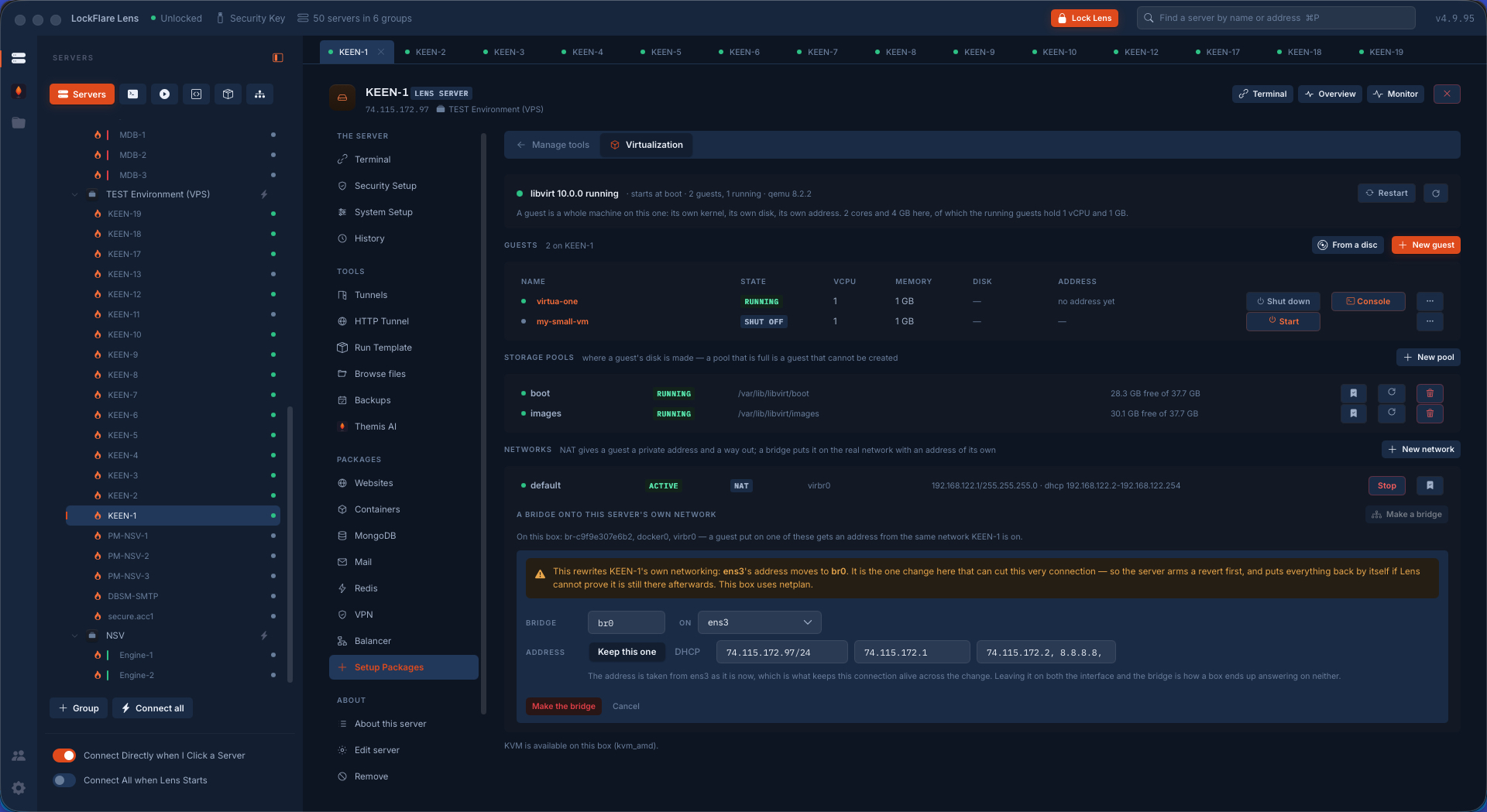
The Virtualization tool in LockFlare Lens: libvirt running, the guests with their state and resources, the storage pools with free space, the networks, and the bridge form
libvirt, the guests, the pools with their free space, the networks — and what the host has left to give.

The honest part first: can this box do it at all?

Most VPSs cannot run KVM — nested virtualization is off, or the CPU flag is not there. Lens checks before it offers anything and says so plainly, because finding out after four hundred megabytes of packages is worse than being told no. Where KVM is available it names the extension it found; where it is not, it says what the box would need.

A machine from a cloud image, in one form

Name it, pick the distribution, say how big. Lens downloads that image once from the distribution itself and keeps it beside the pool, copies it for this guest, grows the copy to the size you asked, writes the cloud-init that configures it on first boot, and defines it. The next guest from the same image is seconds rather than minutes.

The form does the arithmetic you would otherwise do in your head: how many cores and how much memory this host actually has, how much is free right now, and what this image needs as a minimum. It asks for the login to create with sudo, an SSH key to install, and — this is the detail that saves an afternoon — a password for the serial console, because a cloud image ships without one and a console that shows a prompt nothing can answer is a machine you cannot get into. That password goes into the guest's cloud-init and the file is deleted the moment it has been handed over.

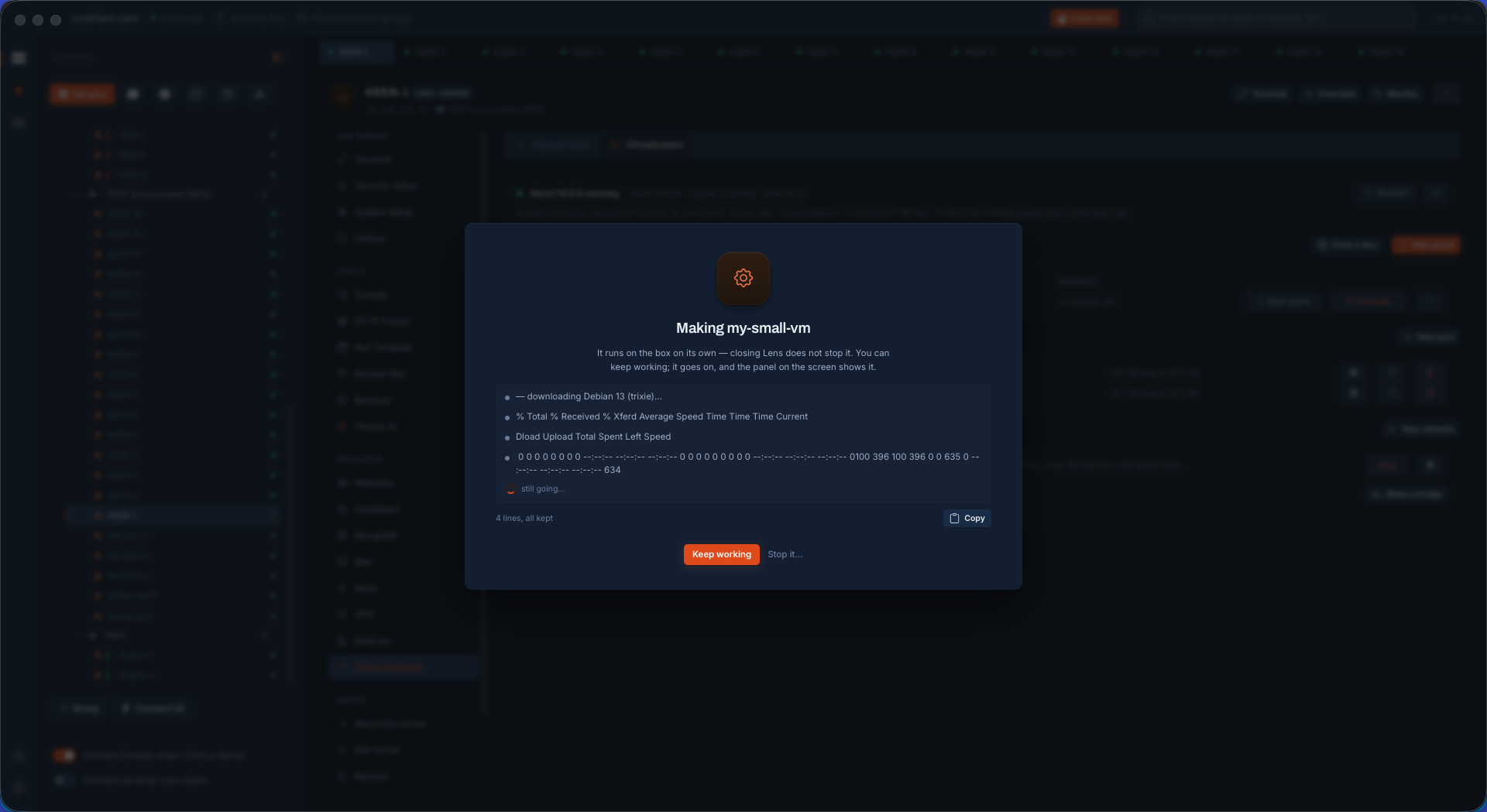
The job runs on the box on its own, so closing Lens does not stop it, and it says so on the panel: keep working, it goes on.
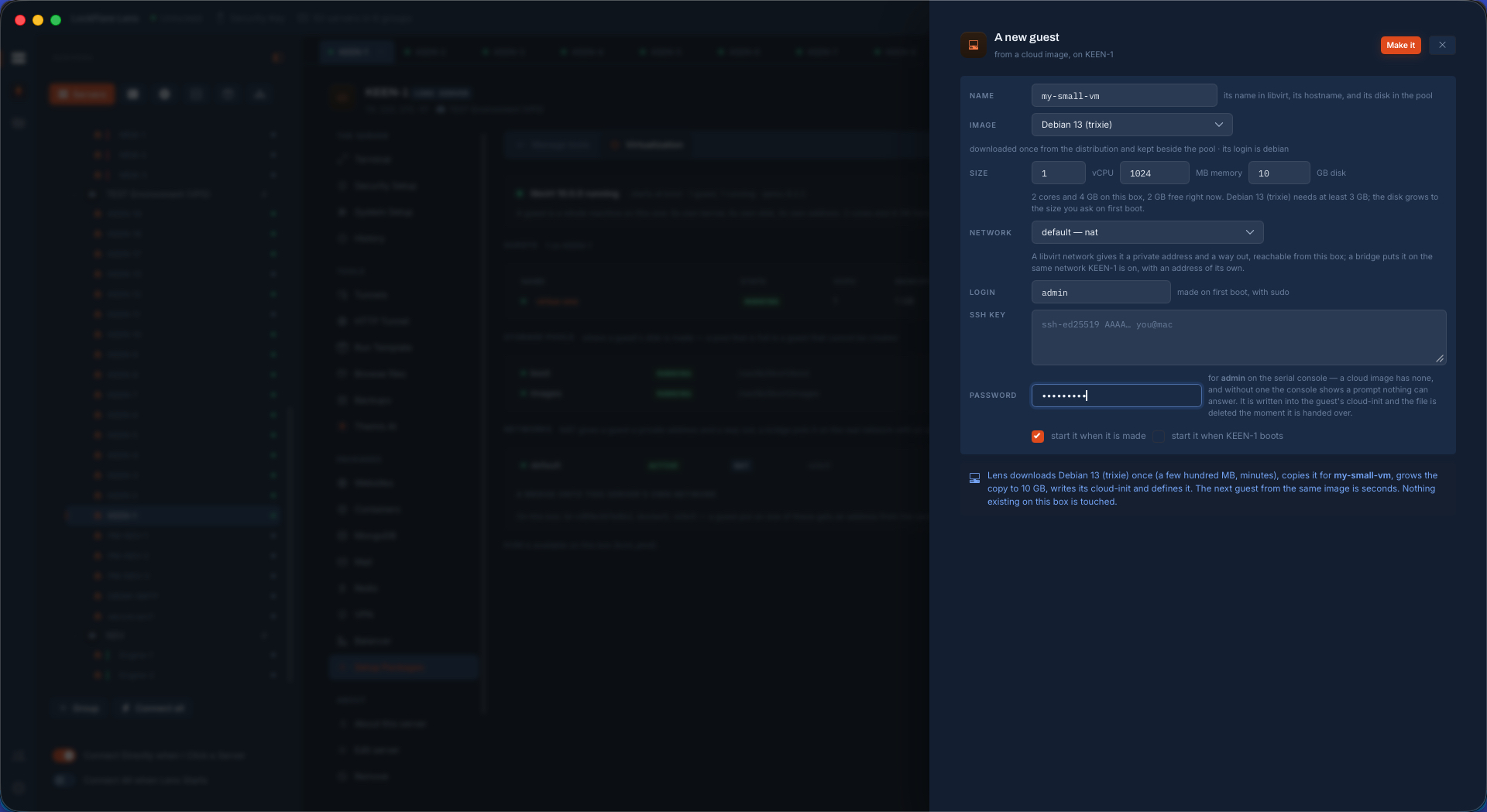
Creating a guest from a cloud image in LockFlare Lens: name, image, size against what the host has free, network, login, SSH key and a console password
Every field says what it costs — and what this host has left.
The guest being made in LockFlare Lens: the image downloading on the box, with Keep working and Stop
It runs on the box. Keep working; the panel keeps showing it.

From a disc, for everything with no cloud image

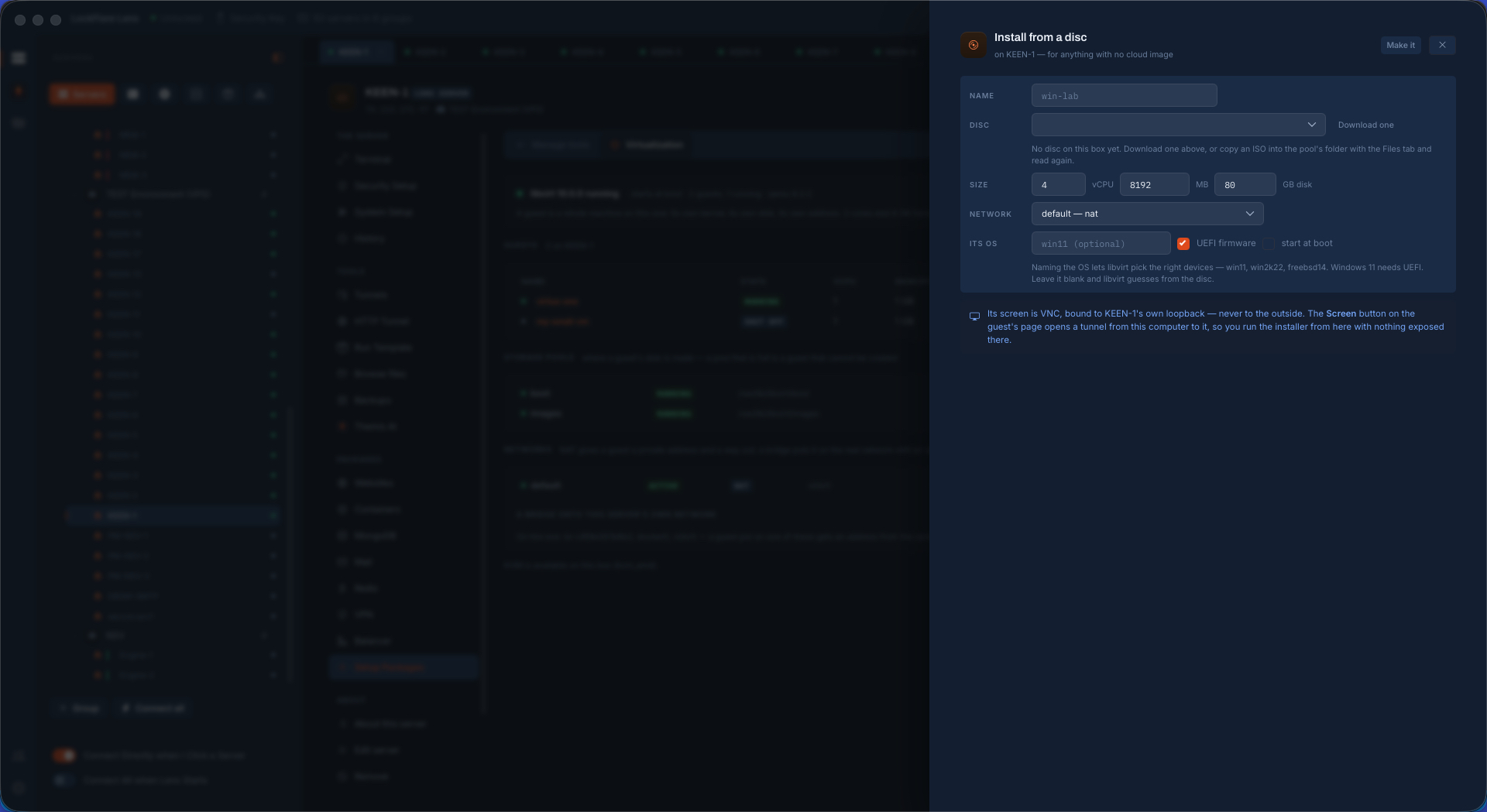
Windows, FreeBSD, an appliance, an old distribution — anything that arrives as an ISO. Download one into the pool from the form or drop it there with the Files tab. Naming the operating system lets libvirt pick the right devices for it, and the form says which names it knows; Windows 11 gets UEFI firmware with one tick.

Then the part that makes this usable on a server in a data centre: the guest's screen is VNC, bound to the host's own loopback and never to the outside. The Screen button opens a tunnel from your computer to it, so you click through the installer from your desk with nothing exposed on the internet. No VNC port open, no password to leak, no forgotten listener left behind afterwards.

Installing a guest from an ISO in LockFlare Lens: the disc, size, network, the OS name for libvirt, UEFI firmware, and a note that the screen is VNC on loopback reached through a tunnel
An ISO, a size, the OS named so libvirt picks the right devices — and a screen that never leaves loopback.

The guest's own page

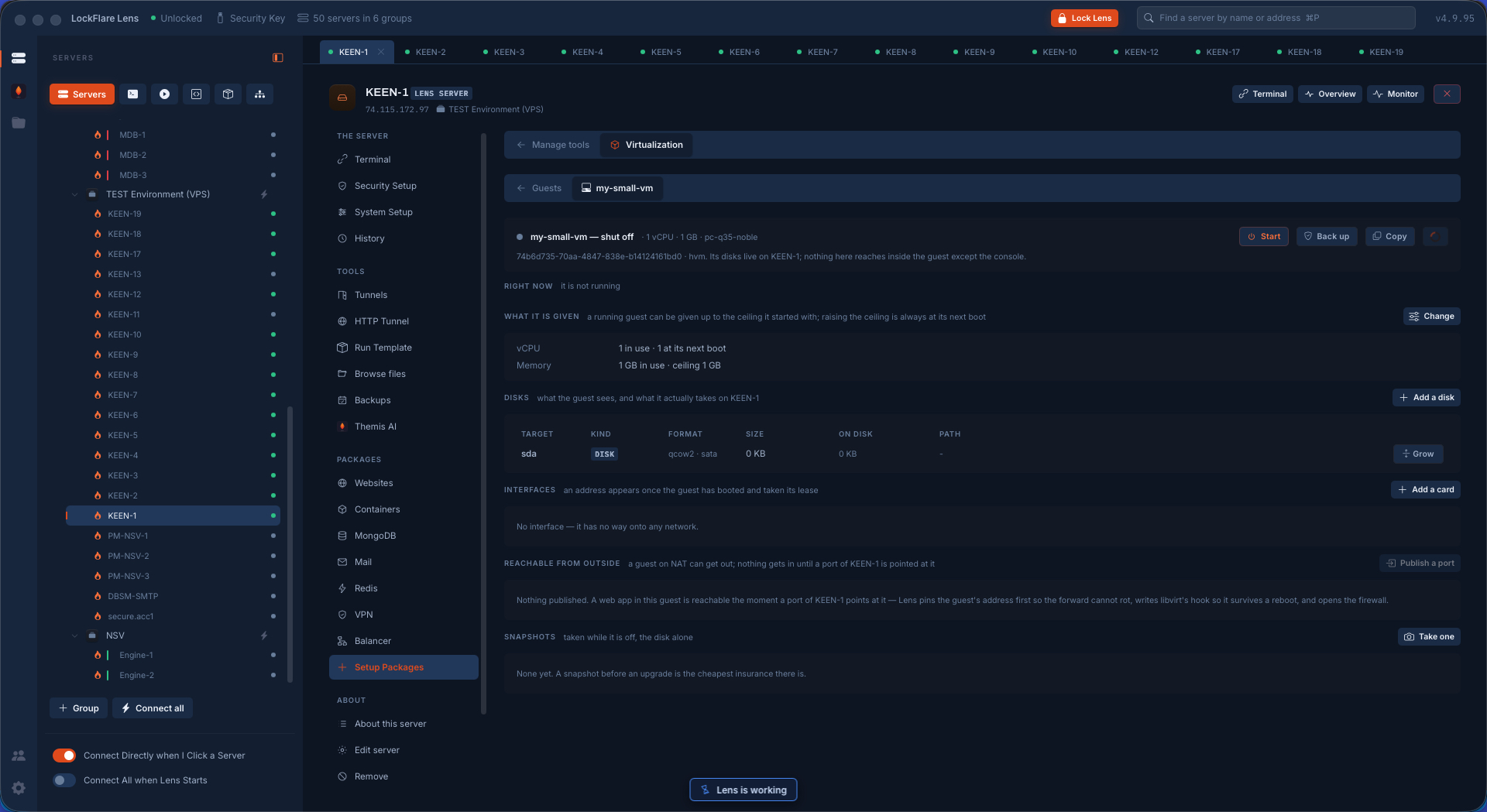
Start, shut down, back up, copy, rename. Then the things you actually come back for, each said in the words that matter rather than in libvirt's:

What it is given. A running guest can be given up to the ceiling it started with; raising the ceiling is always at its next boot. So the page shows both — in use, and at next boot — instead of pretending a change took effect when it did not.

Disks, as what the guest sees and what they actually take on the host, which are not the same number for a thin-provisioned image. Add one, grow one. Interfaces, with the note that an address appears once the guest has booted and taken its lease. Add a card, put it on another network.

Reachable from outside. A guest on NAT can get out; nothing gets in until a port of the host is pointed at it. Publishing one is three things at once, which is why it is a button and not a paragraph of documentation: Lens pins the guest's address first so the forward cannot rot after a reboot, writes libvirt's hook so it survives one, and opens the firewall. Snapshots taken while it is off, the disk alone — and the line that is simply true: a snapshot before an upgrade is the cheapest insurance there is.

A guest's page in LockFlare Lens: what it is given now and at next boot, its disks and what they take on the host, interfaces, publishing a port, and snapshots
In use and at next boot, side by side — and a port published as one button that does three things.

Pools, networks, and the one change that can cut the wire

Storage pools are where a guest's disk is made, so the page says the thing that actually bites: a pool that is full is a guest that cannot be created. Each with its path and its free space.

Networks in one sentence: NAT gives a guest a private address and a way out; a bridge puts it on the real network with an address of its own. A libvirt NAT network touches nothing on the host and can be made and stopped freely.

A bridge is different, and Lens refuses to be casual about it. It rewrites the server's own networking — the interface's address moves to the bridge — and it is the one change on this screen that can cut the very connection Lens is using. So the server arms a revert before anything is touched and puts everything back by itself if Lens cannot prove it is still there afterwards. The form takes the address from the interface exactly as it is now, which is what keeps the session alive across the change, and says why leaving it on both is how a box ends up answering on neither. It also tells you which tool the box uses to configure networking, because that is the file it is about to rewrite.

Making a bridge in LockFlare Lens: the warning that this rewrites the server's own networking, the armed revert, and the address carried across from the interface
The warning, the armed revert, and the address carried across — the reason nobody drives to a data centre.

What the tool will not pretend

It does not reach inside the guest

Lens manages the machine, not what runs in it. Its disks live on the host and nothing here reaches past the console — if you want the guest managed too, add it to the map as its own server.

Rates are real differences

Network and disk numbers on a guest's page are honest differences of libvirt's running counters between two samples, not a gauge invented to look busy.

Nothing existing is touched

Making a guest downloads an image, copies it, grows the copy and defines a machine. It does not alter the host's own storage, its services or its network — except the bridge, which says so twice.

LXD and Incus too

System containers beside full machines, on the same screen, for the workloads that do not need their own kernel.

The console is a terminal

The serial console of a guest opens as a real Lens terminal tab, so a machine with no network is still reachable.

Removing it is a ceremony

libvirt comes off the box through the same uninstall as everything else: Touch ID, what actually goes, the phrase typed by hand, and Touch ID again.

Containers, on the same rail

For the workloads that do not need their own kernel: Docker with compose stacks, volumes backed up, and ufw made to govern its ports.

Containers, end to end