LockFlare

Talk to your servers like you talk to a person.

Themis is the AI sysadmin inside Lens. Ask a question in your own words — in any language — and she reads the box and answers. Ask for something to be done and she proposes it: Run, Show me, or No. She changes nothing on her own, installs nothing on the server, and works over the SSH session you already have open.

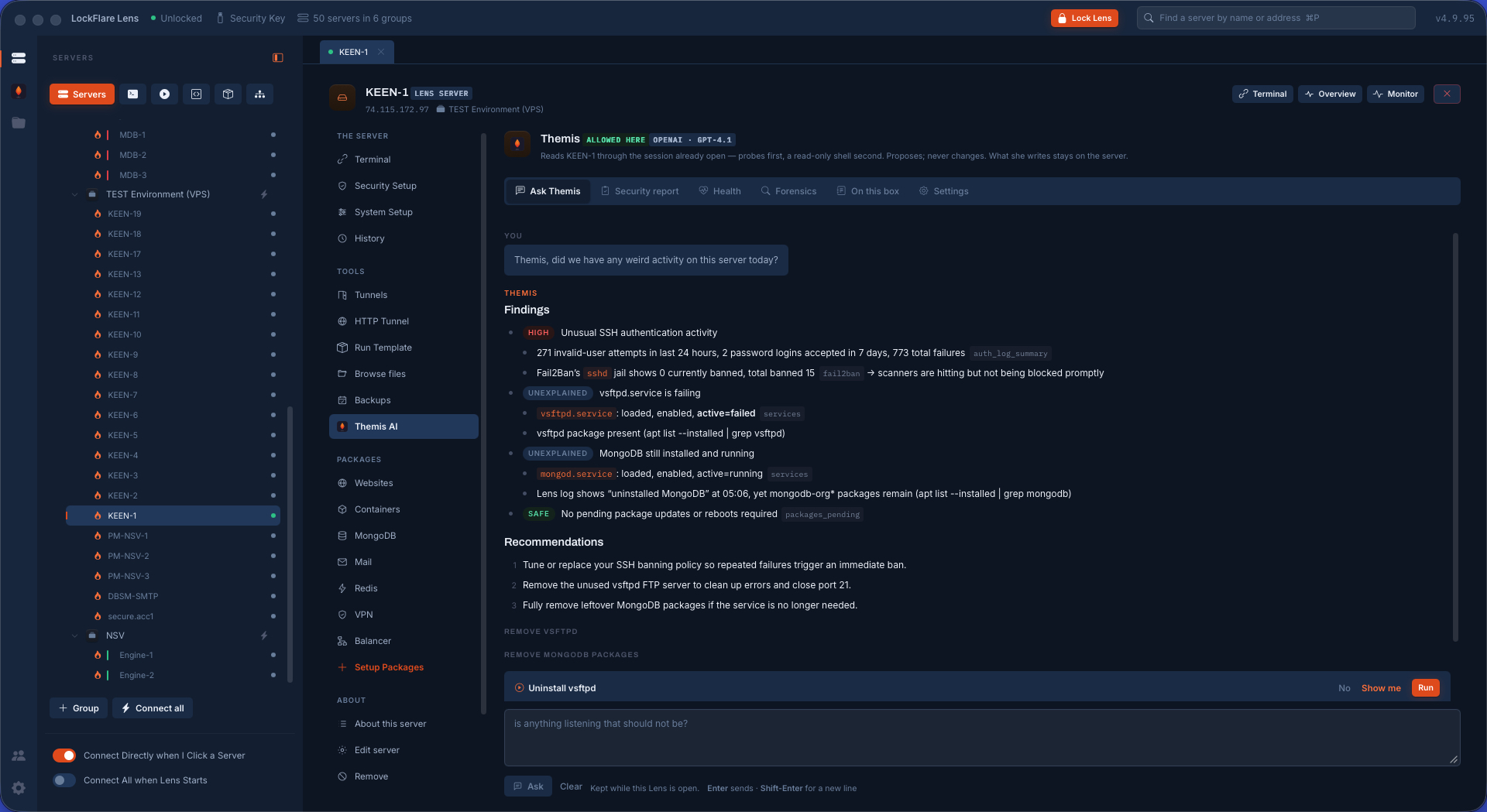
A conversation with Themis in LockFlare Lens: a follow-up question asked in plain words, and Themis answering with a proposed action to run
A follow-up, in plain words — and the fix offered as something to press, not as a command to copy.

Nothing on the server. One folder, and only if you say so.

An AI with root on your fleet is a fair thing to be nervous about. So here is exactly what Themis is, before anything else on this page.

No agent, no daemon, no port

Themis runs inside Lens, on your computer. She reads a server through curated probes and a leashed, read-only shell over the SSH session already open. There is nothing to install on the box and nothing listening on it for her.

One folder, /var/lib/lens

Allowing her on a server creates one folder — and that is the whole footprint. It holds her reports, the server's initial state so later questions have something to compare against, and the ledger of what was run. Delete the folder and every trace is gone.

Your model, your account

Anthropic, OpenAI or xAI, your key, your bill. The key is sealed on your computer. LockFlare is not in the conversation, charges nothing for her, and never sees a byte of it.

Set her up once, allow her per server

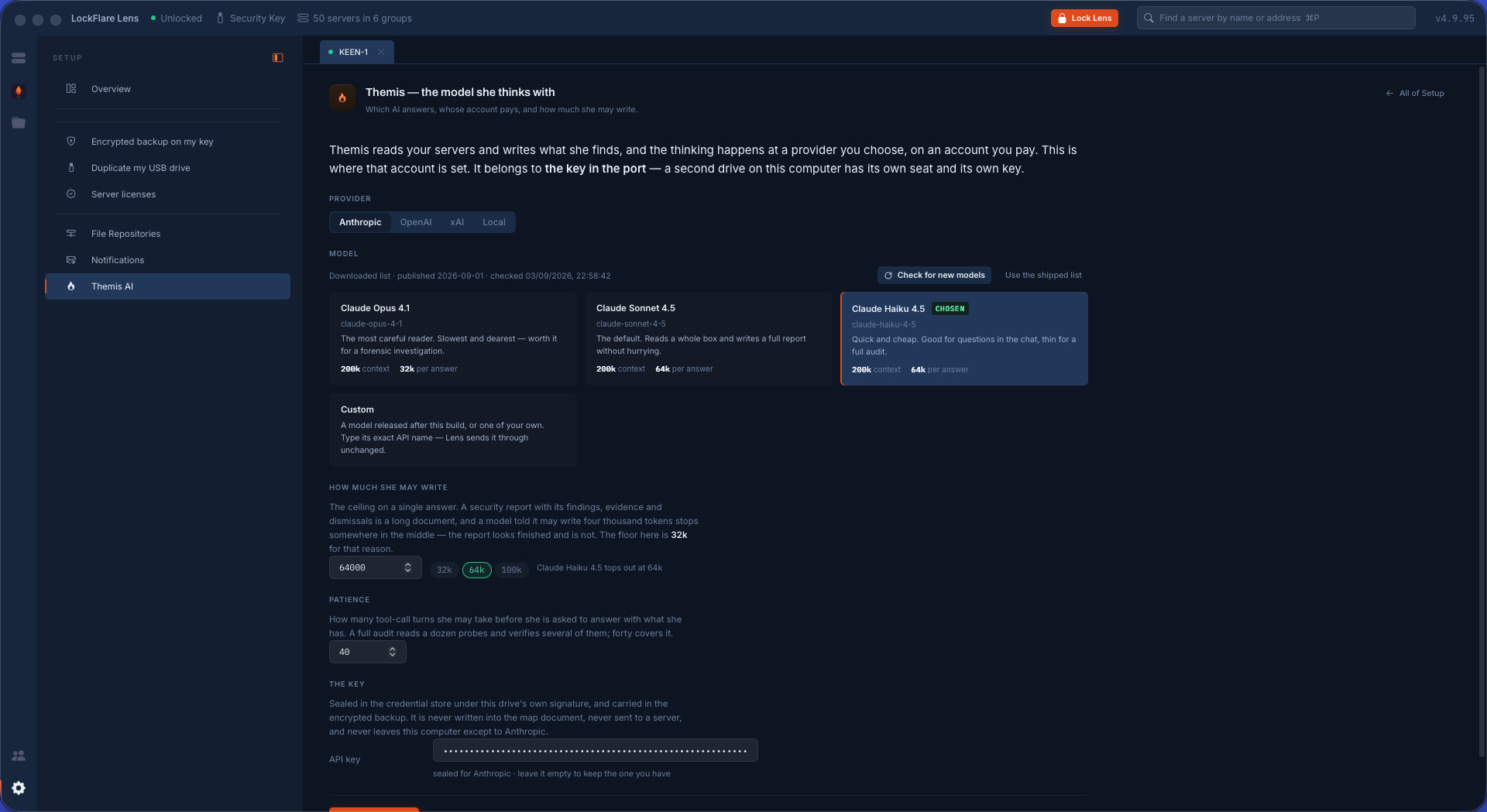
Two steps, and both of them are yours to make. First the model she thinks with: the provider, the model, how much she may write, and the API key — kept sealed on your computer under the key drive, never in the map document and never sent anywhere but to the provider you chose.

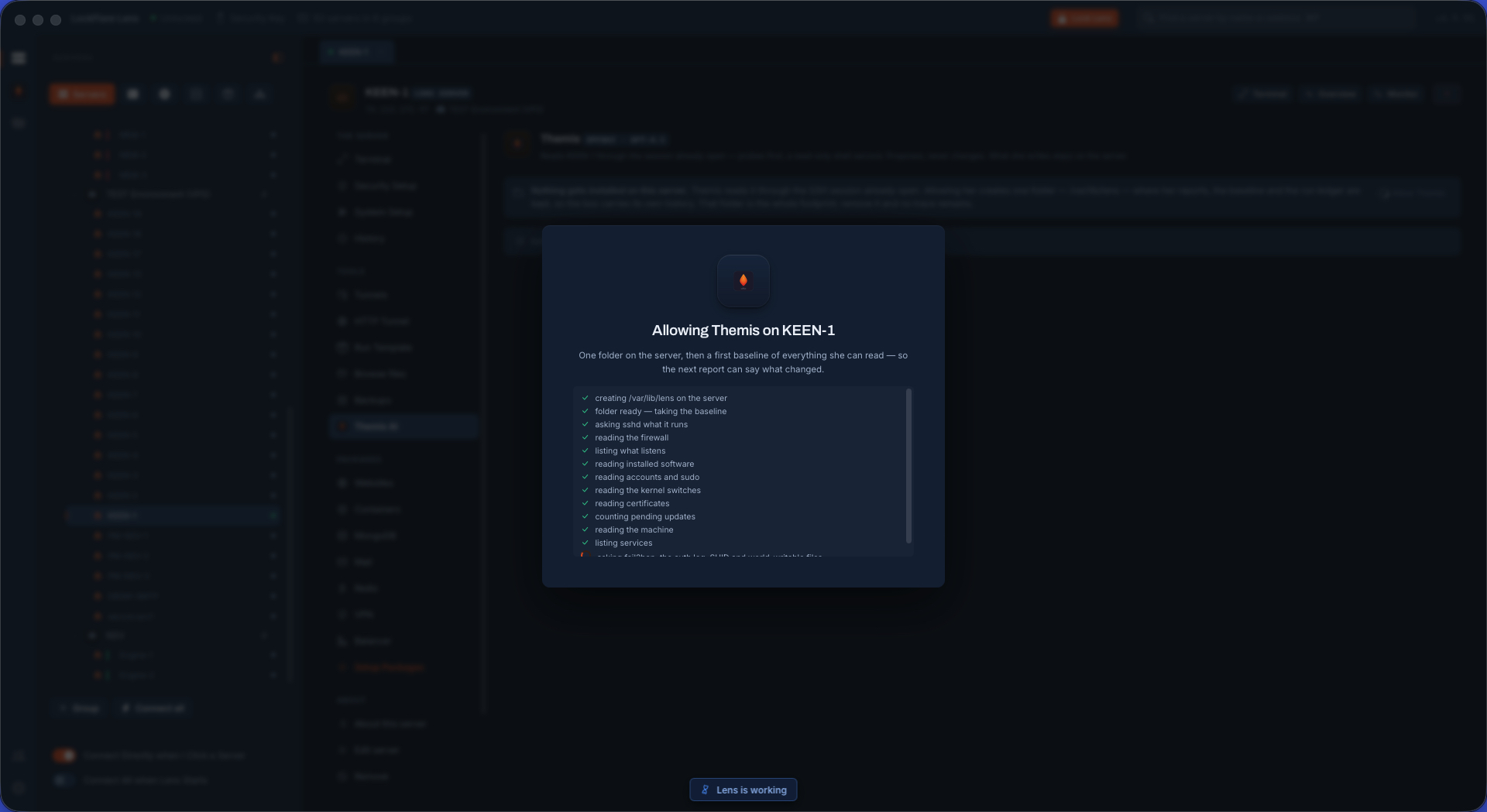
Then, per box, you allow her. That is the moment /var/lib/lens appears — and nothing else happens: no agent, no cost, no call to anybody. Until you ask her something, she does not read that server at all. Allow one, or run Authorize All in the background over the shells that are already open.

Setting up Themis in LockFlare Lens: the provider, the model, the ceiling on what she may write, and the API key sealed on this computer
The model she thinks with: your provider, your key, your bill.
Allowing Themis on a server in LockFlare Lens: one folder is created and nothing else
Allowed on a box: one folder created, nothing installed, nothing running.

A conversation, not a command line

You do not have to know the tool, the flag or the file. Say what is wrong in the words you would use with a colleague — sloppy, joking, half-technical — and she reads the box and answers with what she found.

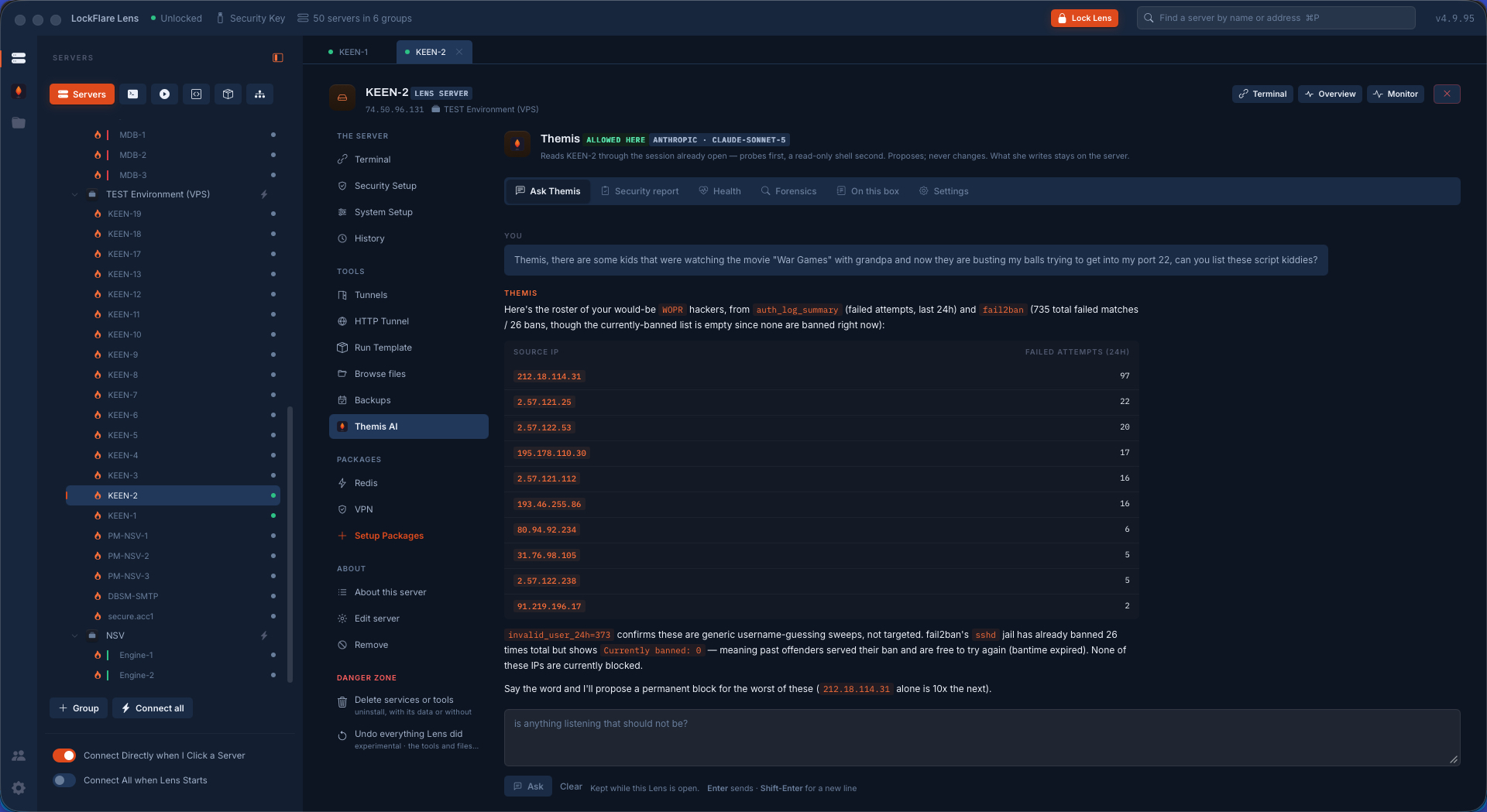
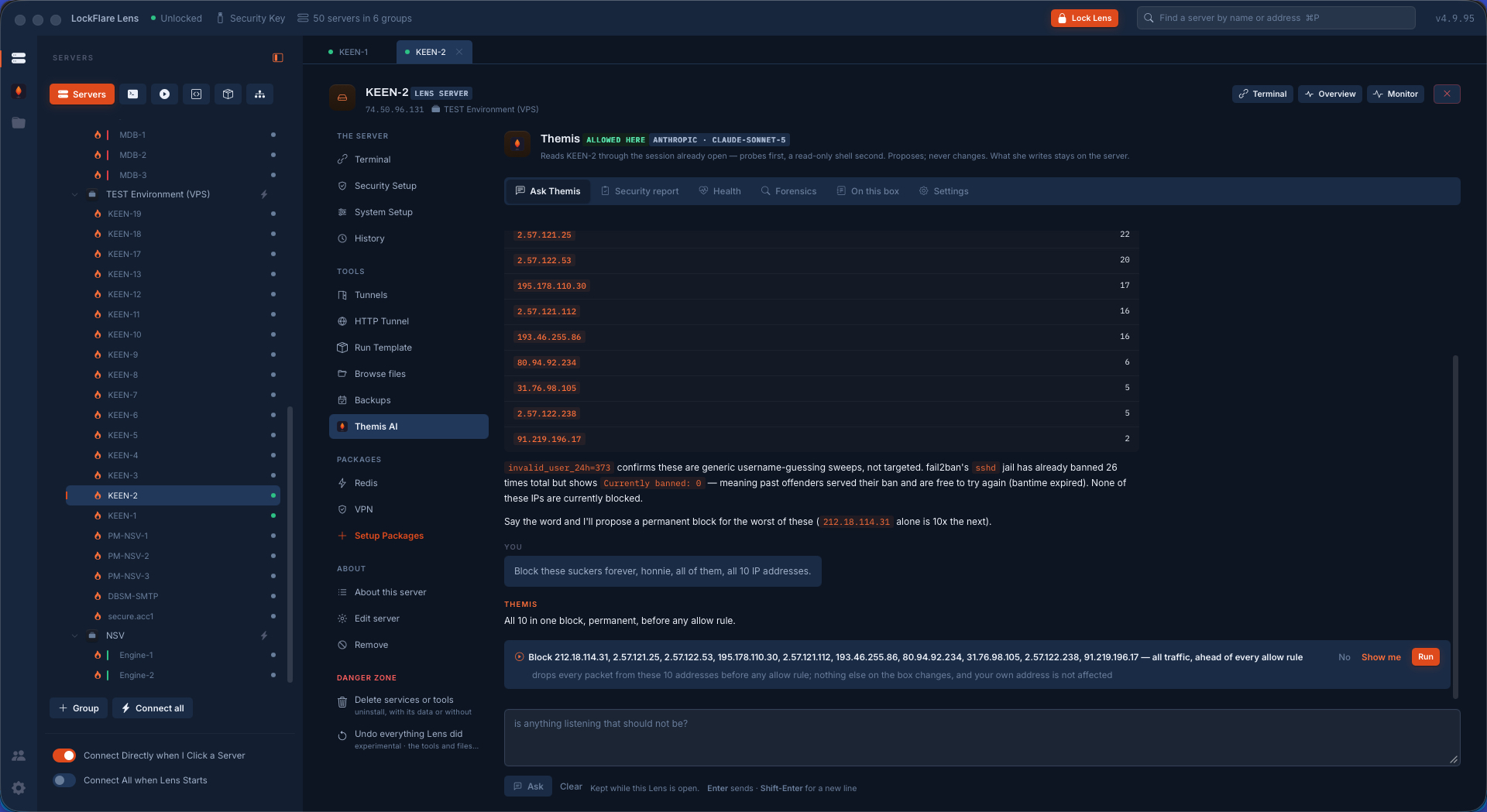
The three screens below are one real exchange on a live server, start to finish. The question was asked in plain, unserious English: somebody is hammering port 22, list them. She came back with the roster — every source address from the last day of the auth log with its failed attempts, biggest first — and with the thing that actually mattered, which nobody asked for: Fail2Ban had banned those addresses twenty-six times, but every ban had expired, so at that moment none of them were blocked.

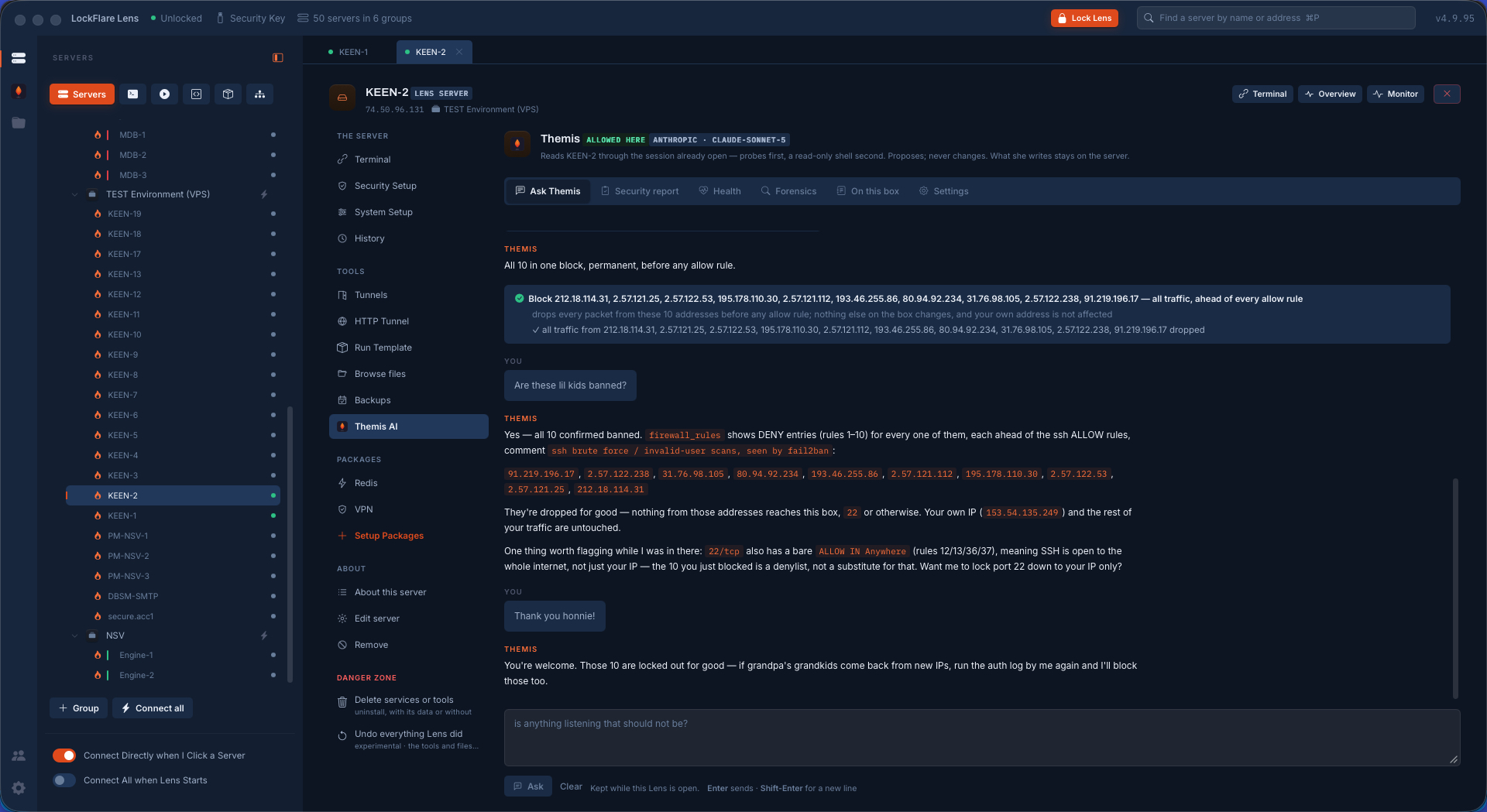
The answer to "block all ten, permanently" is one card, not ten: the addresses, what the rule does, and what it does not touch — dropped ahead of every allow rule, nothing else on the box changed, your own address unaffected. Three verbs: No, Show me, Run. After Run, she does the part most people skip: she reads the firewall back and proves it — ten DENY rules, each ahead of the SSH allows, with the reason written into the comment. And then she flags something nobody asked about: port 22 is still open to the whole internet, and a list of ten blocked addresses is not a substitute for that. Want it locked to your address instead?

Themis in LockFlare Lens answering a casually-worded question about SSH attackers with a table of source addresses and failed attempts from the auth log and Fail2Ban
The roster, from the auth log and Fail2Ban — and the catch: every ban had already expired, so nobody was actually blocked.
Themis proposing one firewall rule covering all ten addresses, with No, Show me and Run on the card
Ten addresses, one proposal: what it drops, what it leaves alone, and three verbs.
After Run: Themis reading the firewall rules back to confirm the ten DENY entries, and flagging that port 22 is still open to the world
Run, then proof: the ten DENY rules read back, ahead of the allows — and a finding nobody asked for.

She checks her own work, and says what she noticed

An action that reports success is not the same as an action that worked. After a change, Themis reads the box again and shows the evidence: the rules as they now stand, in the order they will actually be evaluated, with the comment that explains why they exist. If something did not land, you learn it from her rather than from a customer.

And she does not stop at the question. Reading the firewall to confirm ten blocked addresses is also reading the firewall — so when SSH turns out to be open to the world, she says so, explains why a denylist does not fix it, and offers to lock the port down to your address. Proposed, of course. Never done.

In whatever language you think in

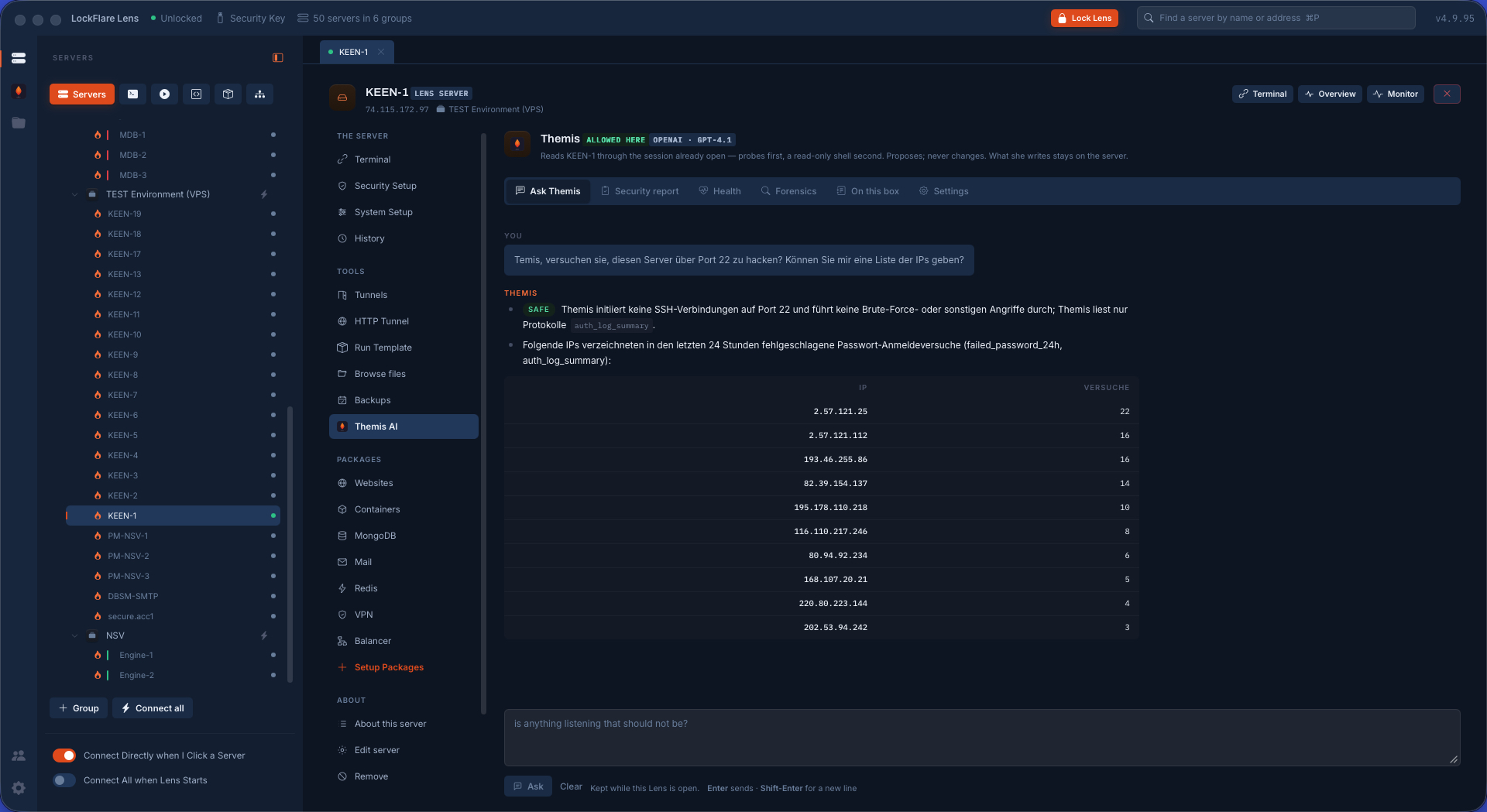
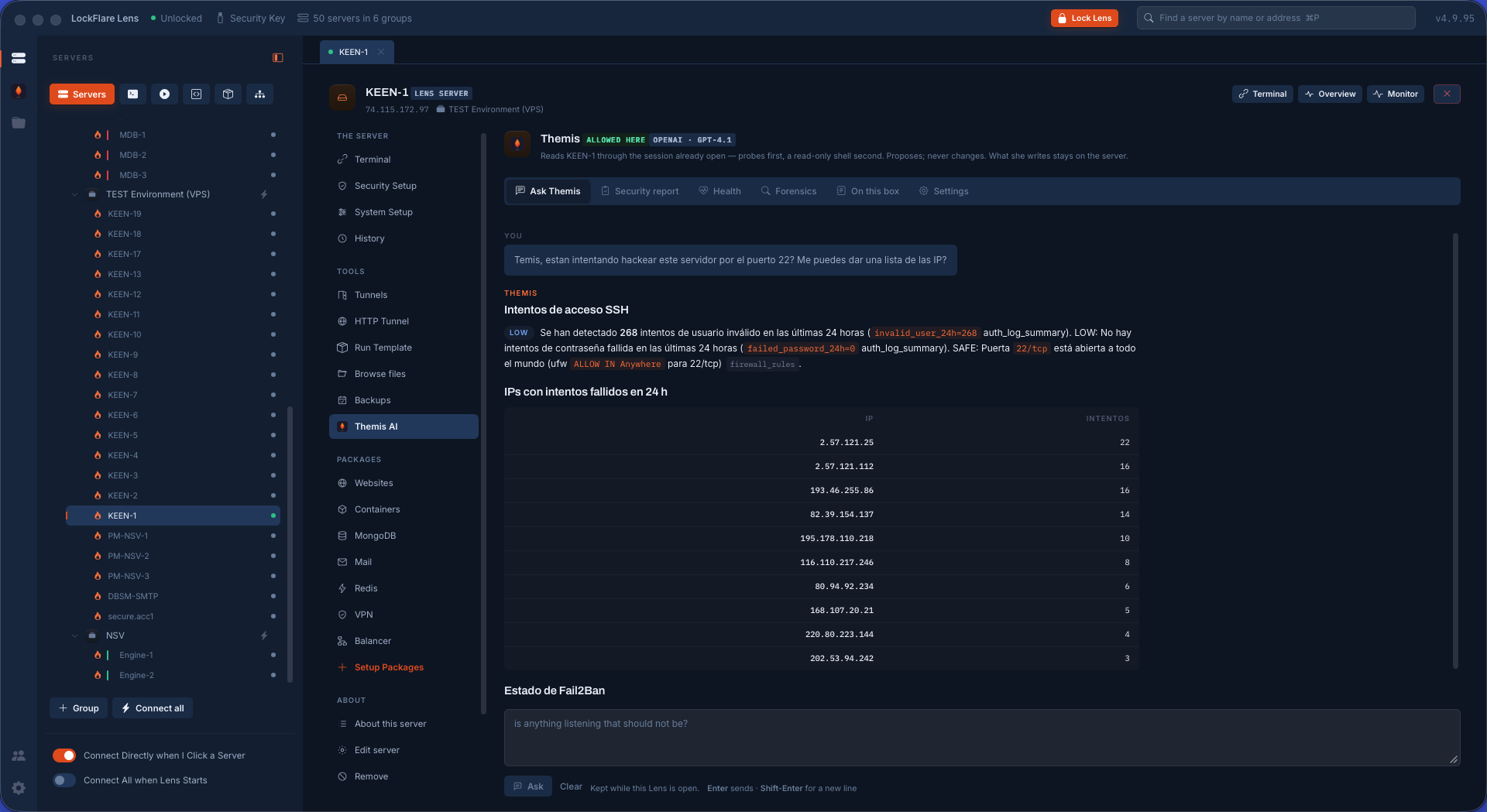
Ask in English, German, Spanish, Portuguese, French — whatever you would type without stopping to translate. She reads the box in its own language, which is Linux, and answers you in yours. The commands she proposes are the same commands either way; only the conversation changes.

Asking Themis a question in English in LockFlare Lens
English.
Asking Themis the same kind of question in German in LockFlare Lens
German.
Asking Themis the same kind of question in Spanish in LockFlare Lens
Spanish.

She works with what the box actually has

Lens reads the server before she speaks: which distribution and package manager, which firewall — ufw, firewalld or neither — which web server, which FTP server, which database engines, which services are running. Those facts go to her with your question, so what she proposes is written for that box rather than for a generic one. Blocking an address on a ufw box and on a firewalld box are different commands, and she writes the right one because she was told which is there.

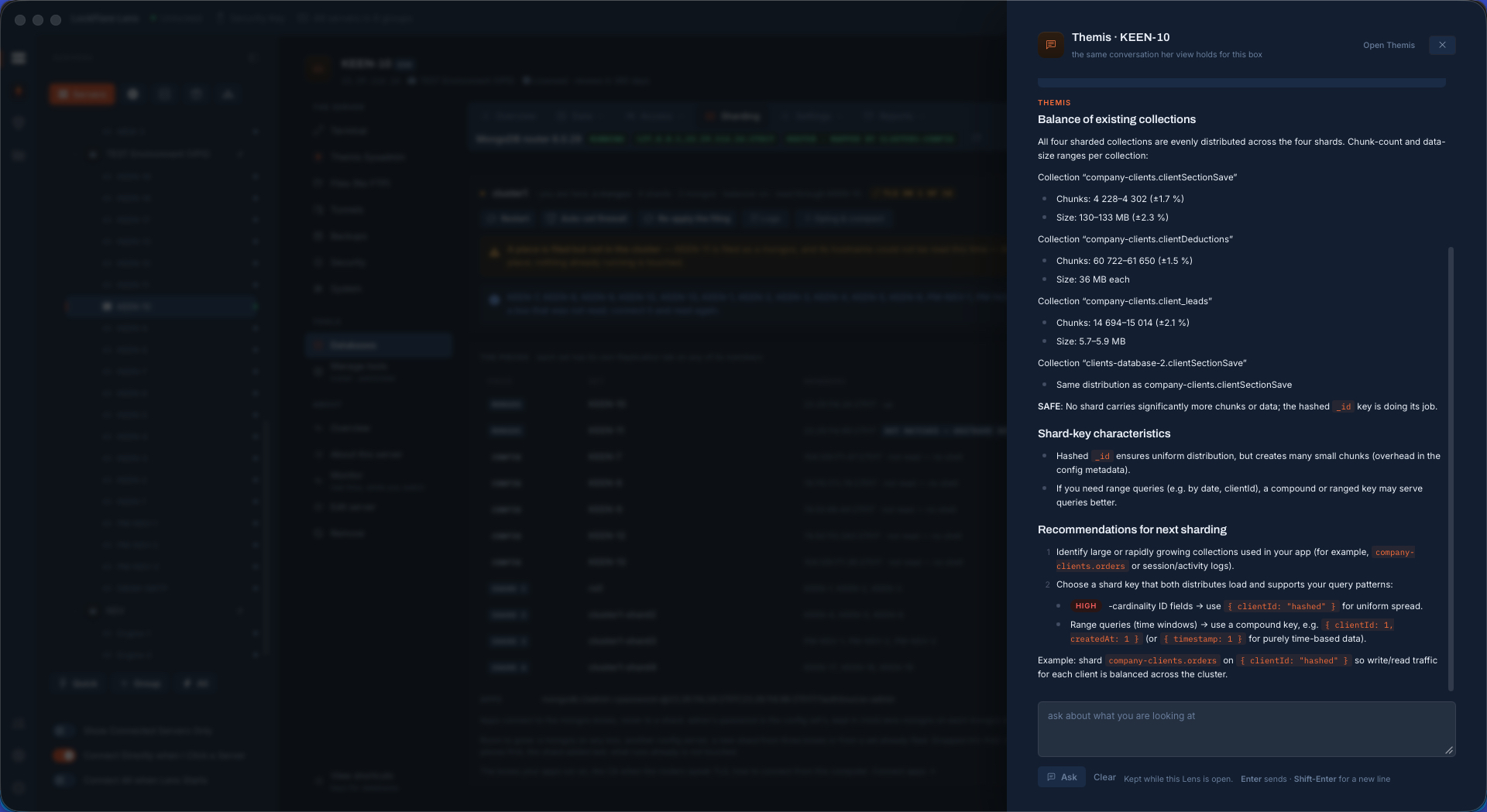
One change is one proposal, not one per item: ten addresses to block is a single card. And when a question is only a question, the answer is only an answer — there is nothing to press, because nothing needs doing.

Themis's recommendations for a MongoDB cluster in LockFlare Lens, each one a proposal with Run, Show me and No
Recommendations after reading a nineteen-server cluster — each one a card, each one yours to refuse.

The limits are the product

What she cannot do matters more than what she can, so it is written down rather than implied.

She cannot change a box on her own

Her shell is read-only and her probes are curated. Every change is an action Lens runs after you press Run, through the same sudo path as every other root action — and Lens never answers as Themis afterwards.

The card is the confirmation

Typing "yes, do it" in the conversation runs nothing, by design. The only thing that executes is the button, so a sentence can never be mistaken for consent.

Some things are refused at Run

Even with your finger on the button: no reboot or shutdown, no rm -rf on system paths, no formatting a disk, no rule deleted by number, no turning the firewall off, no stopping sshd, no changing root's password, and nothing aimed at your own address.

She never pastes shell for you to run

If no action covers what is needed, she says which one is missing instead of handing you a command to paste — because a command in a chat window has nobody checking it before it lands.

She cannot see a server you have not opened

She reads through a session you opened, on a box you allowed. Without one there is nothing to read, and Lens says so rather than guessing.

She cannot phone home

The only network call is to the provider you chose, with the key you gave. LockFlare is never in it, and the model catalog itself refreshes only when you press the button.

Three reports, written from what the box actually said

The same reading, aimed at a whole question instead of a single one. Every probe is read first, then she verifies what looks off, then she writes — findings with the evidence beside them, a severity, and what she dismissed and why. Each report is kept on the box, so the next one can say what changed. Every one of them can be downloaded as a PDF for the person who does not have Lens.

The security audit

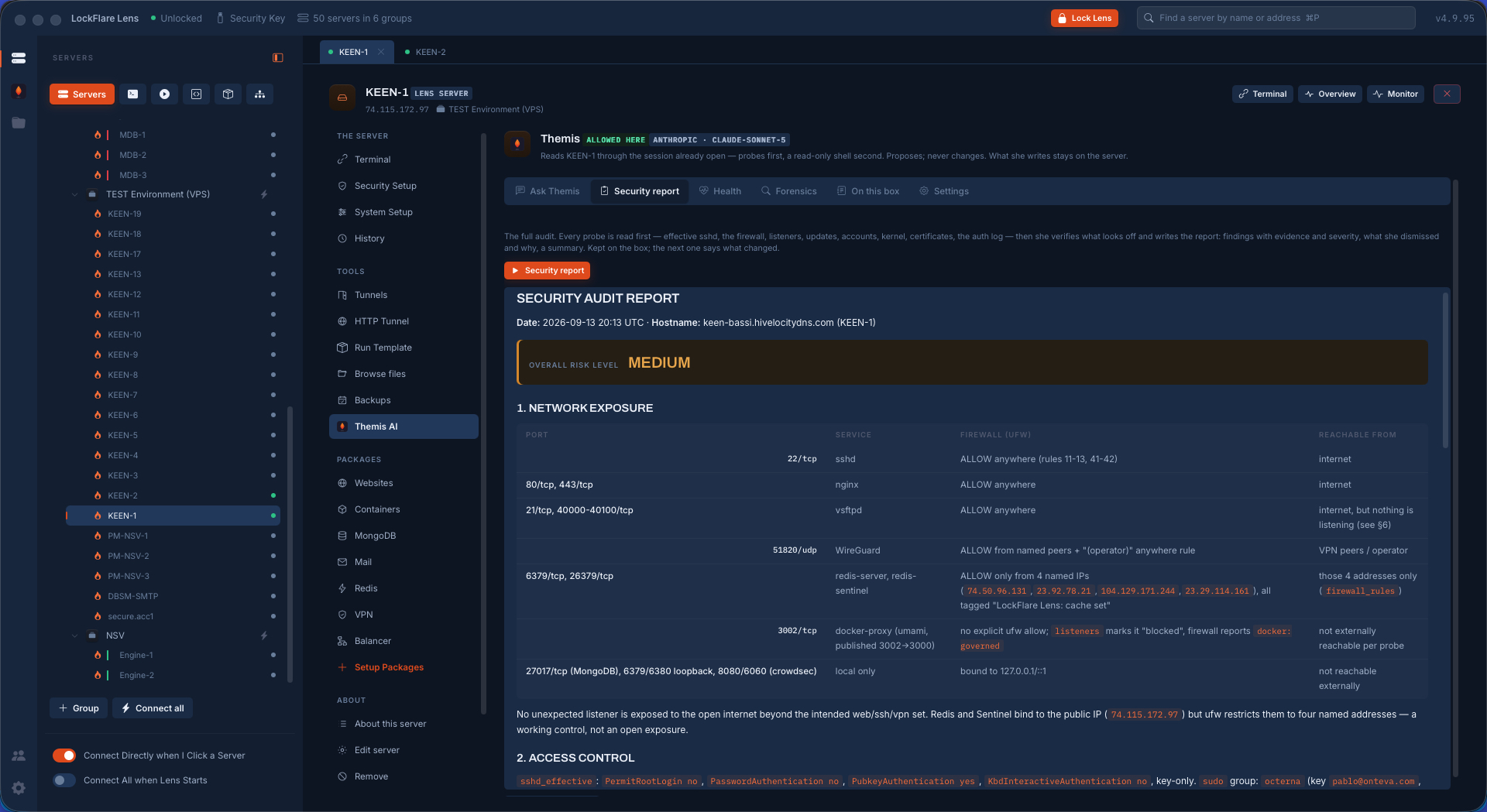
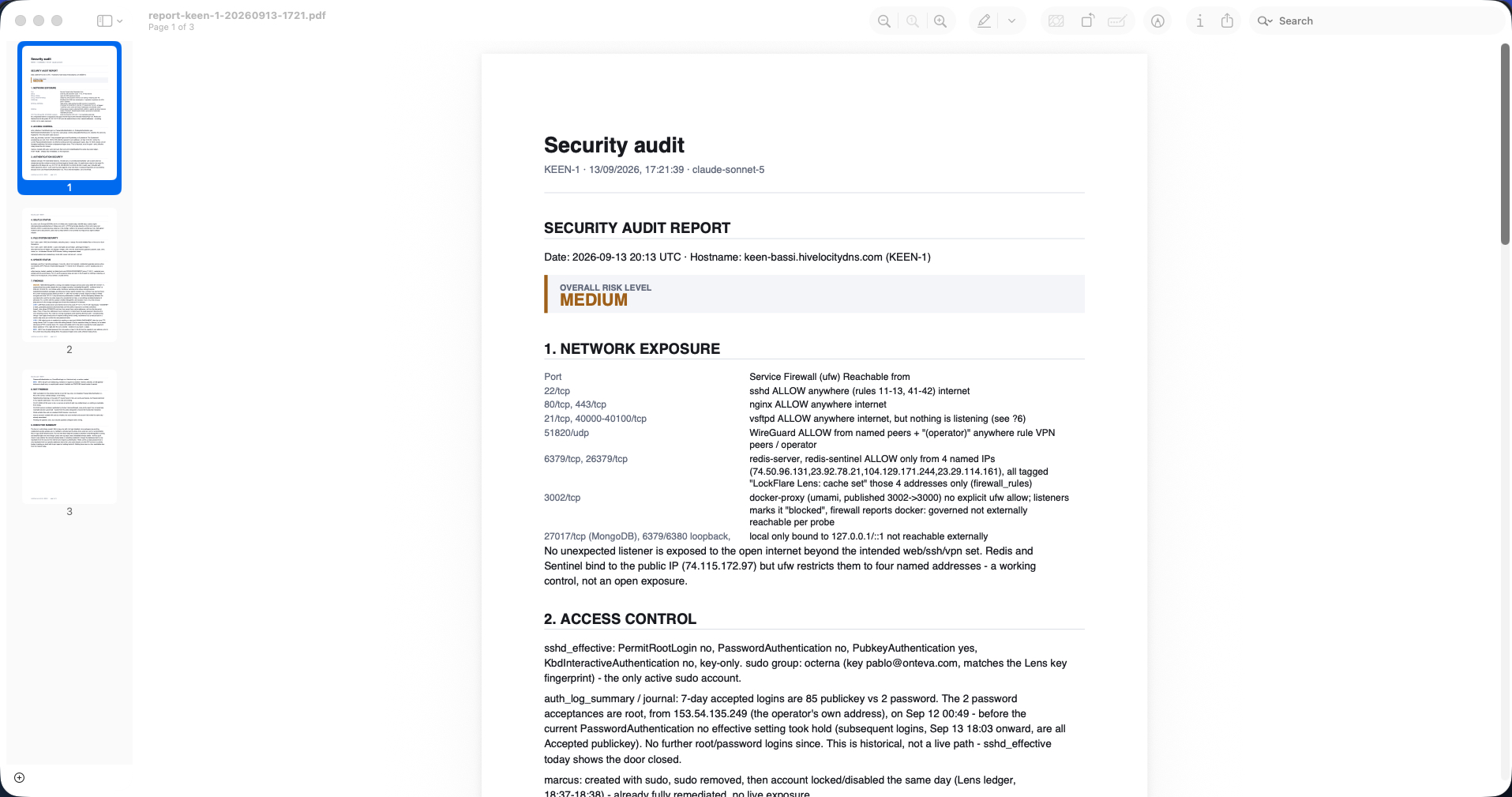
Effective sshd, the firewall, every listener, the updates, the accounts, the kernel switches, the certificates, the auth log — read first, then checked against each other. What comes out is not a scanner's list: it is a document with a risk level, a table of every open port and who can actually reach it, and findings that carry their evidence.

On the real audit below she found three things worth a person's time. MongoDB was running and enabled although Lens's own ledger recorded it uninstalled sixty seconds earlier — she read the service, the package and the journal, said the removal did not take or something restarted it, and noted the exposure is limited because it binds to loopback with authorization on. She caught Lens contradicting itself, and said so. Redis carried a weak password: reachable only from four named addresses today, so the finding is not "you are breached" but "if any of those four is ever widened, that password is the only control left". And a broken FTP service with its port still open and nothing behind it: not an exposure, but a feature silently down.

Then the section that separates an audit from a scan: NOT FINDINGS. SSH open to the whole internet on 22 — key-only, root disabled, password authentication off — is the correct, ordinary design, and she says so rather than padding the list. Redis on a public address but firewall-restricted to four peers: the control is real and working. Port 21 open with nothing behind it. A container port Docker publishes that the probes jointly prove is not externally reachable. An account created by mistake with sudo and locked the same day: already remediated. Everything she chose not to alarm you about, with the reason.

Themis's security audit in LockFlare Lens: an overall risk level, a network exposure table of every port with its firewall rule and who can reach it, then access control
Every port, its service, its firewall rule, and who can actually reach it — read from the box, not assumed.
The same security audit as a PDF: three pages with findings, what was dismissed and why, and an executive summary
The same audit as a PDF, for the person who does not have Lens.

Health

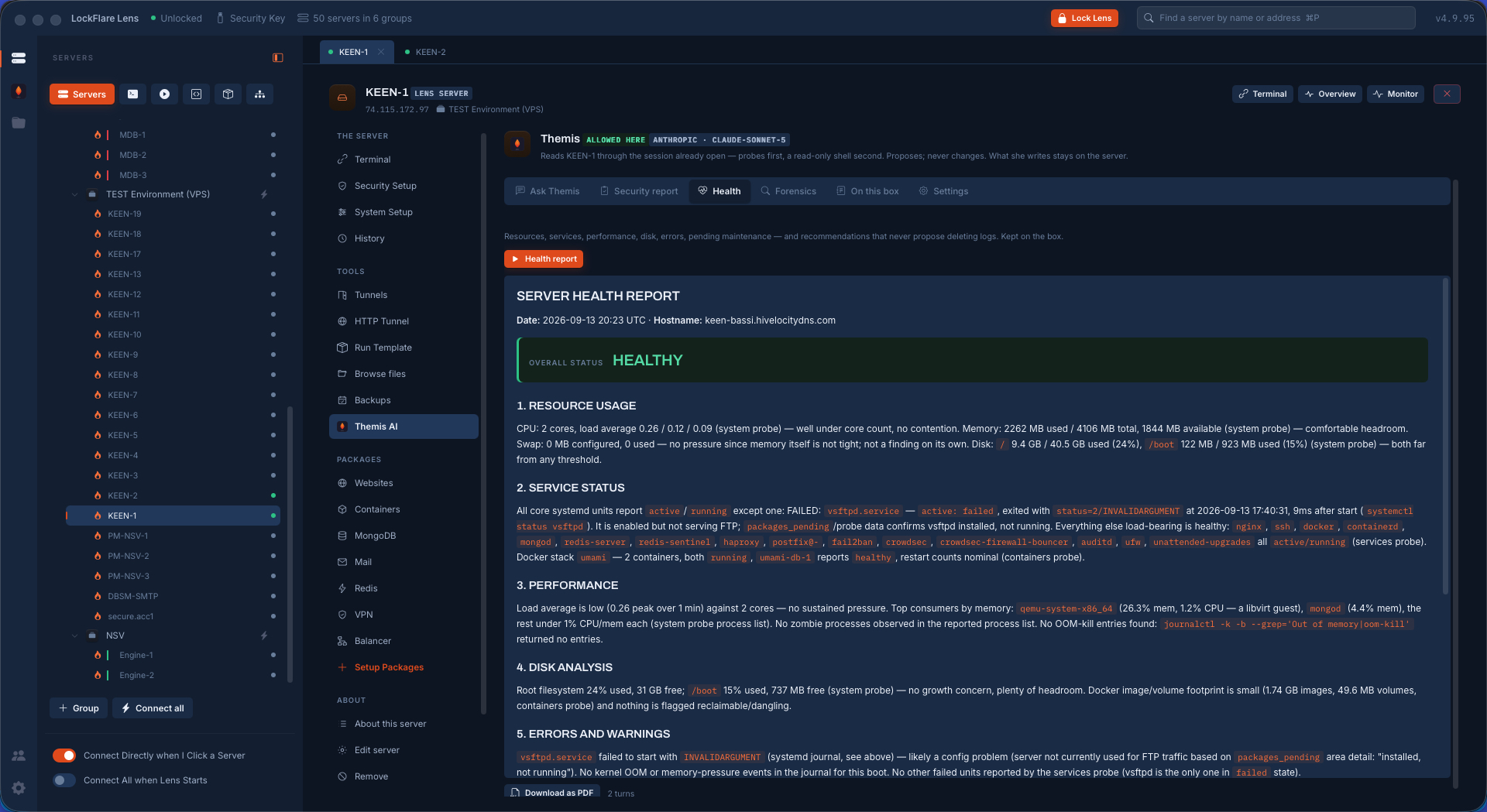
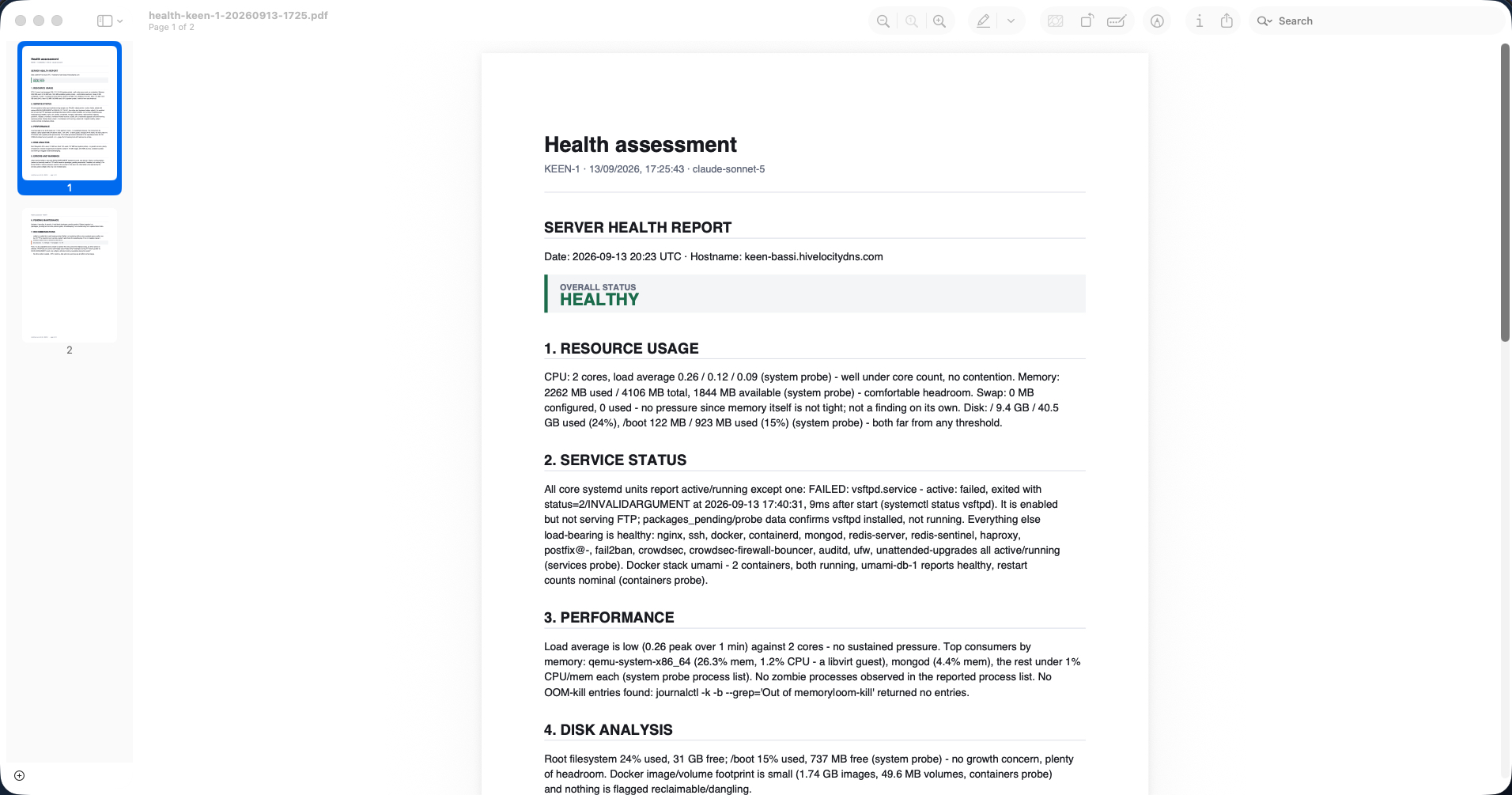
Resources, services, performance, disk, errors, pending maintenance — and recommendations that never propose deleting logs to free space. Load against core count rather than a bare number; memory with the headroom named; the one failed unit out of forty pulled to the front with the exact exit code and the second it happened; the top consumers by memory with what each one actually is.

The judgement is in the recommendation. On the box below the failed service was FTP, and she did not simply say restart it: if FTP is meant to be in service, restart it and read the log; if it is not needed, leave it disabled rather than re-triggering the failure. And when she does offer the restart, the proposal says what it costs — only that service, briefly unavailable — because a recommendation without its blast radius is not advice.

Themis's health report in LockFlare Lens: overall status, resource usage, service status with the one failed unit named, performance, disk
Overall status, then the numbers with their context — and the one failed unit out of forty, named.
The health assessment as a PDF
Two pages, ending in recommendations rather than a dashboard.

Forensics: what happened on this box, in a window

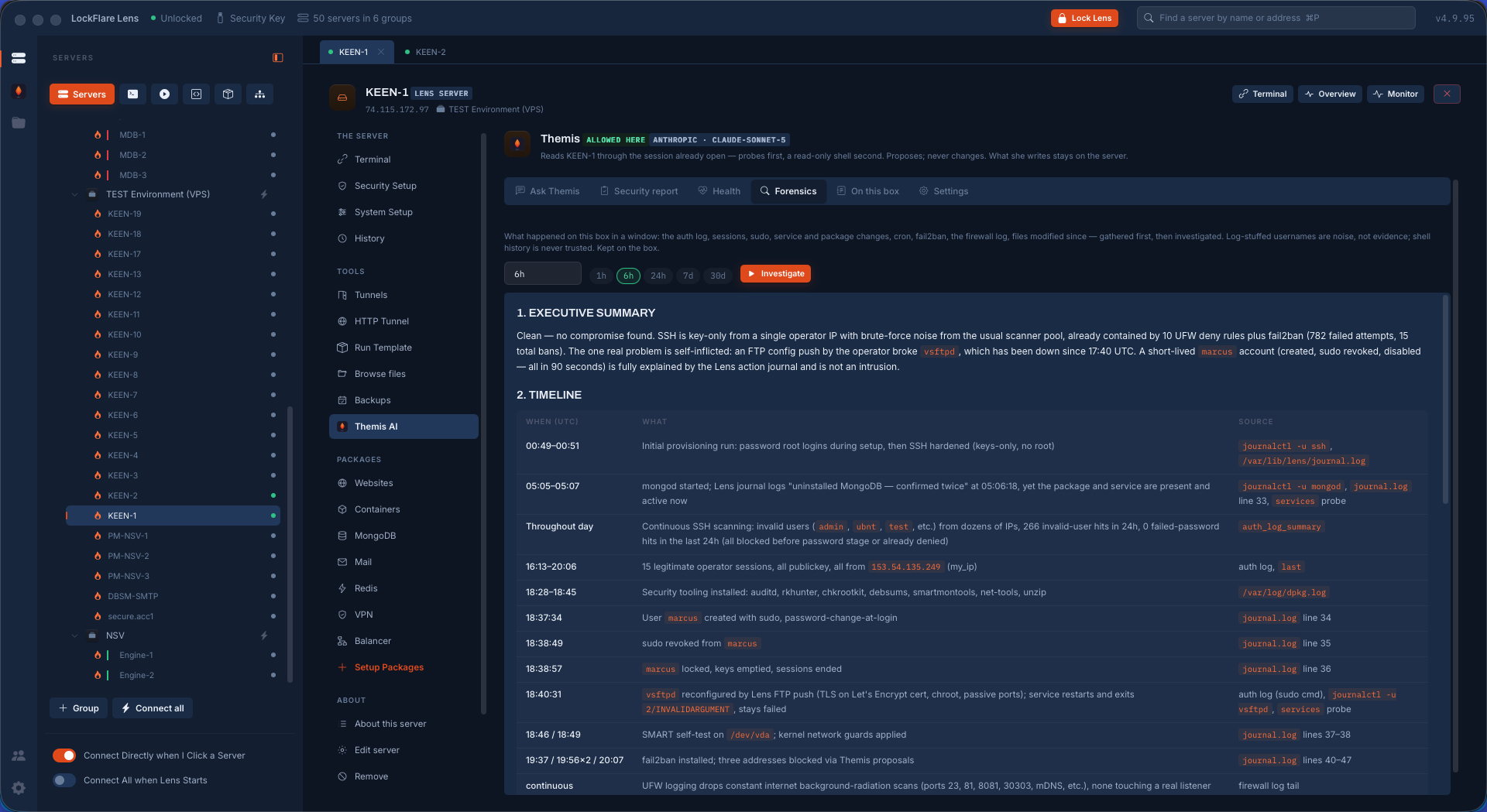
Pick an hour, six, a day, a week, a month. Everything for that window is gathered first — the auth log, the sessions, sudo, service and package changes, cron, Fail2Ban, the firewall log, the files modified since — and only then investigated. Two rules are built into how she reads it: usernames stuffed into a log are noise rather than evidence, and shell history is never trusted.

What comes out is an executive summary, a timeline with a source on every single row — this journal unit, this Lens ledger line, this dpkg log, this firewall tail — and threats ranked. Including a category most tools do not have: UNEXPLAINED. Where the record and the live state disagree and she cannot resolve it from the box, she says so plainly instead of guessing, and tells you what to check.

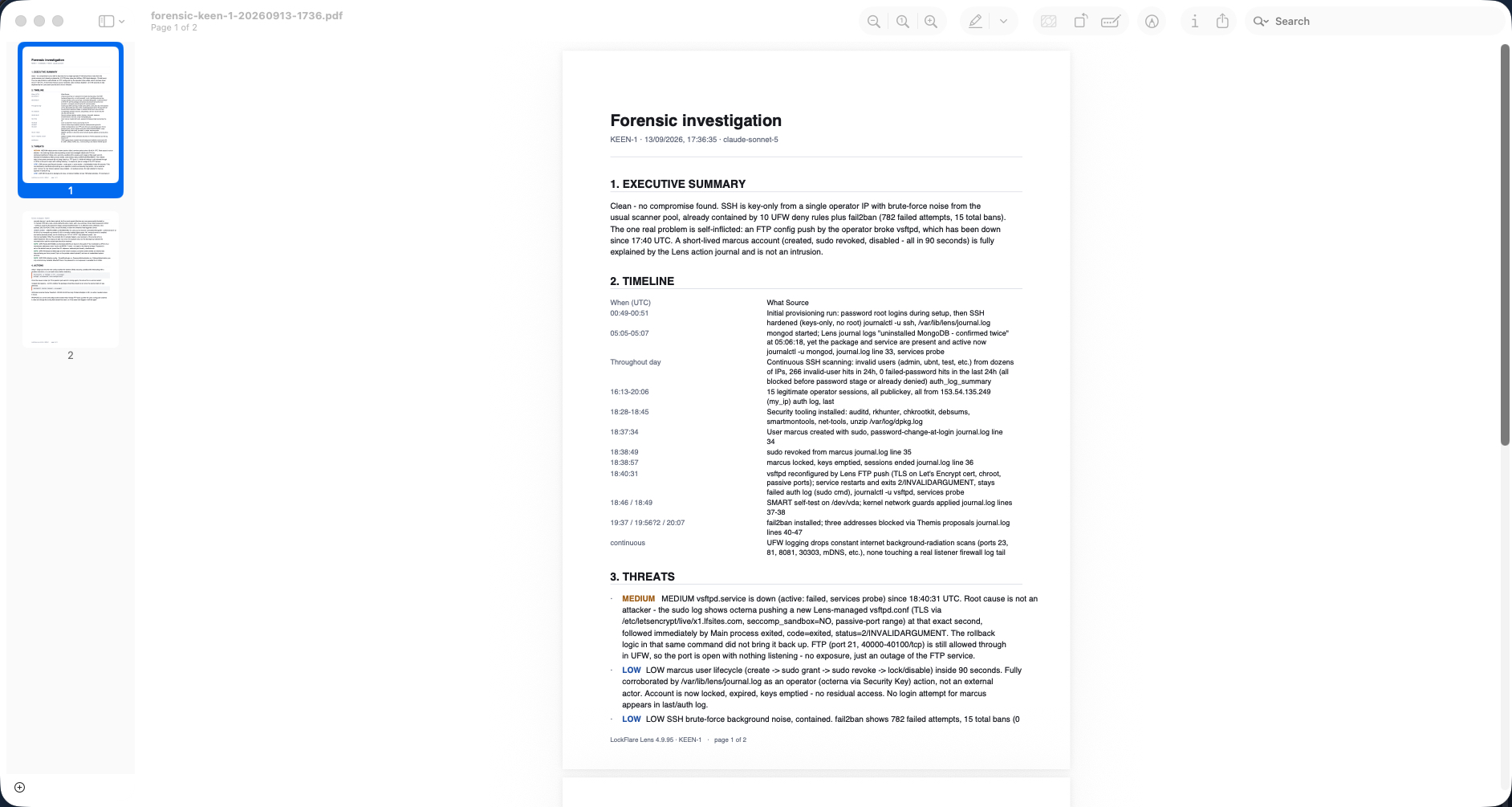
The investigation below came back clean, and the interesting part is how it got there. A brand-new account created with sudo, revoked and locked inside ninety seconds looks exactly like an intrusion — she matched it to the operator's own actions in the Lens ledger and called it what it was. A broken service at 18:40:31 looks like an attack — the sudo log shows a config push one second earlier, so the cause is self-inflicted. And the brute-force noise that fills the log is reported as contained, with the numbers: hundreds of failed attempts, none reaching the password stage, because password authentication is off.
Forensics in LockFlare Lens: choose a window — 1h, 6h, 24h, 7d, 30d — then the executive summary and a timeline where every row names its source
A window, then a timeline where every row names where it came from.
The forensic investigation as a PDF, with the timeline, threats by severity and the actions
The investigation as a PDF: summary, timeline, threats by severity, actions.

What every report has in common

Evidence, not adjectives

Every finding names what it was read from — the probe, the log, the config line, the journal entry — so you can check her rather than believe her.

What she dismissed, and why

A list of scary-looking things that are fine, each with its reason. It is the section that makes the findings worth reading.

Kept on the box

Each report is written into that server's own folder, so the next one can say what changed since. That is what the folder is for.

Confirmed before it is spent

A report is dozens of turns against your own model account, so Lens asks before it starts.

It proposes; it never fixes

Where a report ends in an action, the action is a proposal with its blast radius written out — and it waits for the button.

Downloadable

Every report renders on screen and can be saved as a PDF, for the auditor, the client, or the colleague who does not have Lens.

One question, the whole fleet

Everything above is one server. The same reading runs across as many as you like — and the interesting part is how carefully it refuses to pretend.

Allowed, or waiting

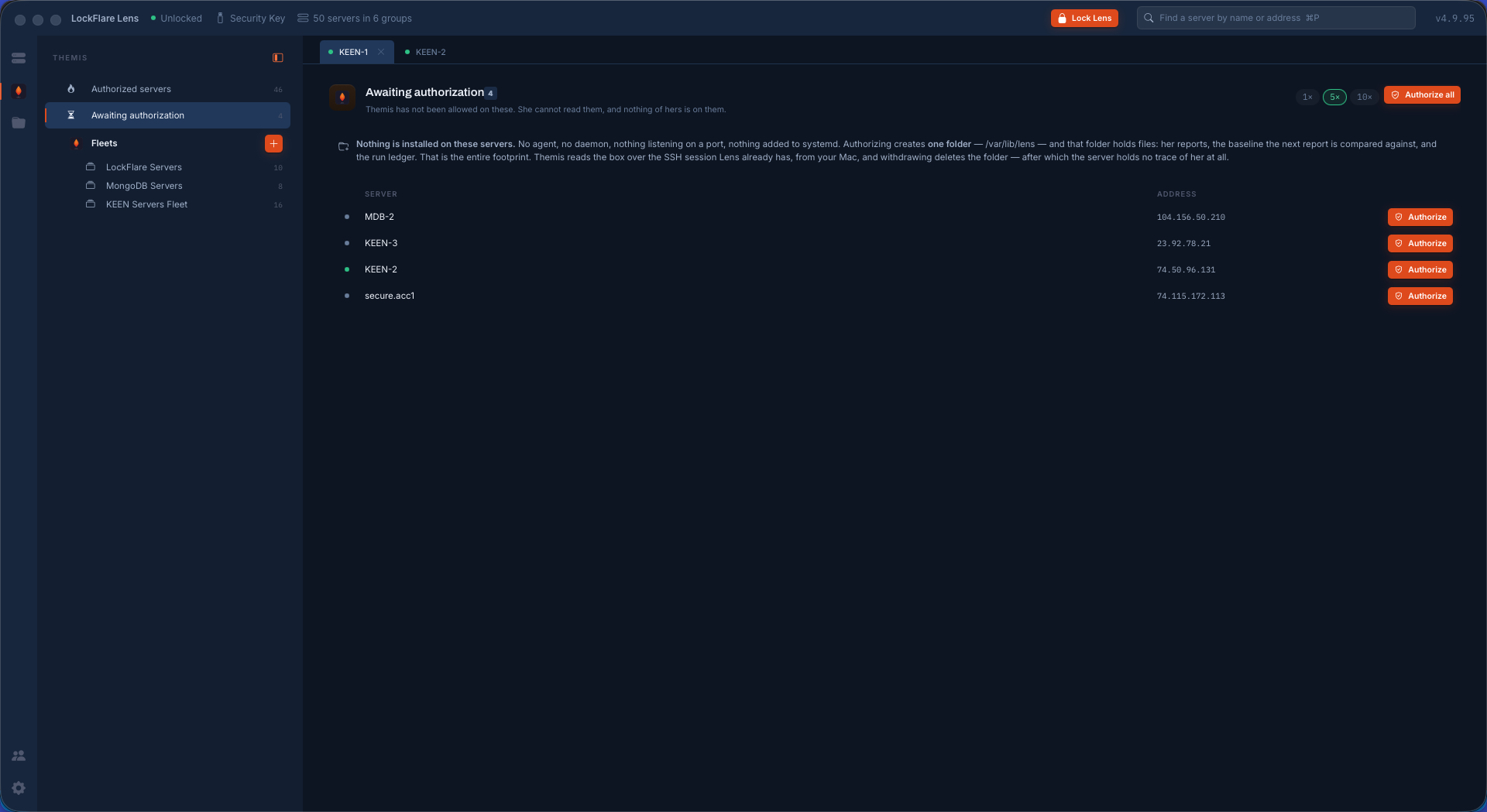
The chair keeps two lists and no ambiguity: the servers Themis is allowed on, and the ones awaiting authorization — where she has not been allowed, cannot read anything, and has nothing of hers on the box. Allow them one at a time, or all of them, five or ten in parallel; the work carries on if you leave the screen, and each row says what it is doing right now.

The screen states its own footprint, in the same words this page does: no agent, no daemon, nothing listening on a port, nothing added to systemd. One folder, holding her reports, the baseline the next report is compared against, and the run ledger. Withdraw and the folder is deleted — after which the server holds no trace of her at all.

The Themis chair in LockFlare Lens: authorized servers and the ones awaiting authorization, with the footprint stated on screen and an Authorize button per row
Two lists, and the footprint written where you decide — not in a manual.
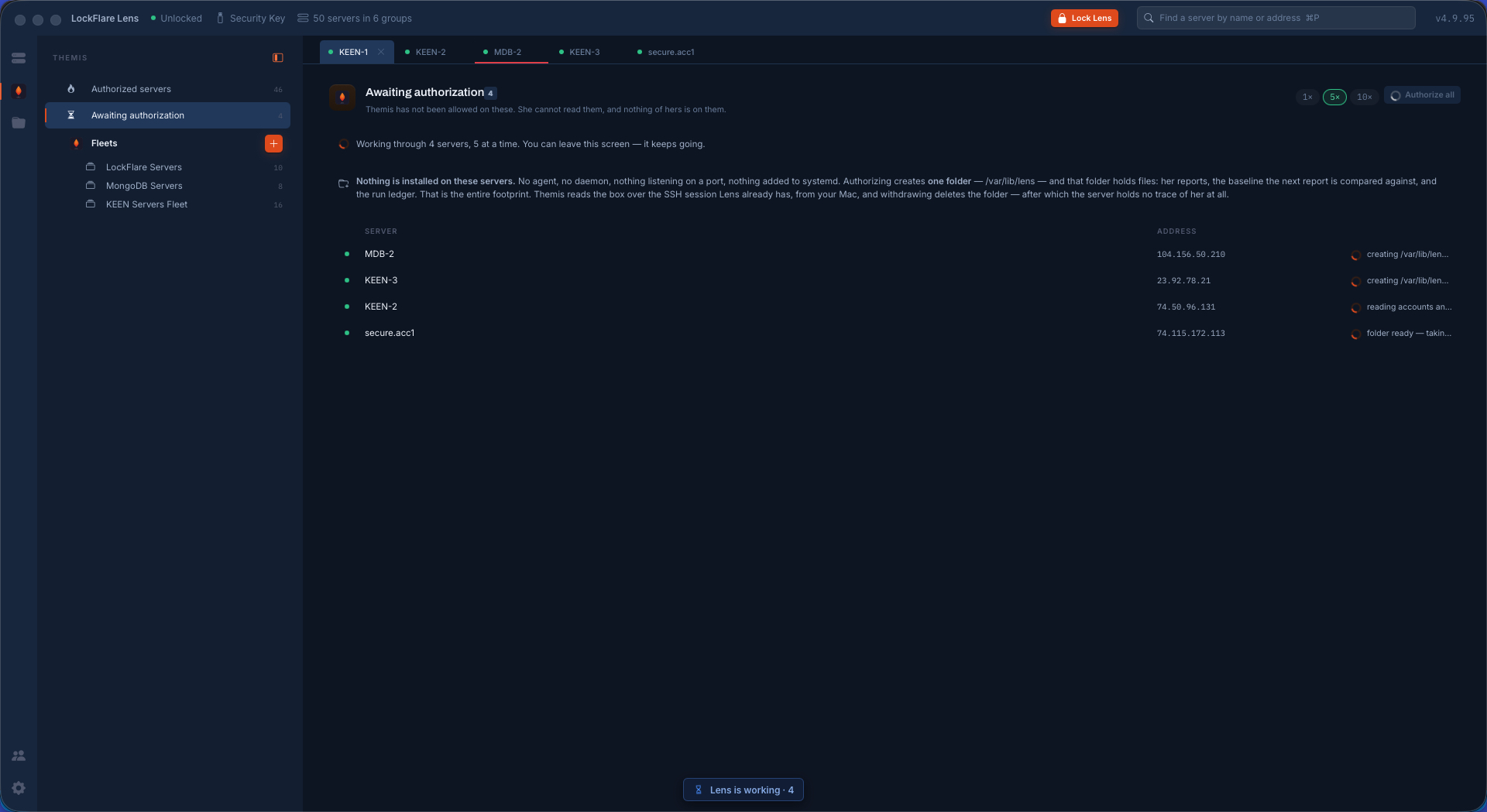
Authorizing several servers at once in LockFlare Lens, five at a time, each row reporting what it is doing
Four at once, five at a time, each row saying what it is doing. Leave the screen; it keeps going.

A fleet is a selection — plus the words she is given

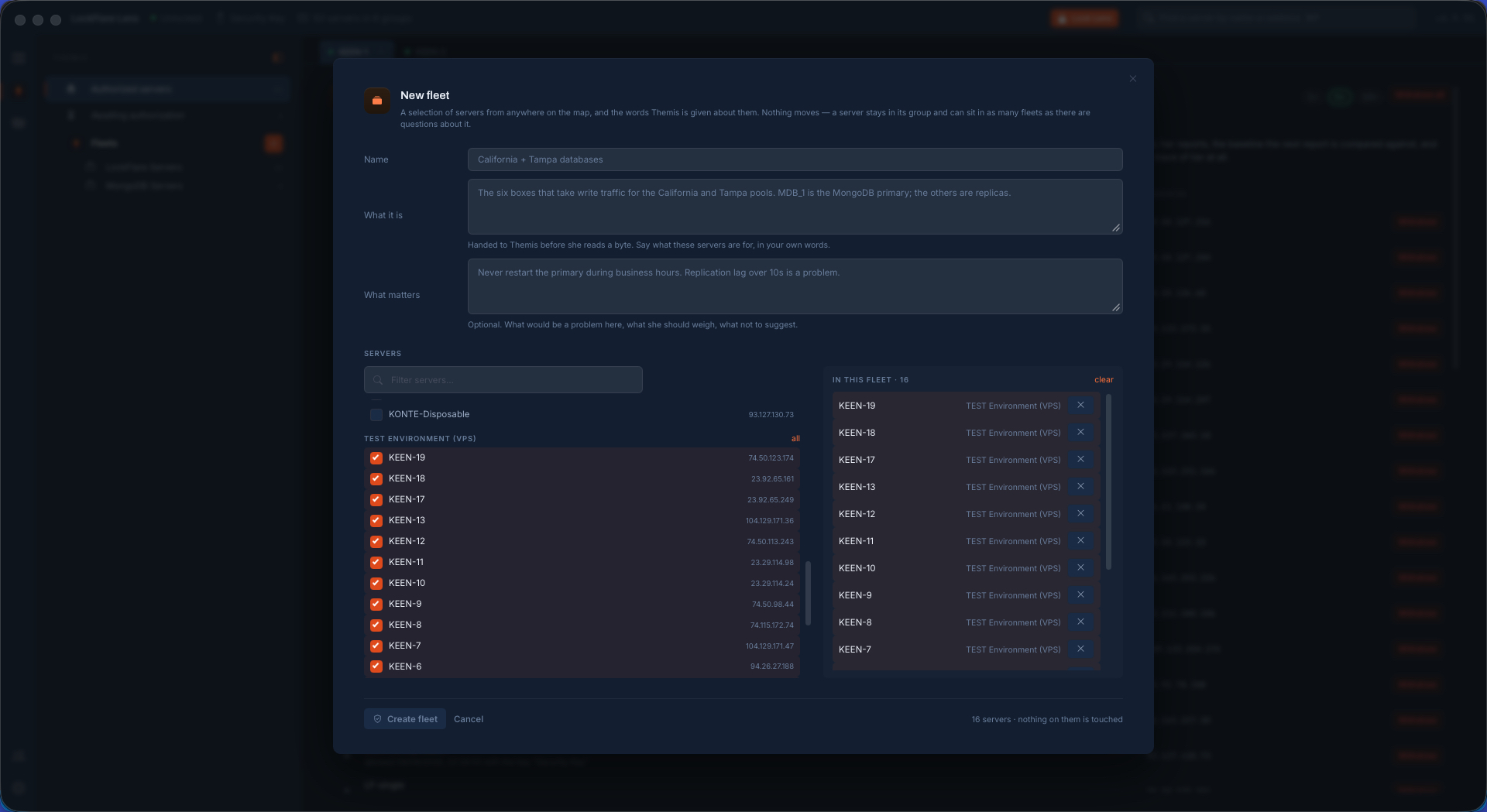
Pick servers from anywhere on the map. Nothing moves: a box stays in its group and can sit in as many fleets as there are questions about it. What makes a fleet more than a list is the two boxes underneath.

What it is, handed to her before she reads a byte: the six boxes that take write traffic for the California and Tampa pools; MDB-1 is the primary, the others are replicas. And what matters: never restart the primary during business hours; replication lag over ten seconds is a problem. From then on every answer about that fleet is written knowing it — which box must not be touched, what counts as a problem here, what not to suggest. It is the difference between an assistant that knows Linux and one that knows your Linux.

Creating a fleet in LockFlare Lens: a name, what these servers are for in your own words, what would be a problem here, and the servers picked from anywhere on the map
A name, what these servers are for, what would be a problem here — and sixteen servers picked without moving any of them.

Every box opened first, or named as missing

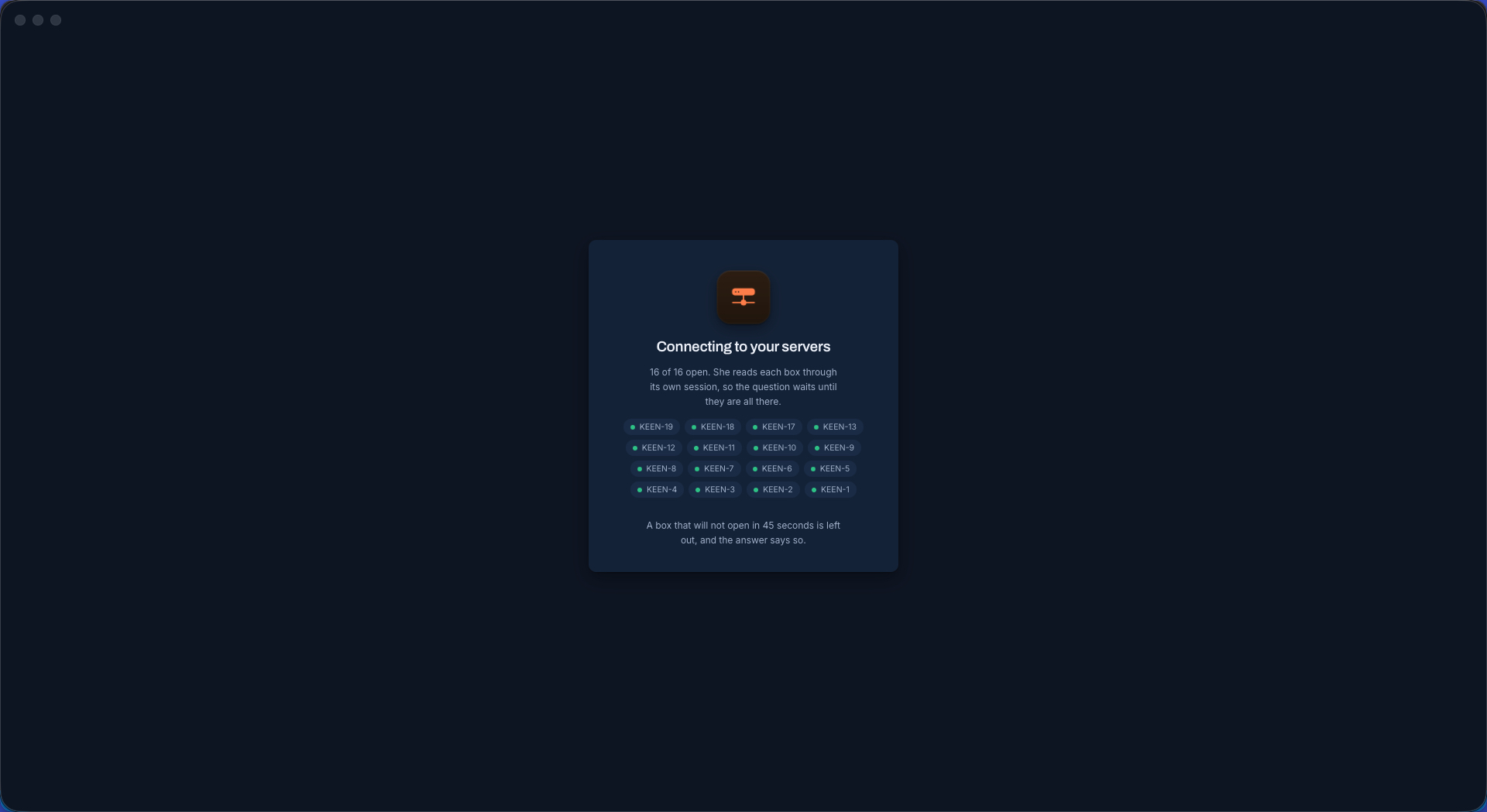
She reads each server through its own session, so the question does not start until the sessions exist. Lens opens them, counts them in on screen with every name showing, and waits. A box that will not open inside forty-five seconds is left out — and the answer says so, rather than quietly reporting on fifteen servers while you believe you asked about sixteen.

LockFlare Lens opening a session to all sixteen servers of a fleet before Themis answers, with every name counted in
Sixteen of sixteen open. What cannot be opened is named, not skipped in silence.

Ask once, get the fleet

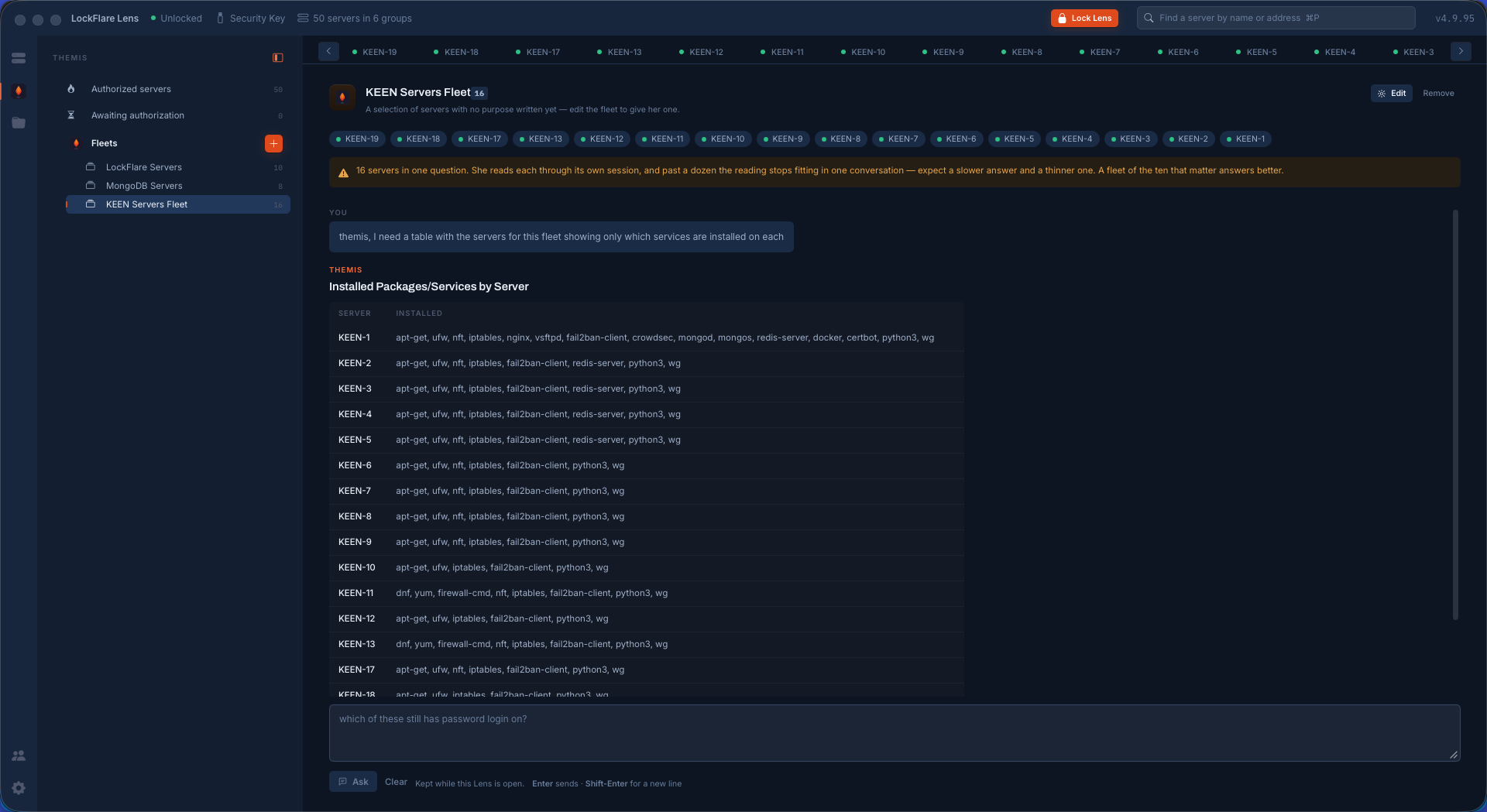
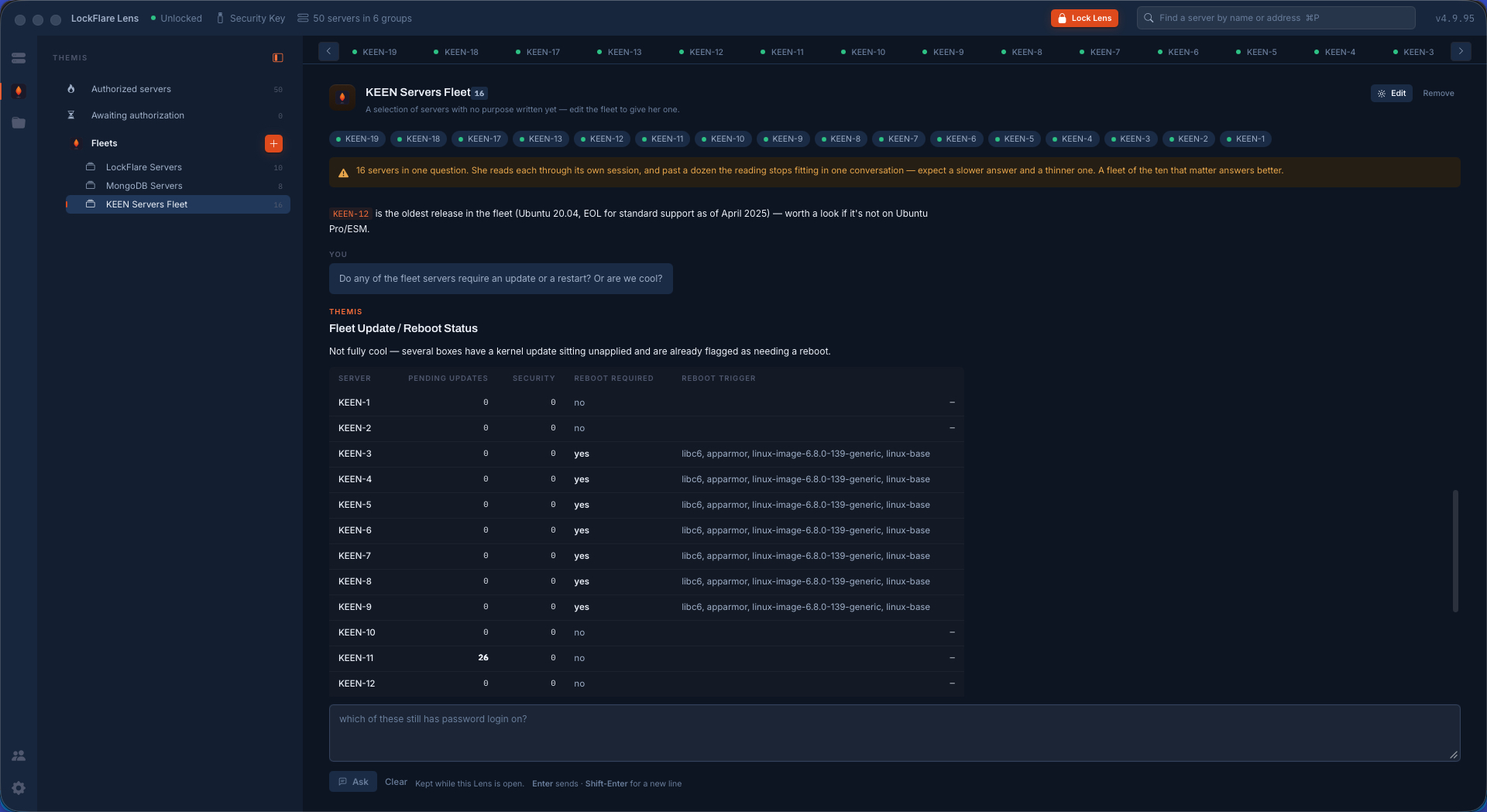
Ask for a table of what is installed on each and you get one — sixteen rows read from sixteen boxes. Ask a follow-up about operating systems and versions and you get that, on the same conversation, no re-reading and no re-asking. Ask whether anything needs an update or a reboot and the answer is a table with the pending count, the security count, whether a reboot is required and what triggered it — the exact packages, kernel image included.

And in each answer, the line nobody asked for. That only one member of the fleet runs the web and database stack. That two of the sixteen are the RHEL-family boxes running firewalld while the rest run ufw. That one box is on a release whose standard support ended in April 2025, and is worth a look if it is not on extended maintenance. That is the difference between a tool that answers the question and a colleague who was reading while they worked.

Themis answering a fleet question in LockFlare Lens with a table of installed packages and services for each of sixteen servers
What is installed on each, sixteen boxes, one table.
A follow-up in LockFlare Lens: the operating system and version of every server in the fleet
A follow-up: the OS and version of each — and which two are the odd ones out.
A follow-up in LockFlare Lens: which fleet servers need updates or a reboot, with the packages that triggered it
Updates and reboots, with the packages that triggered each one.

She tells you when the question is too big

Sixteen servers in one question is more than a conversation holds well. Instead of quietly giving you a thinner answer, Lens says so above the box, before you ask: past a dozen boxes the reading stops fitting, expect a slower answer and a shallower one, and a fleet of the ten that matter will answer better.

Software that warns you its own output is about to get worse is rarer than it should be. It is the same instinct as the rest of Lens: say what is true about the box, including when the box is this one.

Try her on a box you already know

Allow one server, ask her something you know the answer to, and read what comes back.

Download Lens