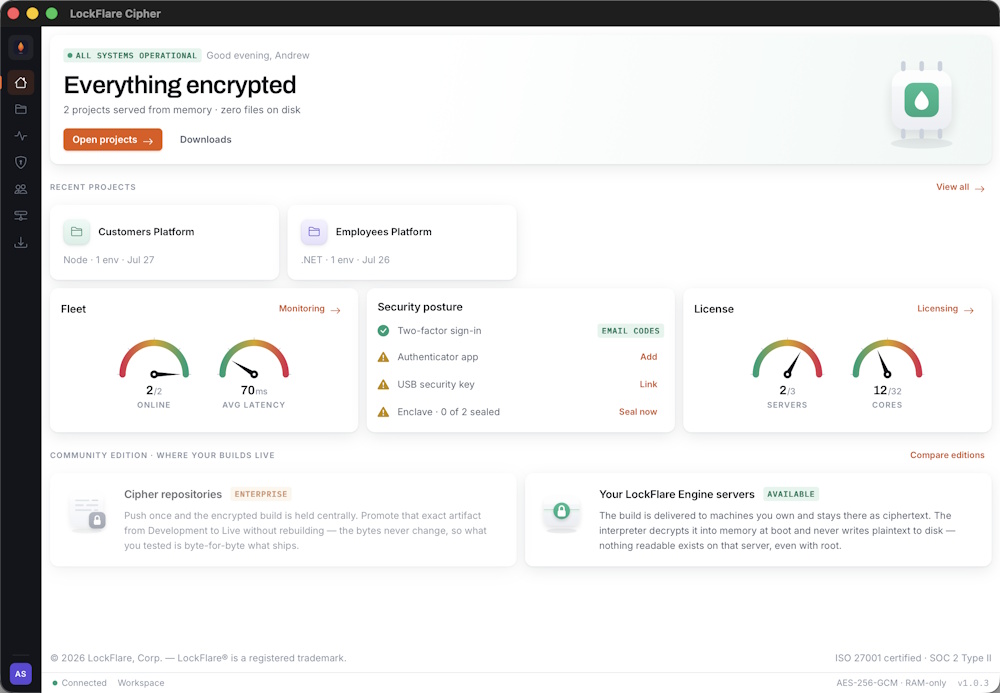
The desktop app that runs your fleet.
Cipher is a native app for macOS and Windows, and it is the only place your source is ever read in plaintext by LockFlare software. Import the projects you already have, push them encrypted, group servers into environments, seal a server shut, decide who may do what. There is no browser version, and nothing to sign up for on the web.
What you do in it
Everything a deployment needs happens in the app, and nothing a deployment needs happens anywhere else. No FTP, no SSH session to a box, no CI pipeline to maintain, no Docker build. The app packs, encrypts and pushes; the engines on your servers do the rest.
Import a project
Point Cipher at a folder you already have on disk — a frontend build, a backend, or both — and say how it should run. Nothing in the folder is modified, ever; Cipher reads it and leaves it alone.
ProjectsPush, encrypted
One click zips the folder in memory, encrypts it with AES-256-GCM and uploads the ciphertext to the environment you picked. Every server in that environment pulls it, decrypts it into RAM and serves. Nothing readable leaves your machine.
EnvironmentsRun the fleet
Add servers by address, attach them to environments, watch each one confirm a push or a reset on its own, read latency and heap on a board, bind as many domains as you need. The app is the console; the engine is the only thing on the box.
ServersPacked in memory. Uploaded as ciphertext.
Push Code is one screen: the environment, the project type, the source folder. Cipher zips the folder in memory — no temp directory — and encrypts the archive before anything touches the network. The pack is deterministic, so an unchanged project produces an identical archive and an identical version hash, and the version hash is how you later know that Live is running exactly what you tested.
- Zipped in memory, uploaded as AES-256-GCM ciphertext. GCM is authenticated encryption: a modified payload fails to decrypt rather than running something you did not write.
- Runs in memory on every server in the environment, each confirming independently.
- Push and reload are separate acts: a push moves the environment's pointer, the fleet keeps serving the previous build until you reload. Deploy at any hour, go live when you choose.
- Zero-downtime reloads: a new image comes up beside the old one and traffic swaps when it is ready.
Group servers. Push once. Serve everywhere.
An environment is a set of servers that run the same code — Development, UAT, Live, or a grouping per client. Add machines by IP, attach them to environments, and every push lands on the whole group, with each server confirming on its own. Bind as many domains as you need to the same project; the fleet serves them all from one in-memory application.
Compare and promote
One card per environment with the version hash it points at, when it was pushed and by whom. Same hash in UAT and Live means the same bytes. Promotion repoints an environment at a build that already exists — no re-upload, no rebuild — and so does a rollback.
Environment variables
Set per environment in the app, held encrypted beside the build and injected into the process at start. There is no .env on the host to read. A change needs a reload, not a push.
Reset, and watch every server answer
Trigger a fleet-wide reset and Cipher tracks each machine independently — including the one that fails. That is the screen that matters when you are on call, so it is the one we show.
One binary on the server. Nothing else.
Preparing a server is a two-minute terminal session: download the engine build Cipher hands you for the runtime you chose, run it, paste the server's license key. From that point on the machine is a runtime — the app pushes everything else, and the engine is the only thing on the box.
Node.js and .NET are first-class hosts with identical delivery; native Go, Rust and C ship as encrypted binaries through the same pipeline. One engine, one flow — the runtime is a detail you pick per environment, not an architecture you commit to.
What is on the box, and what is in RAMSeal the server. Keep it serving.
Server Enclave disables every login on the machine — SSH, console, KVM, IPMI, the hosting panel — while sites, APIs and hot deploys continue. Sealing asks for a typed confirmation and a second factor; unsealing asks for the same, from the app, because the app is the only channel that still reaches a sealed box. Nothing about the flow is symbolic: the doors close.
How Server Enclave worksYour team, your record, your keys
Users and permissions
Invitation only. Permissions per project and per action — push to Live, export source, seal a server — and login rules per user: working hours, allowed days, IP ranges, session timeout. A vendor can build and deploy without ever gaining the ability to extract code.
TeamEvery action on the record
Pushes, promotions, reloads, resets, seals, permission changes, sign-ins: a per-project log of who did what, when, and from where. Filterable per project and per member. When the compliance question comes, the answer is already written.
ActivityLicenses, as the app shows them
Each server holds a license bound to its own address — it is how encrypted builds are keyed per machine. The app shows what is allocated and what is free across the fleet. Remove a license and that machine can no longer decrypt anything.
LicensingYour stack already works here
Vue, React, Angular, Svelte, Next.js, Nuxt, Astro, SolidJS, Preact, Qwik, Remix, Gatsby, Lit, Ember, Docusaurus, Hugo, Jekyll, Eleventy, plain HTML — every frontend that builds to a folder. Node.js and .NET backends. Native Go, Rust, Zig, C and C++. If your tool produces an entry document or a static binary, Cipher ships it encrypted, and it ships it unmodified: no SDK, no base classes, no LockFlare code in your project.
Projects: frontend, backend, full-stackEverything above, on your own servers
Cipher is licensed on request, to companies we have spoken with, for the applications they name. Write to us with what you deploy, where, and to whom, and we will walk you through it on your machines.