LockFlare

A MariaDB primary and two replicas, built by dropping servers in.

MariaDB from the first install to a replicated, encrypted, tuned pair, on screens instead of a terminal and a wiki page. It goes in secured rather than being secured afterwards. Databases, tables, users and backups are things you open. Replication is two servers dragged from the tree: Vigia installs what is missing, makes the primary ready, opens each firewall to the other members only, proves every wire, seeds each replica and leaves them following — and says plainly when the stream would cross the internet in the clear.

MariaDB replication in LockFlare Vigia: a primary and two replicas, both zero seconds behind, and a canvas showing all six wires between the three servers talking
One primary, two replicas at 0 s behind, all six wires proved — and a warning that TLS is not on yet.

Installed secure, not installed and then secured

The install asks one thing, the root password, and does the rest on the way in: root through the socket and the password you gave, no anonymous account, no test database, bound to 127.0.0.1. The version is the distribution's own package, so updates come with the operating system. It runs as a job on the server — closing Vigia does not stop it — and when it is in, MariaDB appears on the rail, by name.

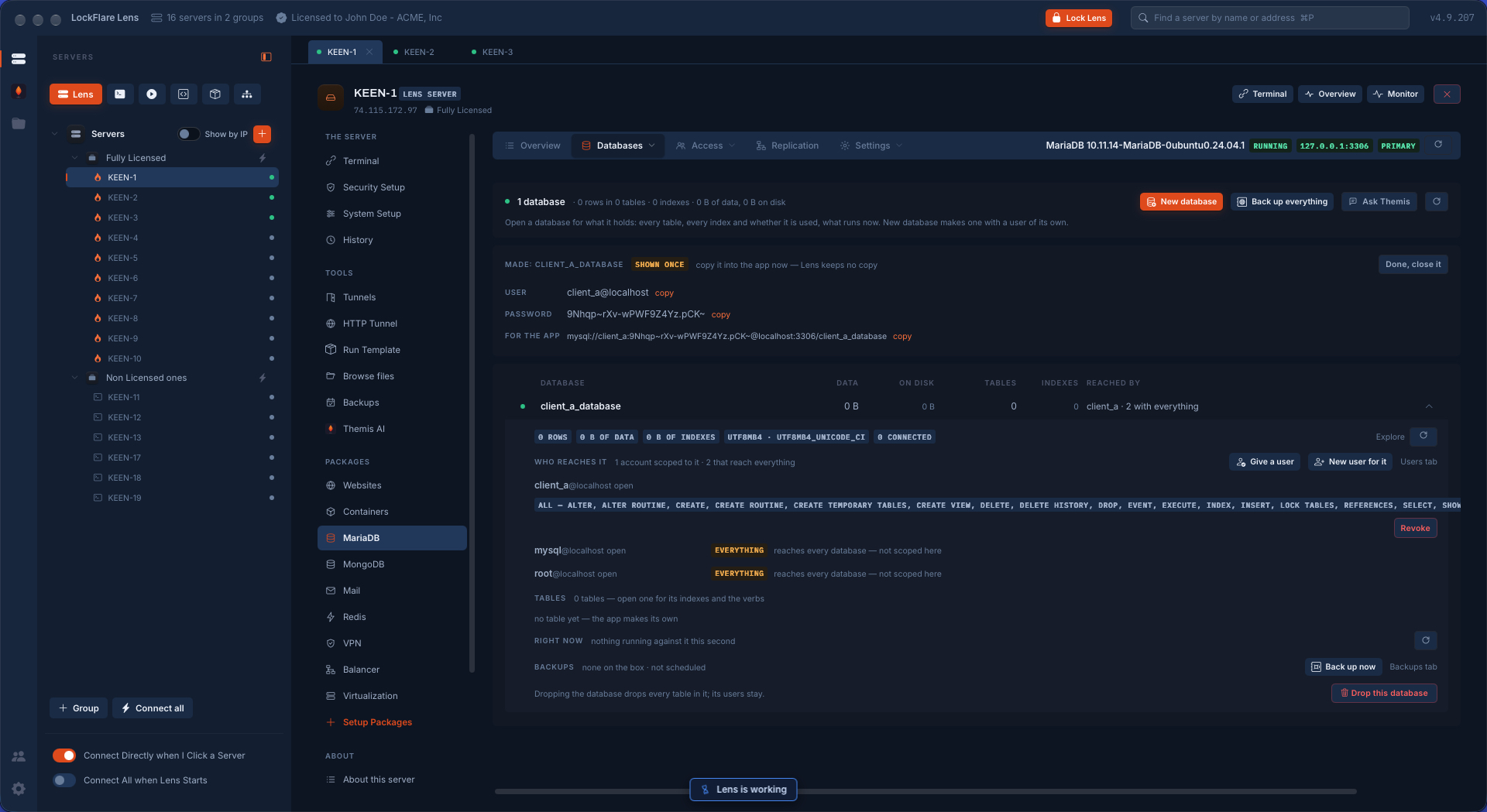
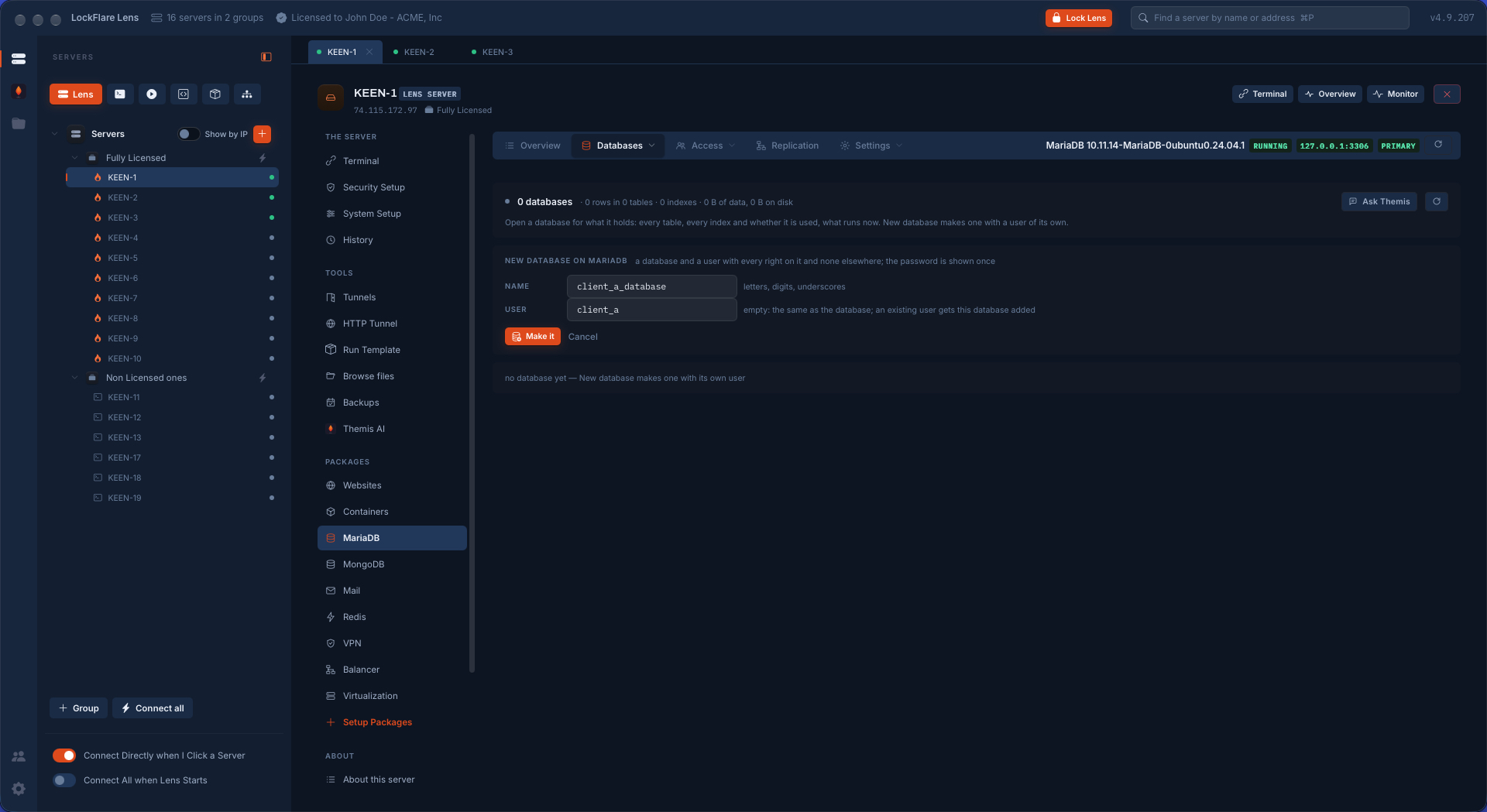
A new database is made with a user of its own: every right on that database and none elsewhere. The password is made there and shown once, with the connection string for the app beside it to copy. Vigia keeps no copy of it.
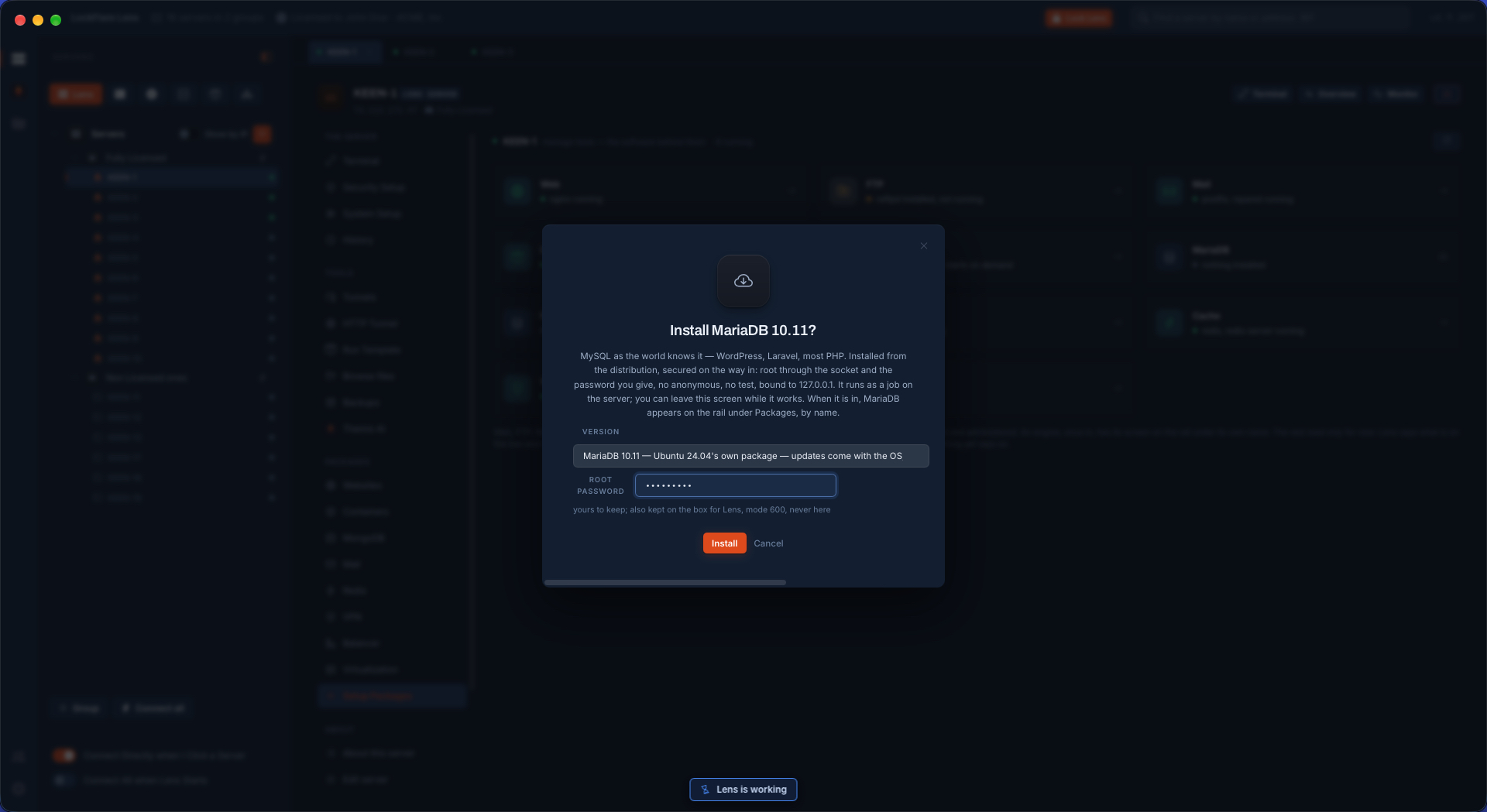
Installing MariaDB 10.11 from LockFlare Vigia: the version from the distribution, the root password, and what is secured on the way in — root through the socket, no anonymous account, no test database, bound to 127.0.0.1
One question. Secured on the way in, bound to loopback.
Creating a MariaDB database in LockFlare Vigia with a user of its own that has every right on it and none elsewhere
A database and a user of its own: every right on it, none elsewhere.
A MariaDB database just created in LockFlare Vigia: its user, the password shown once and the connection string for the app, each with a copy button, above who reaches the database and with which privileges
Made: the password shown once, the connection string to copy, and who reaches it.

The data, without a second tool

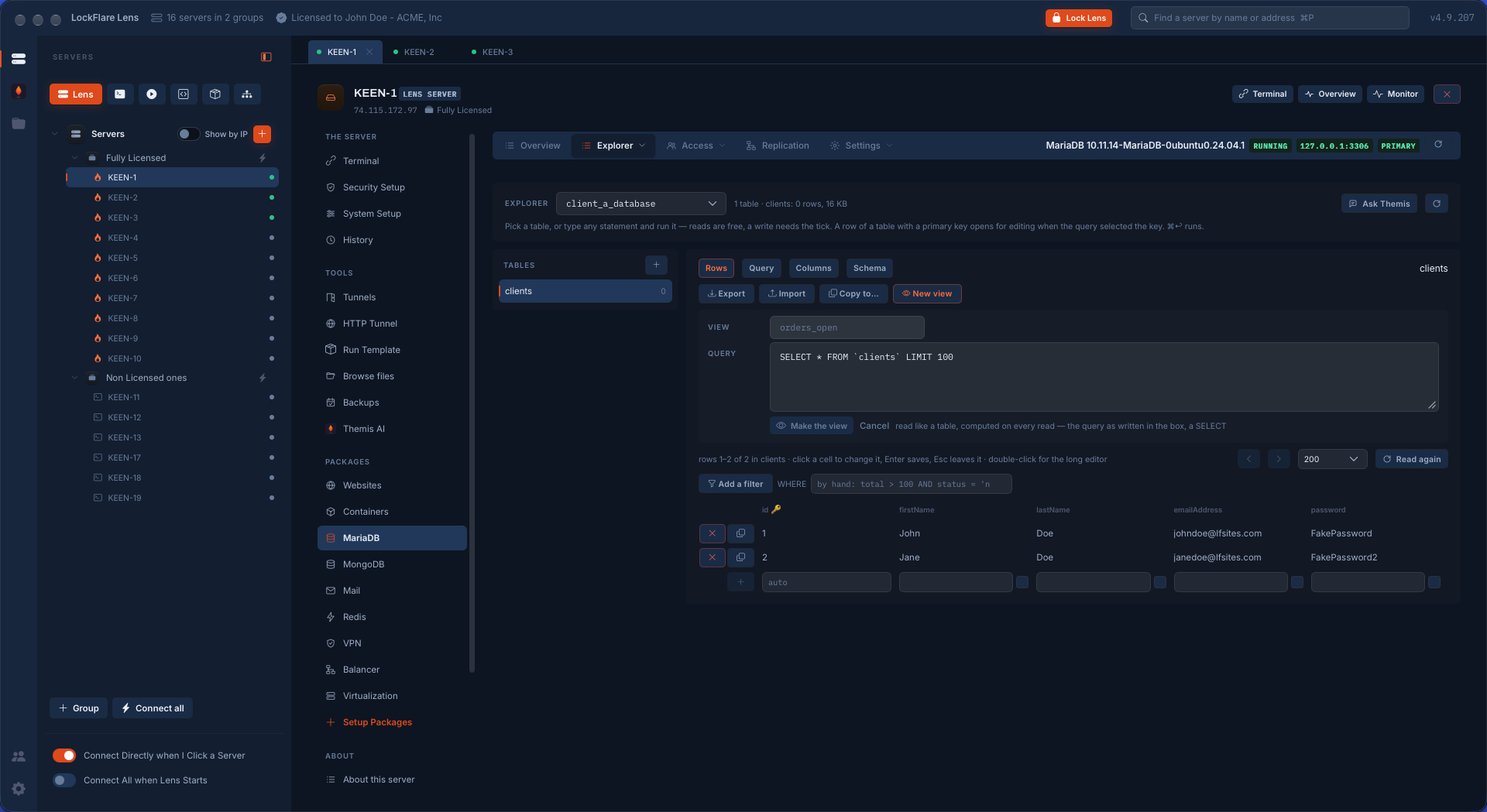
The Explorer is the table the way a database tool shows it. Rows in a grid, edited where they are: click a cell, Enter saves, a new row at the foot. A filter built from the columns, or typed by hand. Any statement run as written — reads are free, a write needs a tick. A query saved as a view.

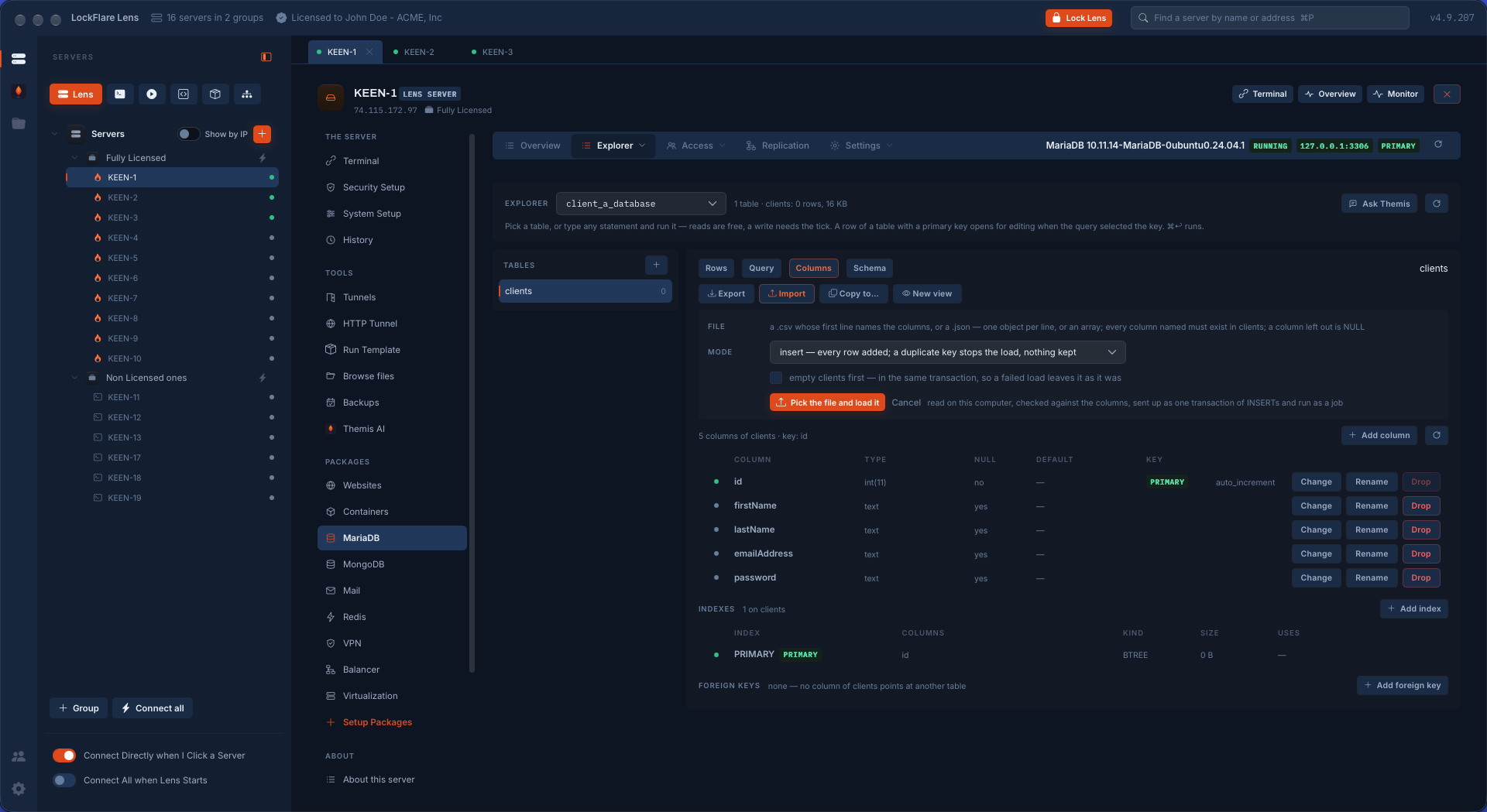
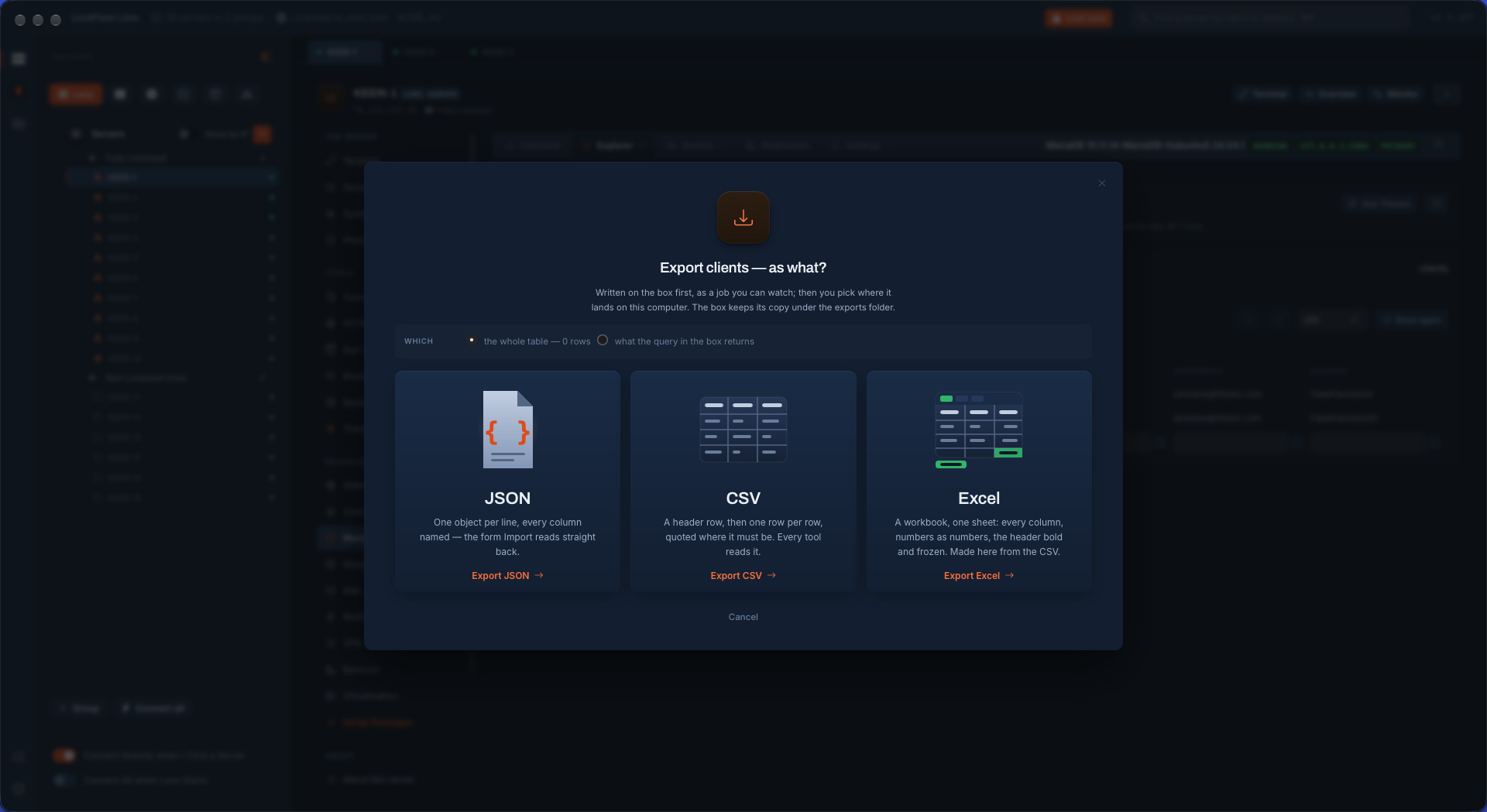
Columns is the structure: every column with its type, null and default, changed, renamed or dropped from its row; indexes with their size and whether anything uses them; foreign keys. Import reads a CSV or a JSON file on your computer, checks it against the columns, and sends it up as one transaction, so a failed load leaves the table as it was. Export writes JSON, CSV or a real Excel workbook on the server first, as a job you can watch, then brings it to your computer.

The MariaDB explorer in LockFlare Vigia: a table's rows in a grid edited in place, a filter, a query box and a view being made
Rows edited in place, a filter, a query, a view.
A MariaDB table's structure in LockFlare Vigia: columns with type, null and default, each with change, rename and drop, the indexes, the foreign keys, and importing a CSV or JSON file as one transaction
Columns, indexes, foreign keys — and a file loaded as one transaction.
Exporting a MariaDB table from LockFlare Vigia as JSON, CSV or an Excel workbook, the whole table or what a query returns
Export as JSON, CSV or Excel: the whole table, or what the query returns.

Users, as what they can reach

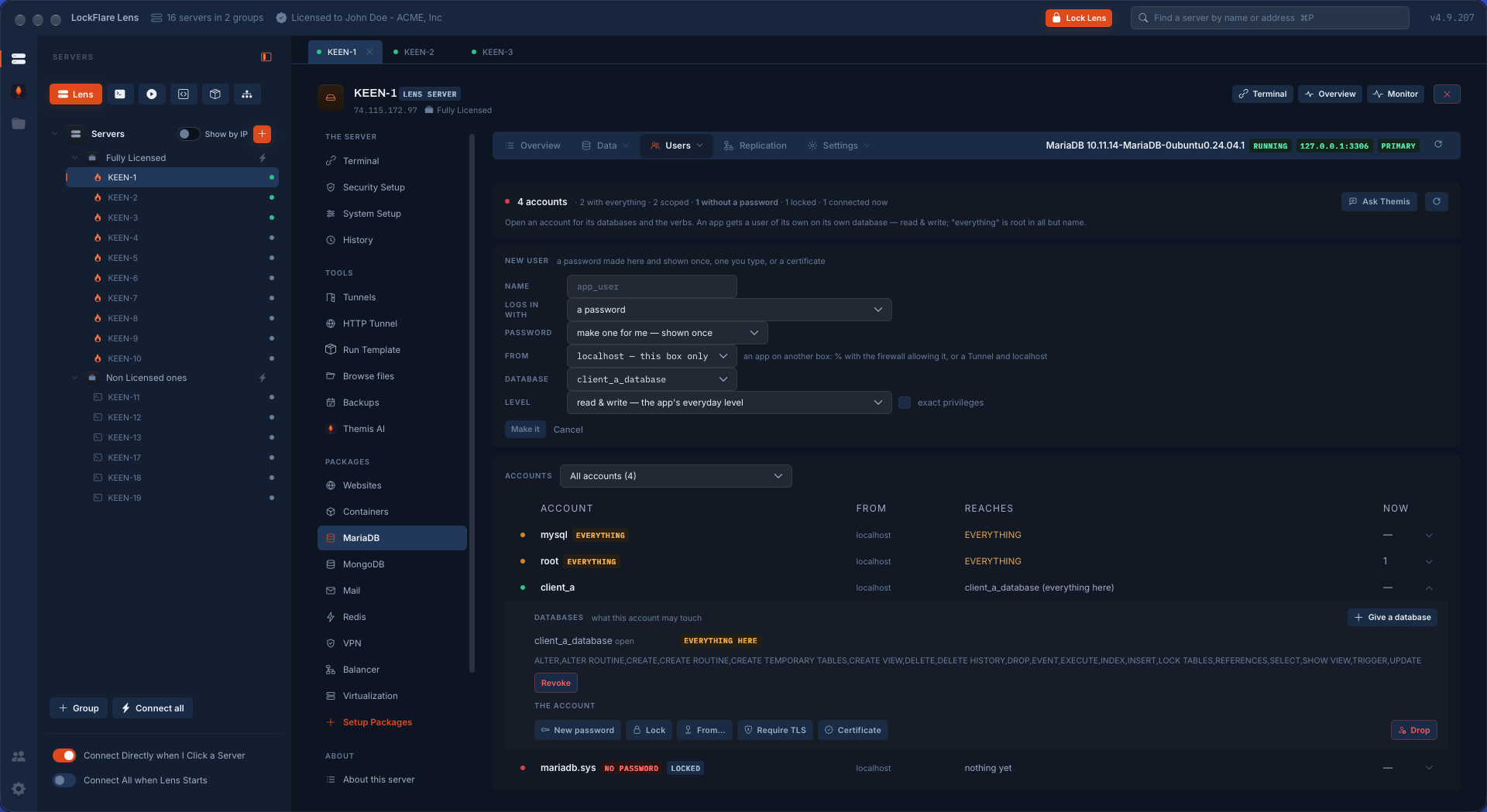
The accounts list answers the question a grant table never does: who reaches what. The head counts it — how many have everything, how many are scoped, which has no password, which is locked, who is connected now.

  • An account opened is every database it may touch and at which level, with Revoke on the row and Give a database beside it.
  • A new user is a password made there and shown once, one you type, or a certificate. From where — this box only, or elsewhere — and at the app's everyday level, read and write, unless you ask for exact privileges.
  • On the account: a new password, Lock, where it may come from, Require TLS, a certificate, Drop.
MariaDB users in LockFlare Vigia: four accounts with what each reaches, one opened to show its database and privileges, and a new user form with password, origin, database and level
Four accounts, what each reaches, and one opened: its database, its verbs, its switches.

Security, read from the engine

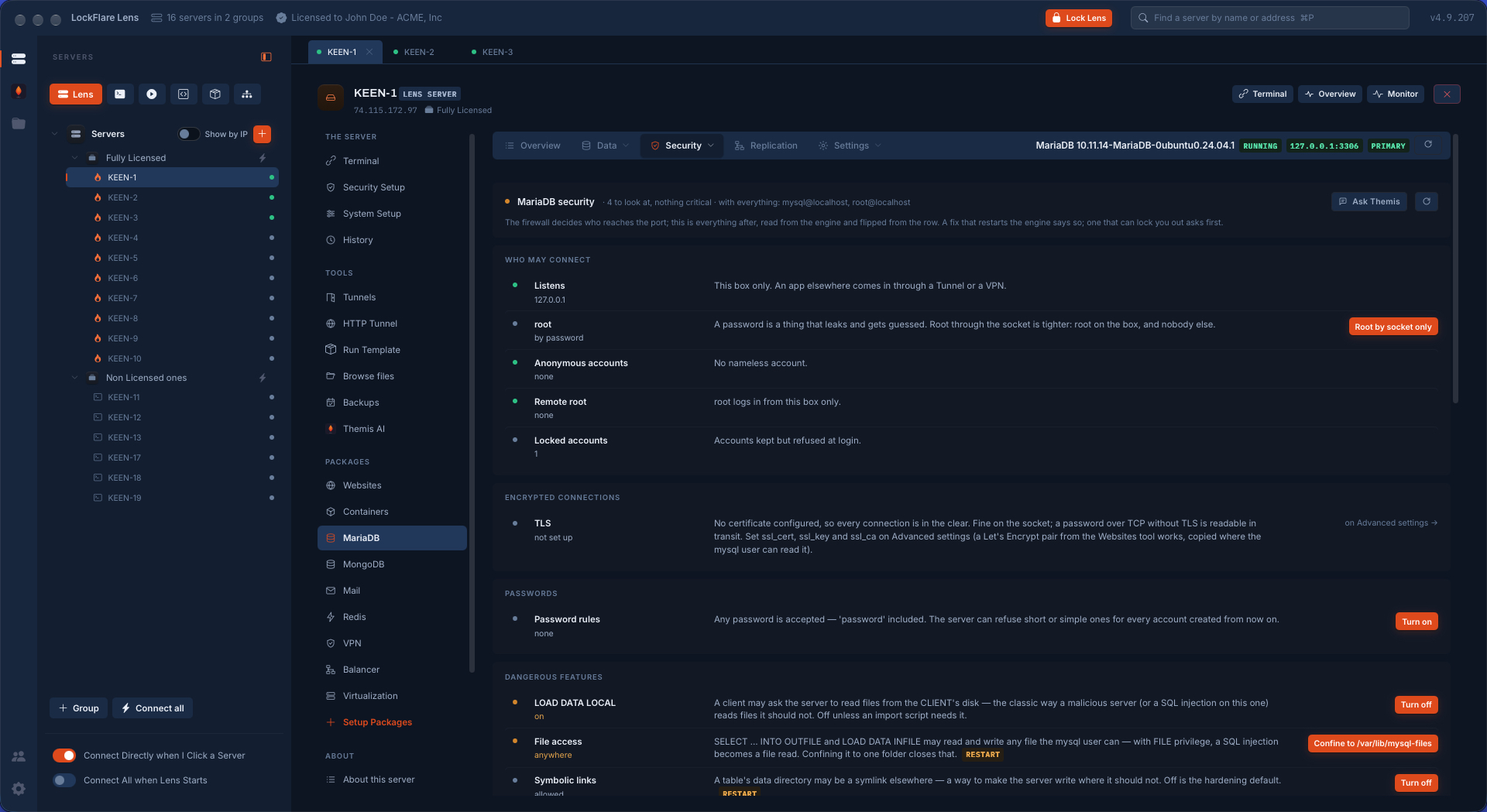
The firewall decides who reaches the port; this page is everything after it, read from MariaDB itself and said in words, with the fix on the row. Who may connect: where it listens, how root logs in, anonymous accounts, remote root. Whether connections are encrypted. Whether any password is accepted, "password" included. The features that turn a SQL injection into a file read — LOAD DATA LOCAL, file access, symbolic links — each with what it is for and the button that closes it. A fix that needs a restart says so; one that could lock you out asks first.

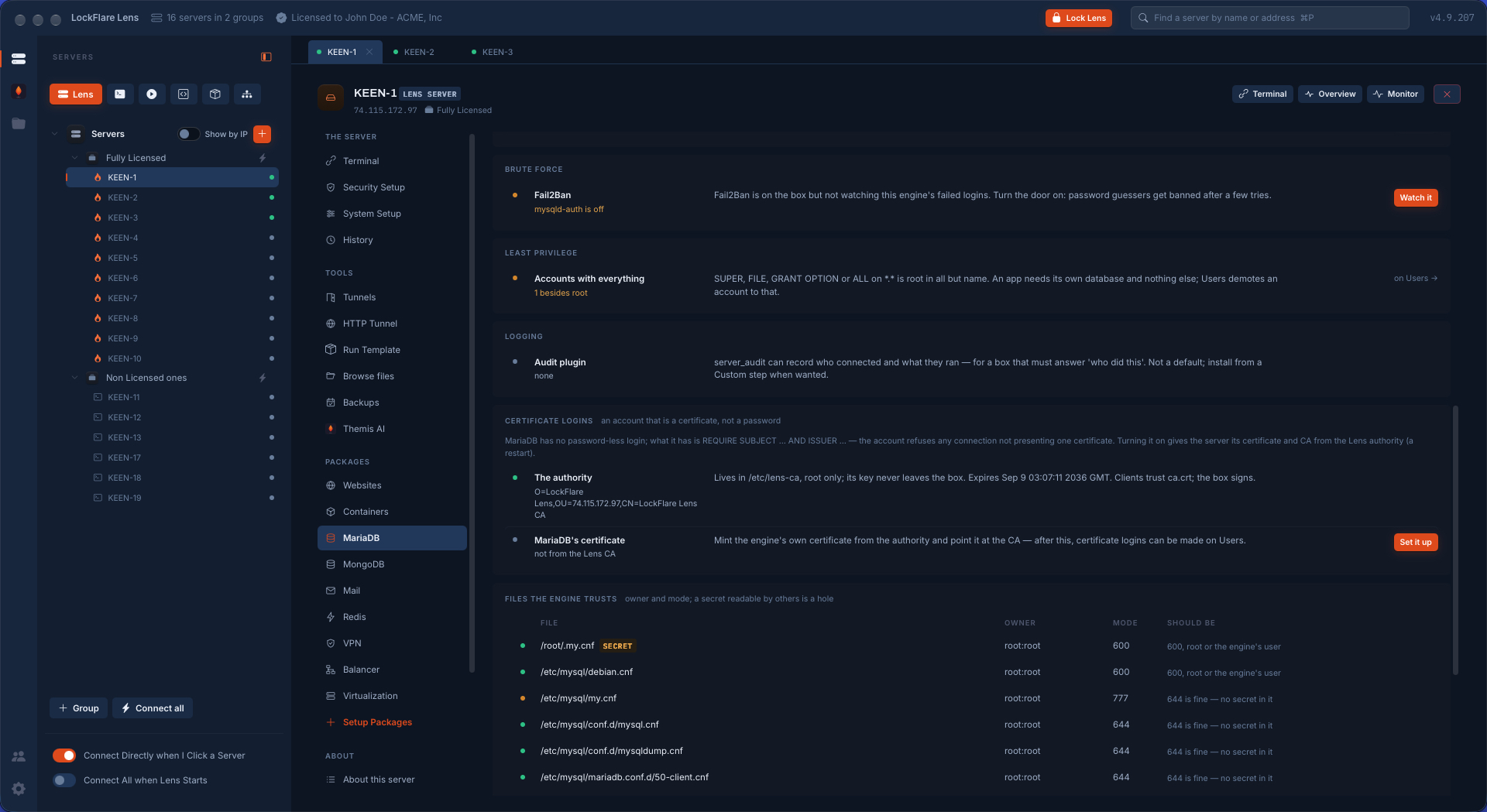
Below that: Fail2Ban watching the engine's failed logins, the accounts that are root in all but name, the audit plugin, and certificate logins — an account that is a certificate, not a password, signed by an authority that lives on the box with a key that never leaves it. And the files the engine trusts, with owner and mode, because a secret another user can read is a hole.

MariaDB security in LockFlare Vigia: who may connect, whether connections are encrypted, password rules and the dangerous features, each as a verdict in words with its fix on the row
Verdicts in words, the fix on the row, and "restart" said where it applies.
More MariaDB security in LockFlare Vigia: Fail2Ban on failed logins, accounts with every privilege, the audit plugin, certificate logins from the Vigia authority, and the configuration files with their owner and mode
Brute force, least privilege, certificate logins, and the files the engine trusts.

Backups that run with Vigia closed

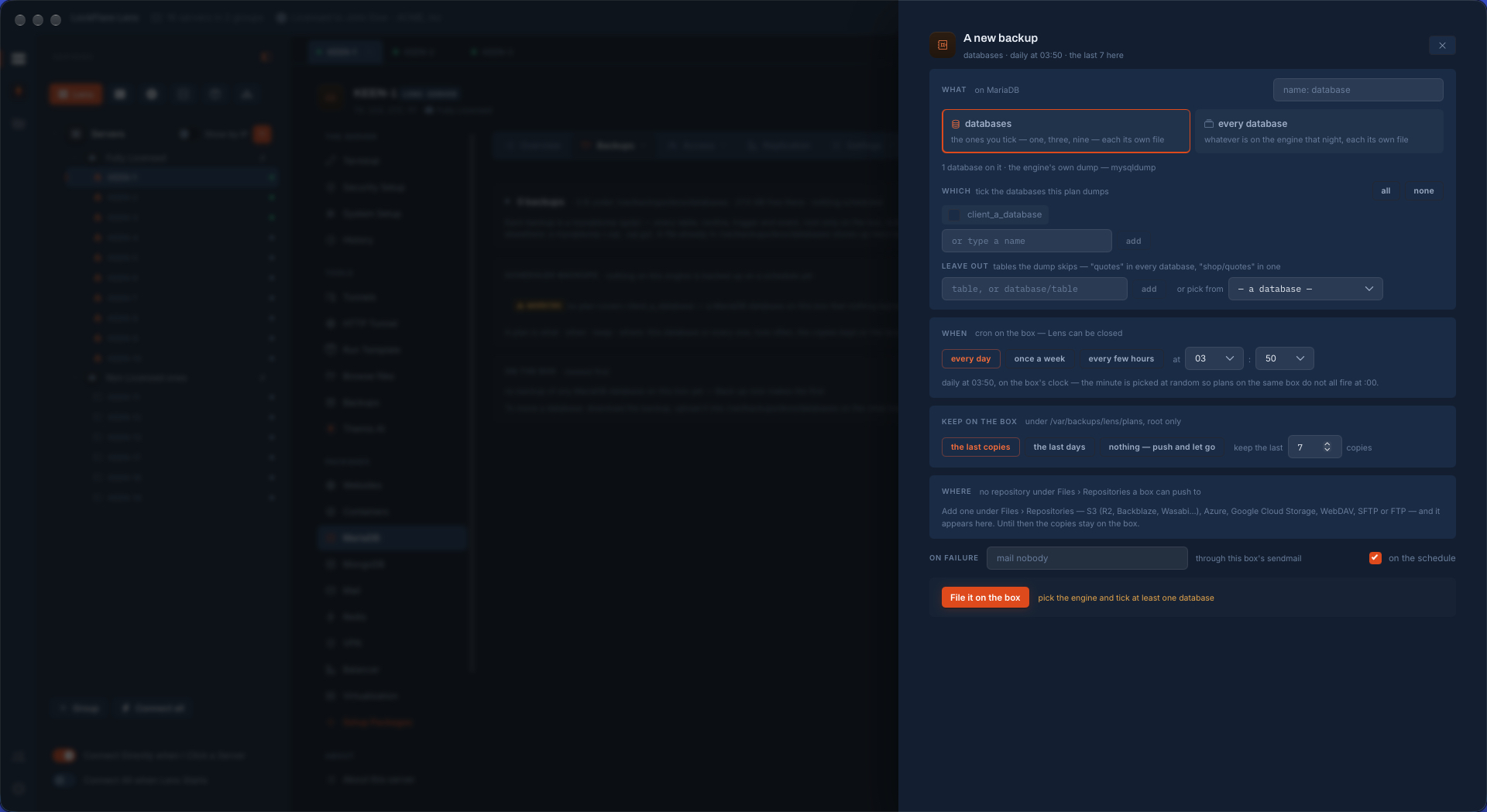
A backup is a plan filed on the server: which databases — the ones you tick, or whatever is on the engine that night — each in its own file, with the tables to leave out. When: from cron on the box, the minute picked at random so plans on the same server do not all fire on the hour. What is kept on the box, and where it is pushed: S3 and its houses, Azure, Google Cloud Storage, WebDAV, SFTP or FTP, from the repositories you have described once. Who is mailed when it fails. Vigia can be closed for all of it.

Scheduling a MariaDB backup in LockFlare Vigia: which databases, tables to leave out, daily from cron on the server, how many copies to keep, where to push them and who to mail on failure
What, when, how many to keep, where to push, who to tell. It runs from cron on the box.

Replication: a primary and its replicas, from the tree

A MariaDB on its own is one copy of the data on one disk. With replication a second box keeps the same data a moment behind, replaying the primary's binary log by GTID: reads can go there, backups can come from there, and when the primary is lost a replica can be promoted.

Say what this box is, then drop the others

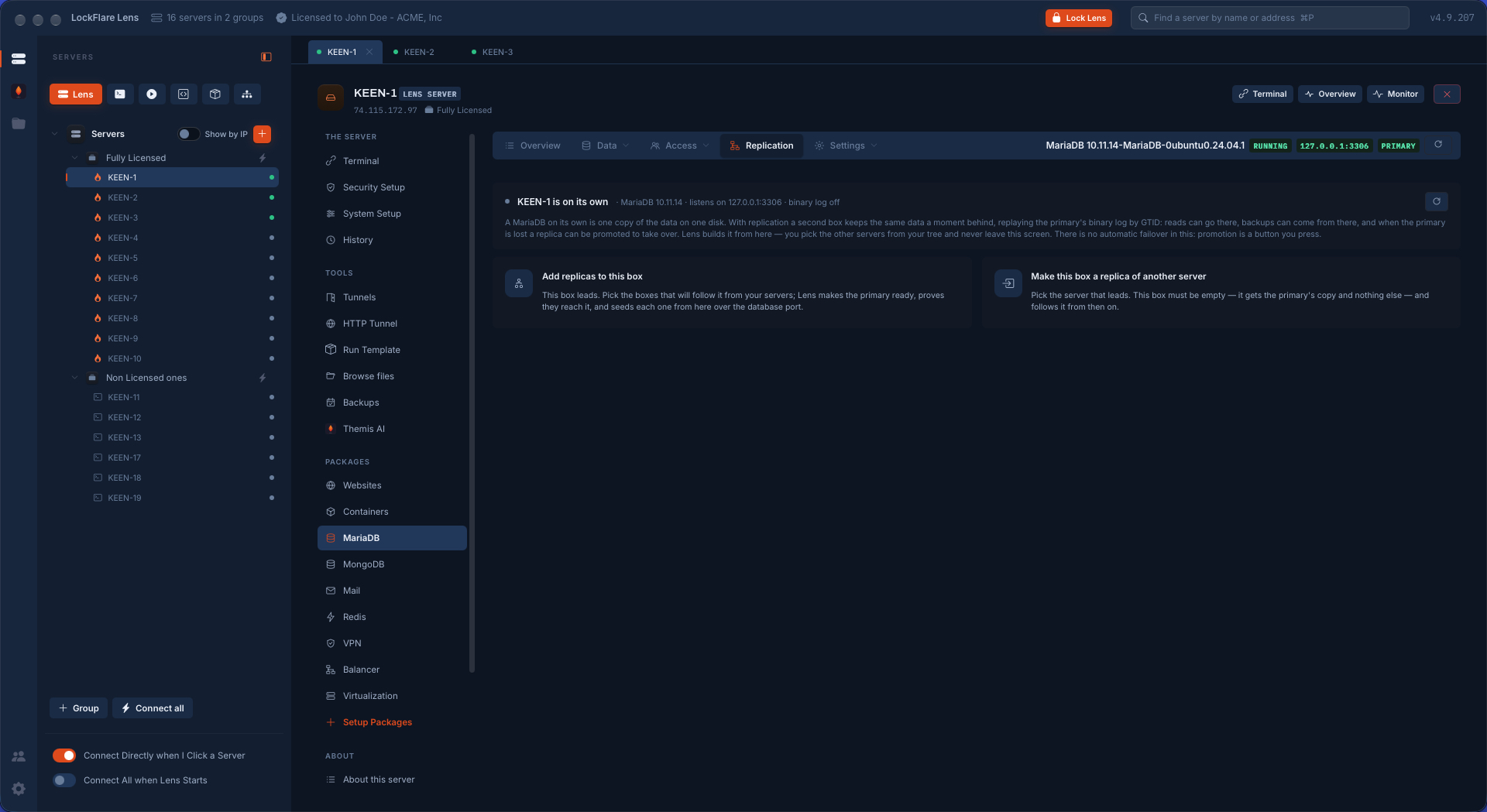
Two ways in: this box leads and the others follow it, or this box becomes a replica of another server. Then drag servers from the tree, or a whole group. Vigia opens a shell to each and reads what it runs — a replica has to be empty, or already following this primary, and the page says which.

Starting MariaDB replication in LockFlare Vigia: add replicas to this box, or make this box a replica of another server
This box leads, or this box follows.
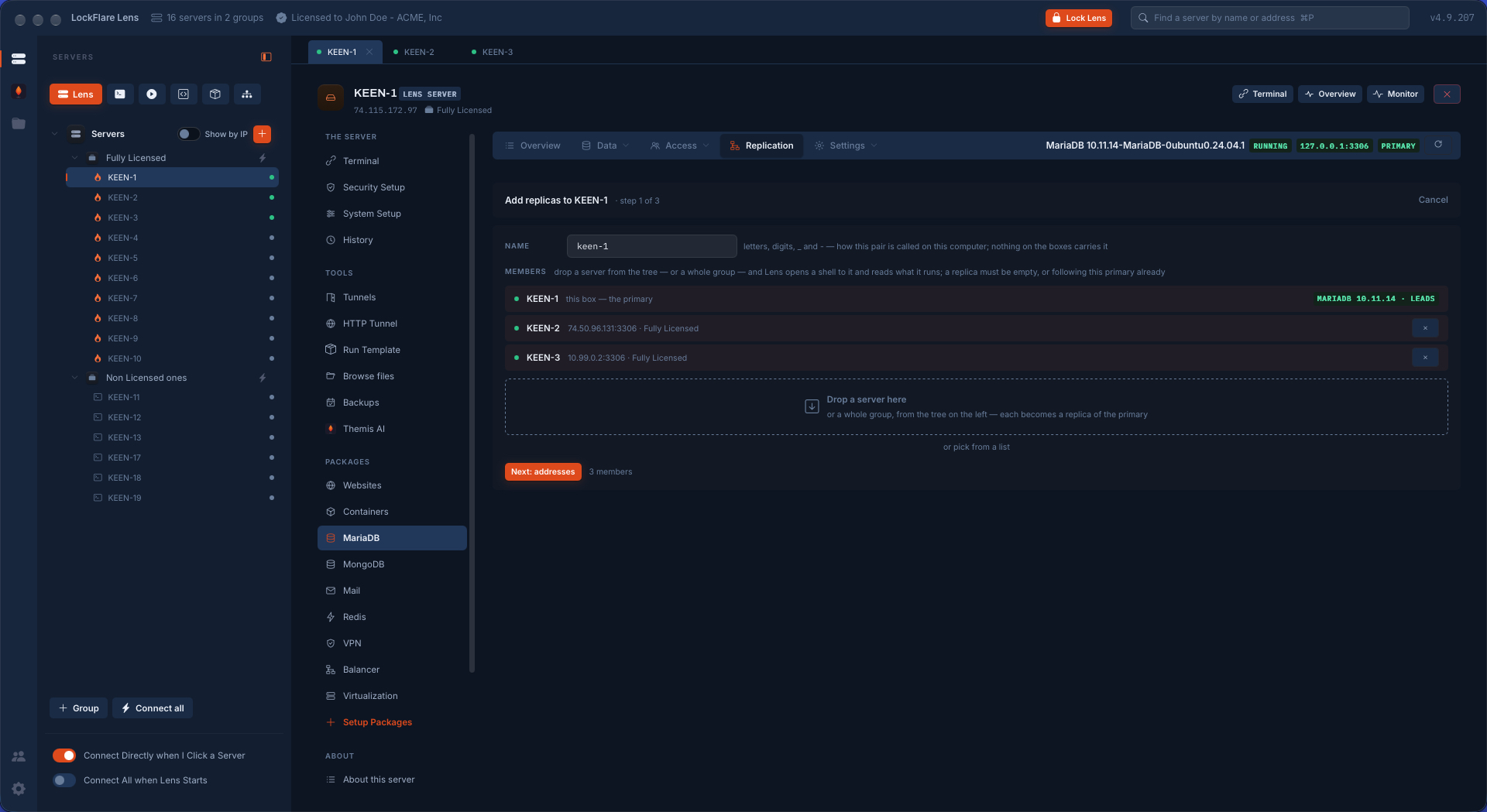
Two servers dropped from the tree as MariaDB replicas in LockFlare Vigia, each read as it landed
Two servers dropped from the tree, each read as it landed.

A box without MariaDB gets it

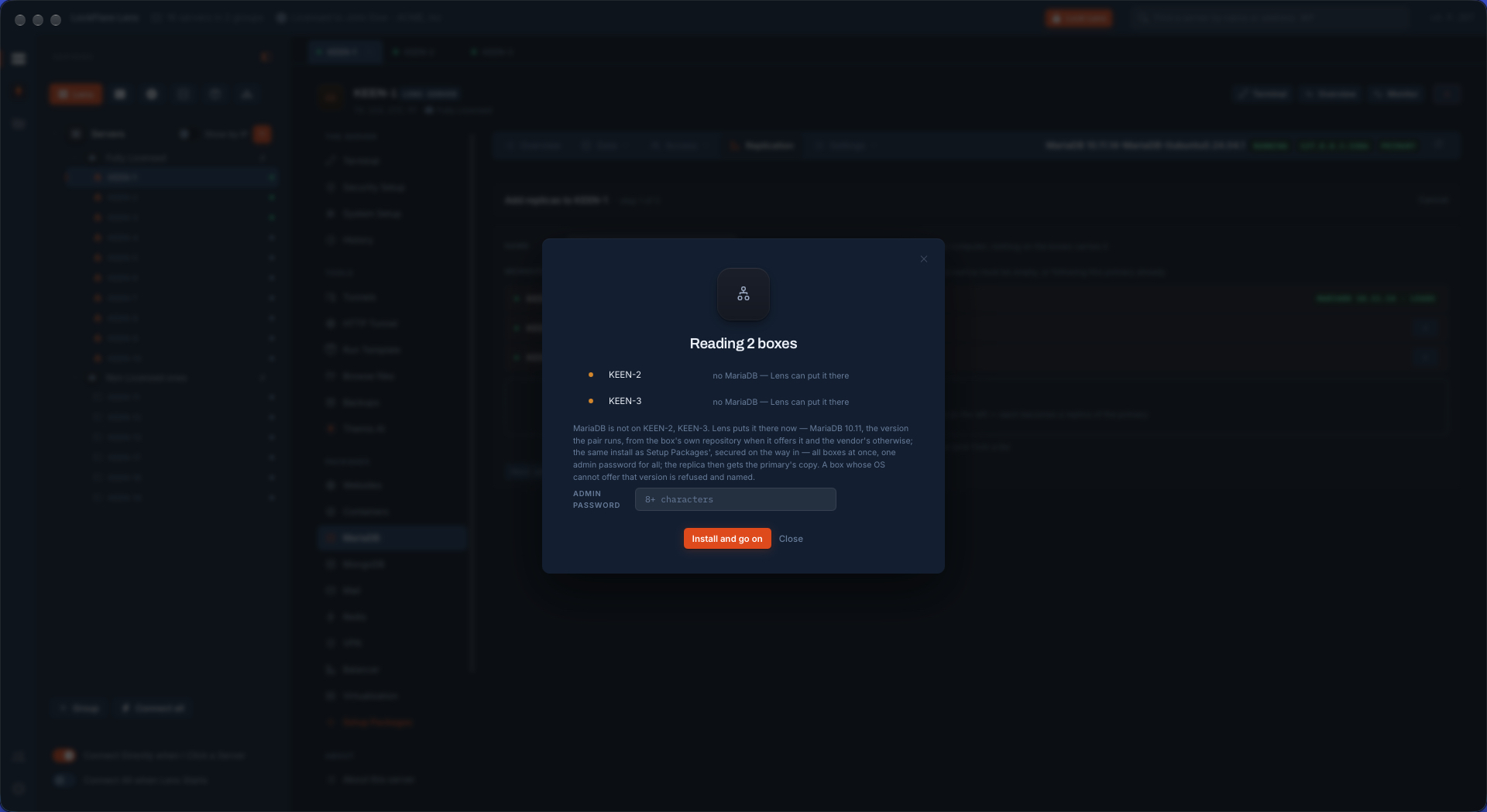
Neither replica had MariaDB. Vigia says so and offers to put it there — the version the pair runs, the same install as the package hub, secured on the way in, on all the boxes at once, with one admin password for all. A server whose operating system cannot offer that version is refused, and named.

LockFlare Vigia finding that two servers dropped as replicas have no MariaDB and offering to install the pair's version on both at once
No MariaDB on either box: Vigia can put it there, the pair's version, on both at once.
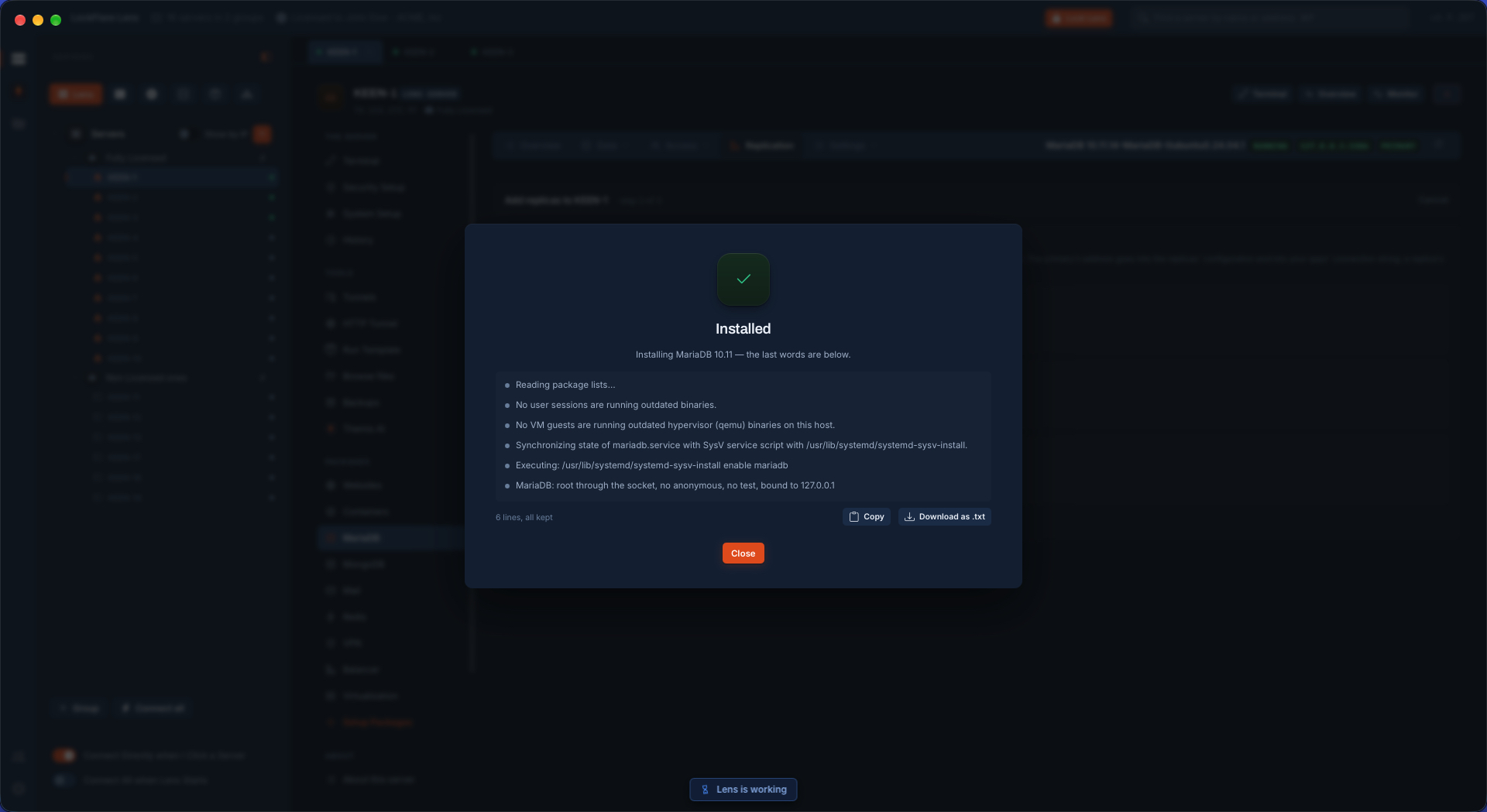
MariaDB installed on the replicas from LockFlare Vigia, the job's last lines kept and downloadable
Installed, with the job's last words kept.

The network, said honestly — and the plan, before Apply

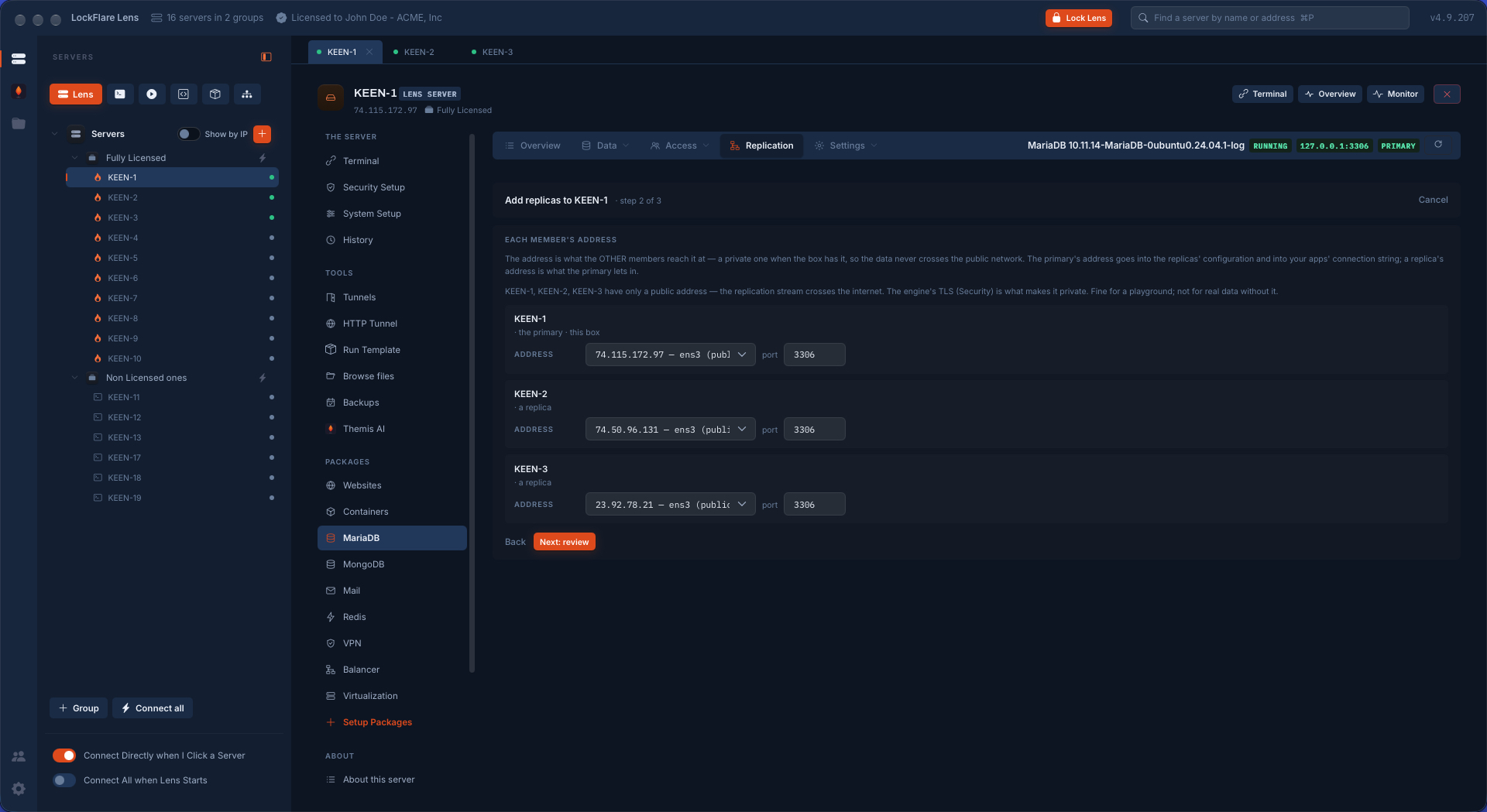
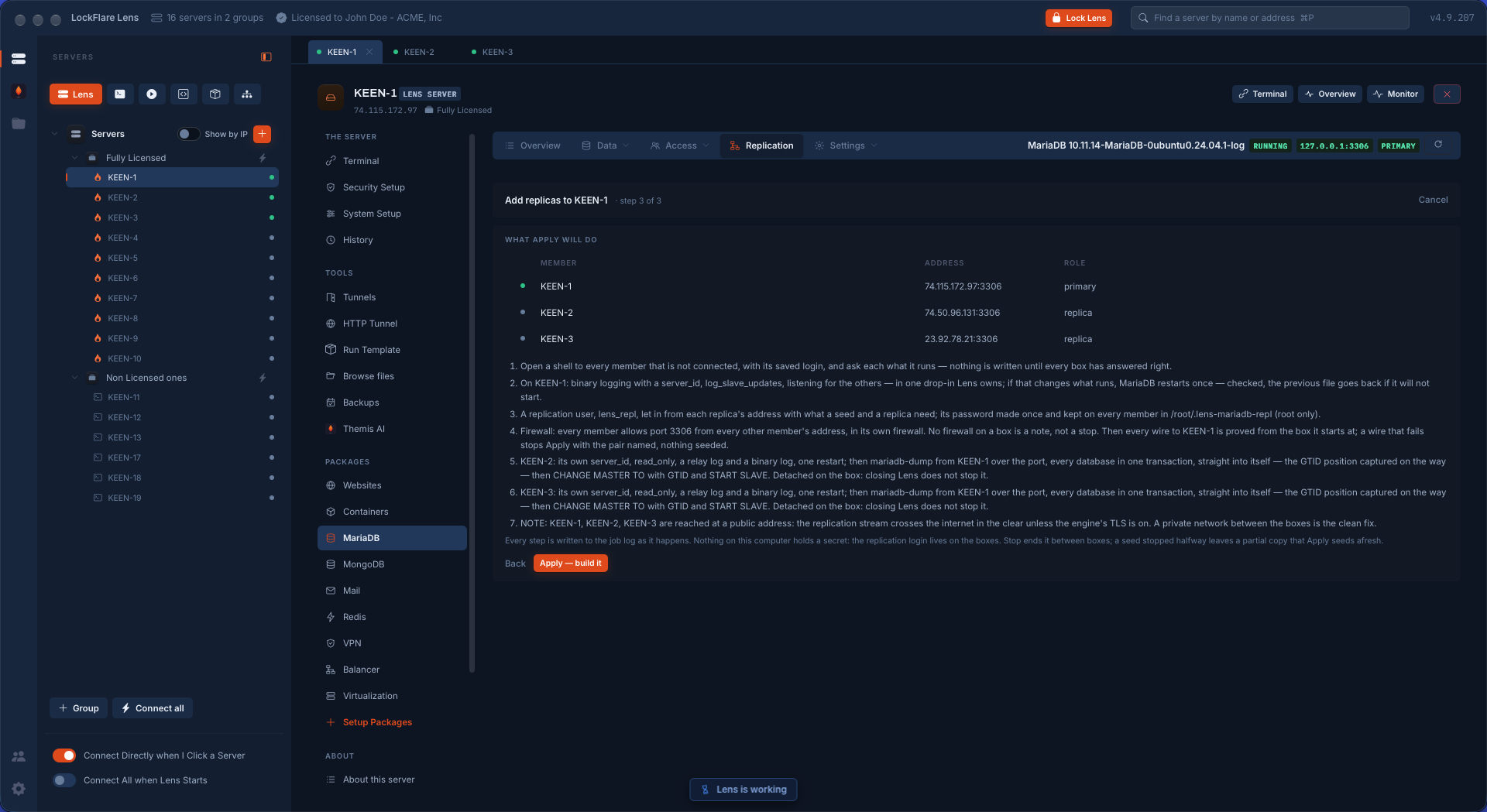
Each member's address is the one the others reach it at: a private one when the box has it, so the data never crosses the public network. Choose public addresses and Vigia does not pretend otherwise: the replication stream crosses the internet, the engine's TLS is what makes it private, fine for a playground and not for real data without it. Then the review lists what Apply will do, step by step, in the words of the commands it will run — nothing is written until every box has answered right.

Choosing each MariaDB member's address in LockFlare Vigia, with a warning that public addresses send the replication stream across the internet
Public addresses chosen, and the cost of that said before anything is built.
The review before building MariaDB replication in LockFlare Vigia: the members, their addresses and roles, and the seven steps Apply will take
What Apply will do, in seven steps, before it does any of it.

Built, seeded, following

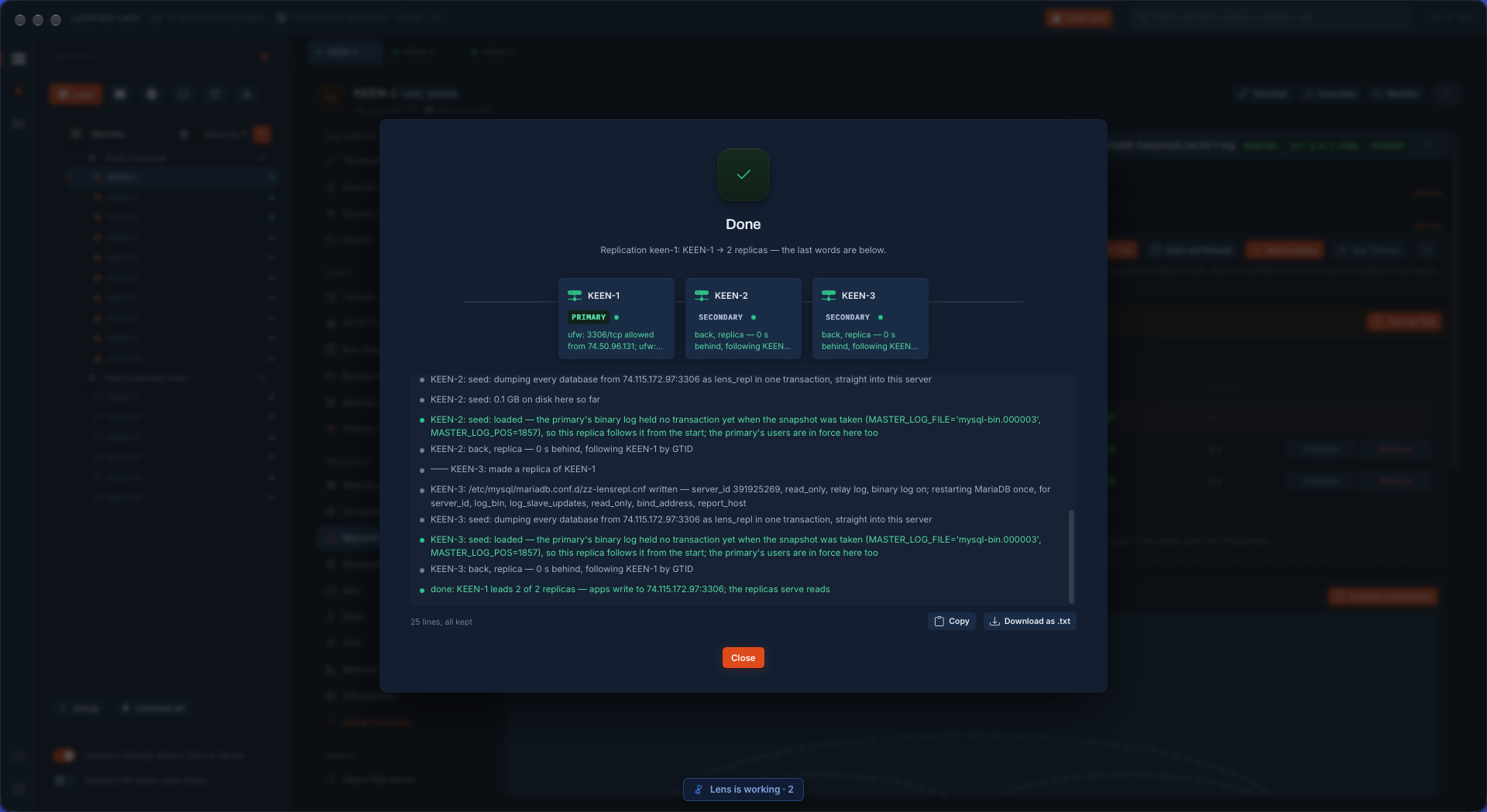
The primary gets binary logging and a server id in one drop-in Vigia owns, restarted once and checked — the previous file goes back if it will not start. A replication login is made, let in from each replica's address only, its password kept on the boxes and nowhere else. Every member opens the port to every other member in its own firewall, and every wire is proved from the box it starts at. Then each replica is seeded with a dump straight from the primary in one transaction, the position captured on the way, and started.

3servers: one primary, two replicas
0 sbehind, both replicas, following by GTID
2 min 50 sto build, timed — MariaDB already installed, a small database to seed

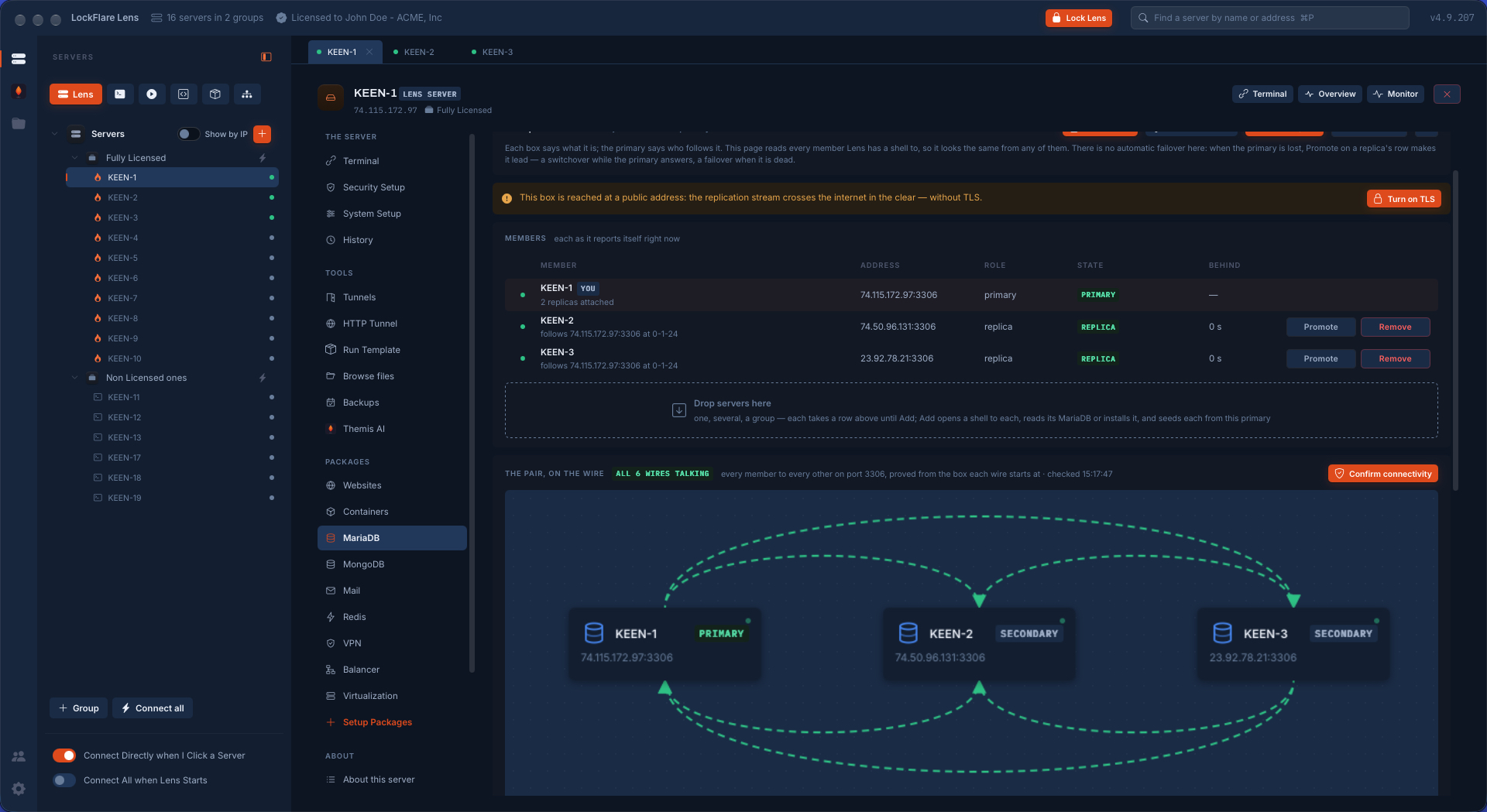
A larger database takes as long as its dump takes to cross. The page afterwards is the pair as it reports itself: each member's role, state and how far behind, Promote and Remove on a replica's row, and the wires drawn and proved again whenever you ask. There is no automatic failover in this, and the page says so: when the primary is lost, Promote makes a replica lead — a switchover while the primary answers, a failover when it does not.

MariaDB replication finished in LockFlare Vigia: both replicas seeded from the primary, zero seconds behind and following by GTID, every line of the job kept
Done: both replicas seeded, 0 s behind, following by GTID. Apps write to the primary; the replicas serve reads.
The MariaDB replication page in LockFlare Vigia: members with role, state and lag, and a canvas with all six wires between three servers proved
The pair on the wire: all six wires talking, each proved from the box it starts at.

TLS between the members, with Vigia as the authority

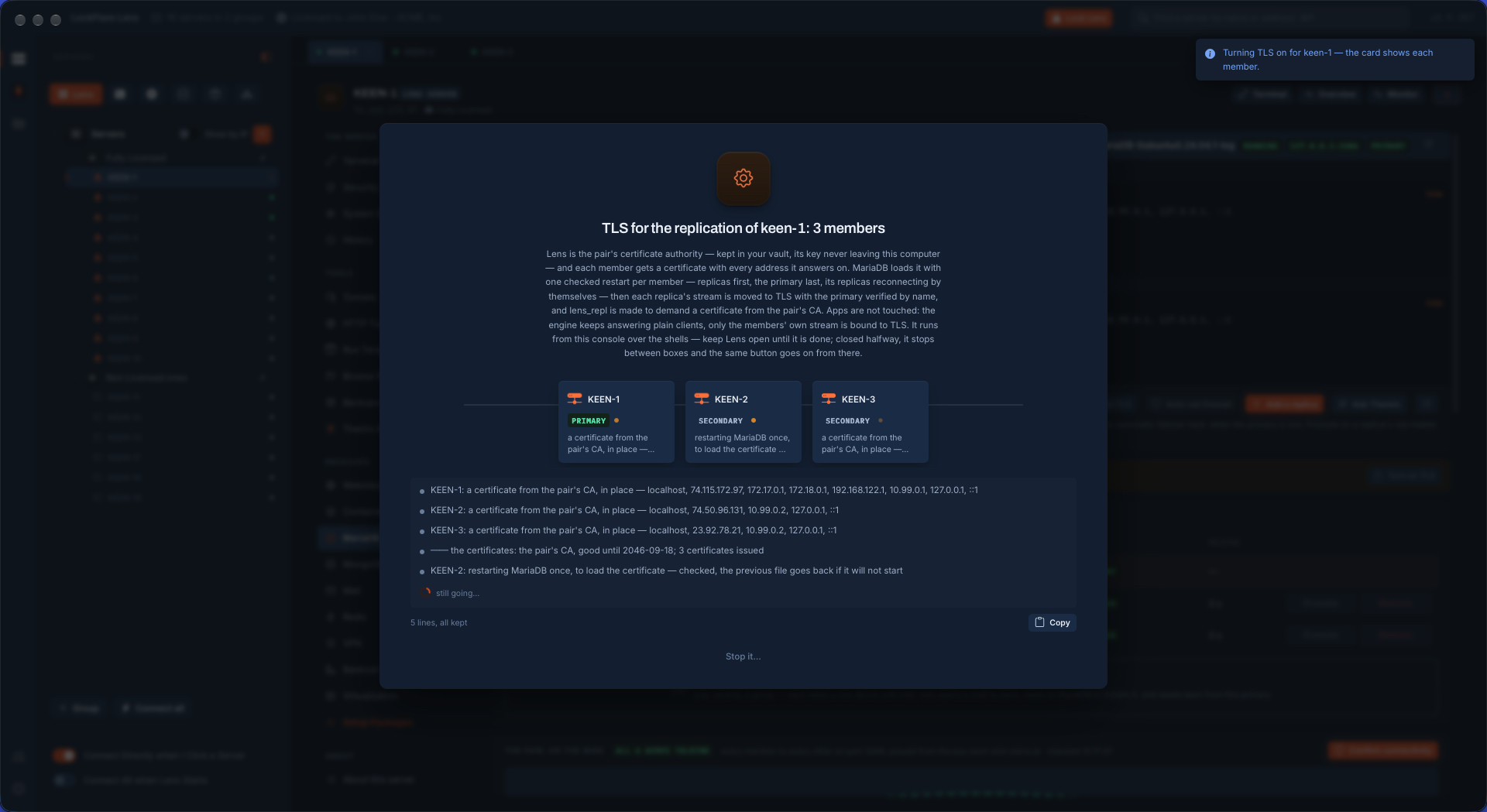
One button. Vigia is the pair's certificate authority — kept in your vault, its key never leaving your computer — and each member gets a certificate carrying every address it answers on. MariaDB loads it with one checked restart per member, replicas first and the primary last, its replicas reconnecting by themselves. Then each replica's stream is moved to TLS with the primary verified by name, and the replication login is made to demand a certificate from the pair's authority. Your apps are not touched: the engine goes on answering plain clients, and only the members' own stream is bound to TLS.

Turning TLS on for a MariaDB replication in LockFlare Vigia: a certificate issued to each of three members from the pair's certificate authority, then one checked restart per member
Three certificates from the pair's own authority, then one checked restart per member.

Settings with an opinion

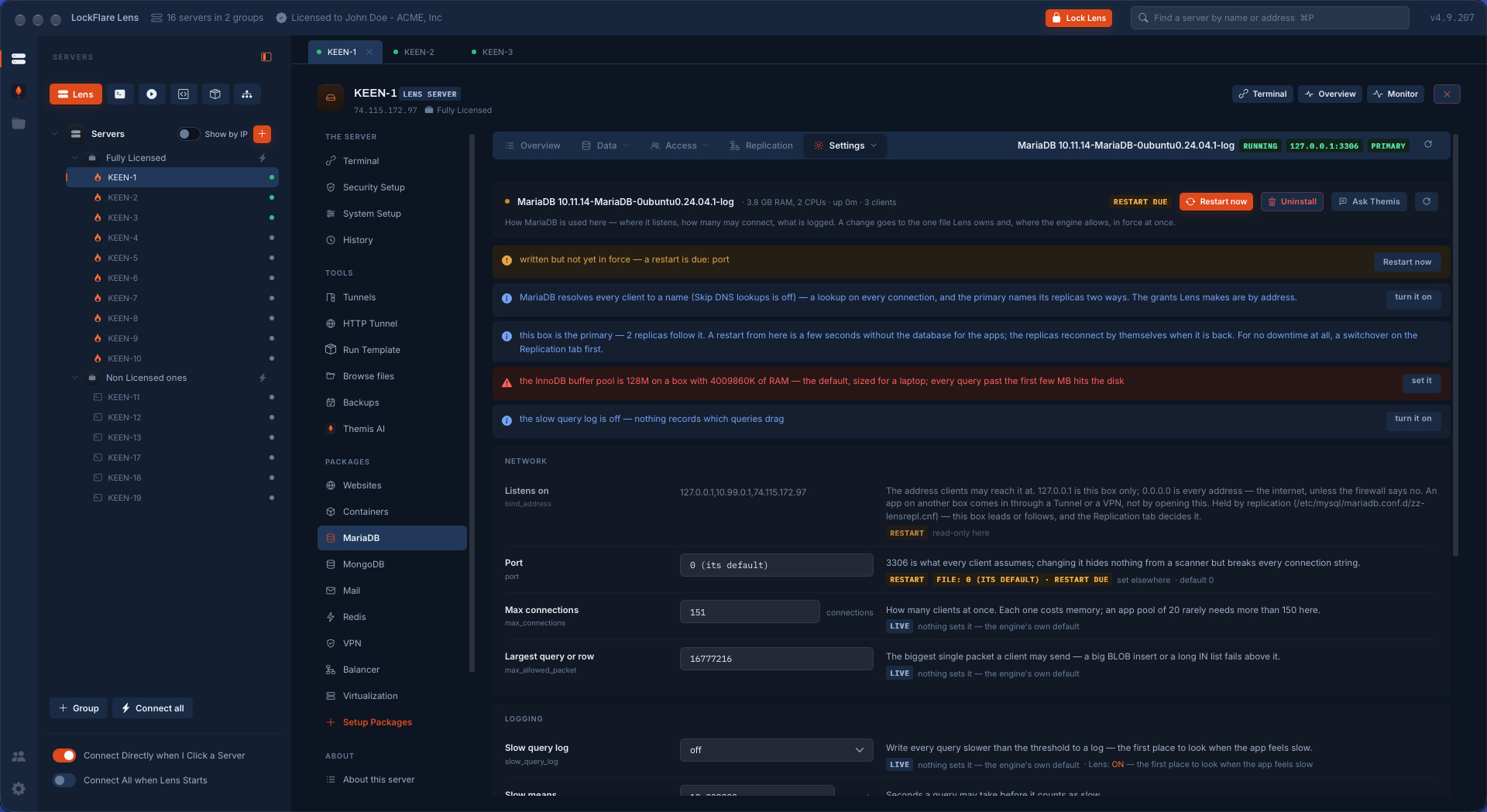
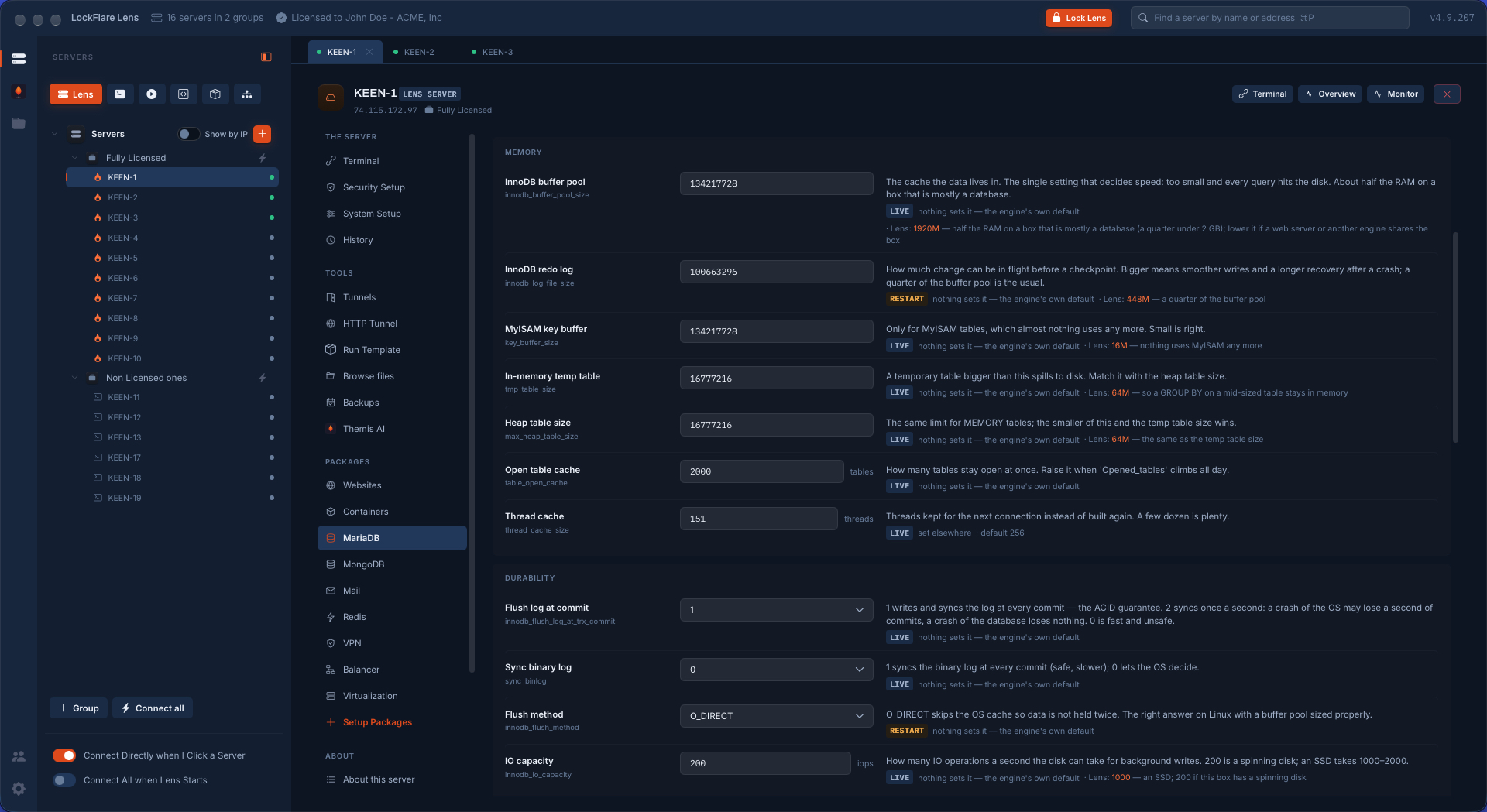
The configuration as rows, not a file: each setting with what it is in a sentence, its value read from the running engine, whether a change is live or needs a restart, and where the value comes from — the engine's default, the distribution's file, or Vigia. Where Vigia would set it differently it says what and why, against the box in front of it: half the RAM for the InnoDB buffer pool on a server that is mostly a database, 1000 IOPS if the disk is an SSD.

And before the rows, what matters on this server today. Here: the buffer pool is 128 MB on a box with 4 GB — the default, sized for a laptop, so every query past the first few megabytes hits the disk. This box is a primary with two replicas, so a restart from here costs the apps a few seconds, and a switchover first costs them nothing. Every change goes into one file Vigia owns, read last so it wins; the distribution's files are never touched.

MariaDB settings in LockFlare Vigia opening with what matters on this server: the InnoDB buffer pool is the 128 MB default on a box with 4 GB of RAM, the slow query log is off, and a restart from a primary costs the apps a few seconds
What matters on this box, first: a buffer pool sized for a laptop, and what a restart costs a primary.
Advanced MariaDB settings in LockFlare Vigia: memory and durability settings, each explained in a sentence with the value Vigia would set for this server and why
Memory and durability, each in a sentence — and what Vigia would set, for this box.
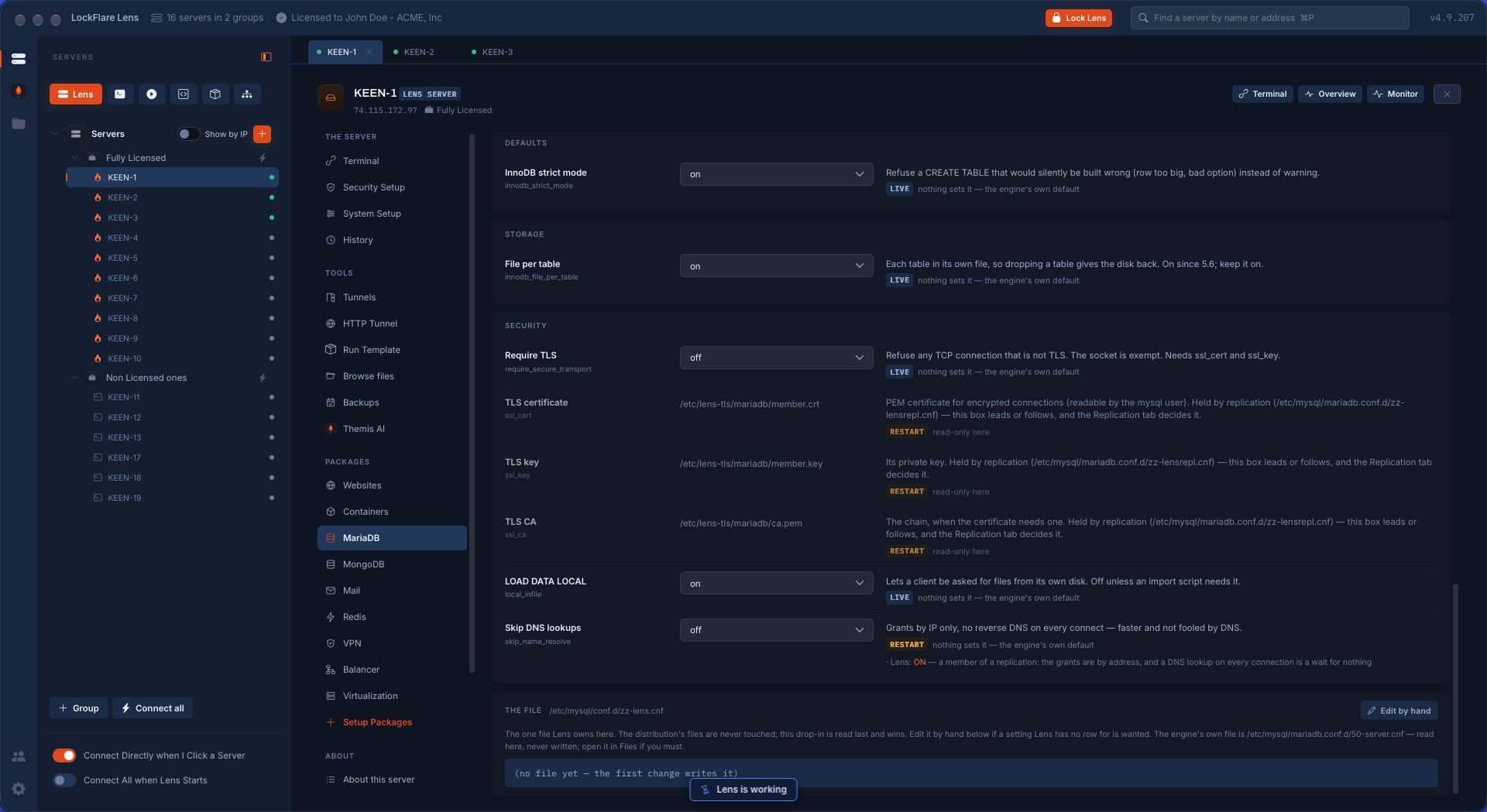
MariaDB security settings in LockFlare Vigia: the TLS certificate, key and CA held by the replication, and the one configuration file Vigia owns
The TLS files held by the replication, and the one file Vigia owns.

What Vigia writes on the server

MariaDB from the distribution, configured through its own drop-in folder. The distribution's files are read and never written. No agent, and nothing of ours in the path of a query.

/etc/mysql/conf.d/zz-lens.cnfThe one settings file Vigia owns, read last so it wins. It does not exist until the first change writes it, and it can be edited by hand.
/etc/mysql/mariadb.conf.d/zz-lensrepl.cnfWhat replication needs: the server id, the binary log, where it listens, the TLS files. Restarted once, checked, and the previous file put back if the engine will not start.
/root/.lens-mariadb-replThe replication login, on each member, root only. Nothing on your computer holds a database secret.
/etc/lens-tls/mariadb/The member's certificate and key and the pair's CA certificate. The authority's own key stays in your vault.
3306/tcp, from the other membersA rule for each other member, in the box's own firewall. The port is never opened to the world to make replication work.
/var/backups/lens/plansThe backup plans and their copies, root only, run from cron on the box.

Questions people ask

Does Vigia install its own build of MariaDB?

No. It installs the distribution's own package, so updates arrive with the operating system, and secures it on the way in: root through the socket, no anonymous account, no test database, bound to 127.0.0.1. For a replica it installs the version the pair runs, and refuses, by name, a server that cannot offer it.

How does it set up replication?

You drop servers from the tree. Vigia prepares the primary with binary logging and a server id, creates a replication login let in from each replica's address only, opens port 3306 between the members in each box's own firewall, proves every wire, seeds each replica with a dump from the primary in one transaction, and starts it following by GTID.

Is there automatic failover?

No, and the page says so. When the primary is lost you press Promote on a replica's row: a switchover while the old primary still answers, a failover when it does not. If a load balancer built in Vigia fronts the pair, the same job repoints it.

Is the replication traffic encrypted?

Over a private network such as a WireGuard mesh it is encrypted by the network. Over public addresses Vigia warns that the stream crosses the internet in the clear, and one button turns on TLS between the members, with certificates from an authority kept in your own vault and the replication login made to demand one.

Will it overwrite my my.cnf?

No. Every change goes into one drop-in file Vigia owns, read last so it wins, plus one for replication. The distribution's files are read and never written, and the file Vigia owns can be edited by hand.

Does the same work for PostgreSQL?

Yes. PostgreSQL has the same screens and the same replication builder, with streaming replication and slots in place of the binary log, and MongoDB has replica sets and sharding of its own.

Put MariaDB on a server you own

Vigia is free for 10 servers — enough for a primary and its replicas.

Download Vigia