LockFlare

Nine servers on one private network. Forty-three seconds.

WireGuard as a full mesh between the boxes you own: a private address for each, every other box a peer, one UDP port between them. Drop the servers in, press one button, and Vigia makes the keys on each box, writes the interface, opens the firewall between the members and then proves every tunnel from both ends. After that the replication, the backups and the admin traffic ride private addresses, and the database ports can be shut to the internet for good.

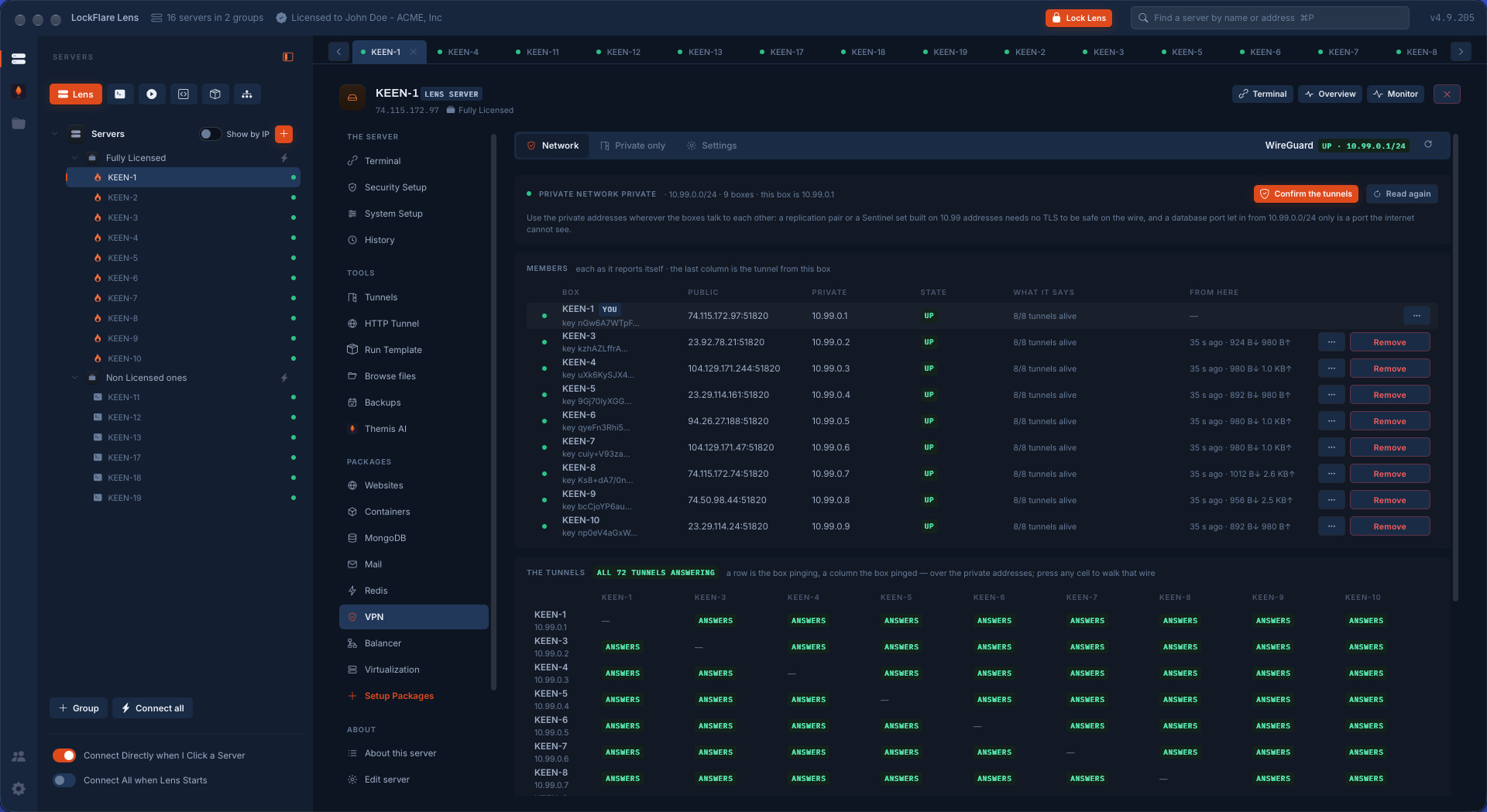
A WireGuard mesh of nine Linux servers in LockFlare Vigia: every member with its public and private address, 8 of 8 tunnels alive, and the matrix showing all 72 tunnels answering
Nine servers, every member up, all 72 tunnels answering.

Drop the servers in. That is the configuration.

Open the VPN tool on any server and it becomes the first member. Name the network, keep or change the subnet — 10.99.0.0/24 unless you already use it — and check the public address the others will dial. Then drag servers from the tree: one, several, a whole group. Each takes a row and is read as it lands, so you know before anything is written whether a box already has the WireGuard tools or Vigia will install them from its distribution.

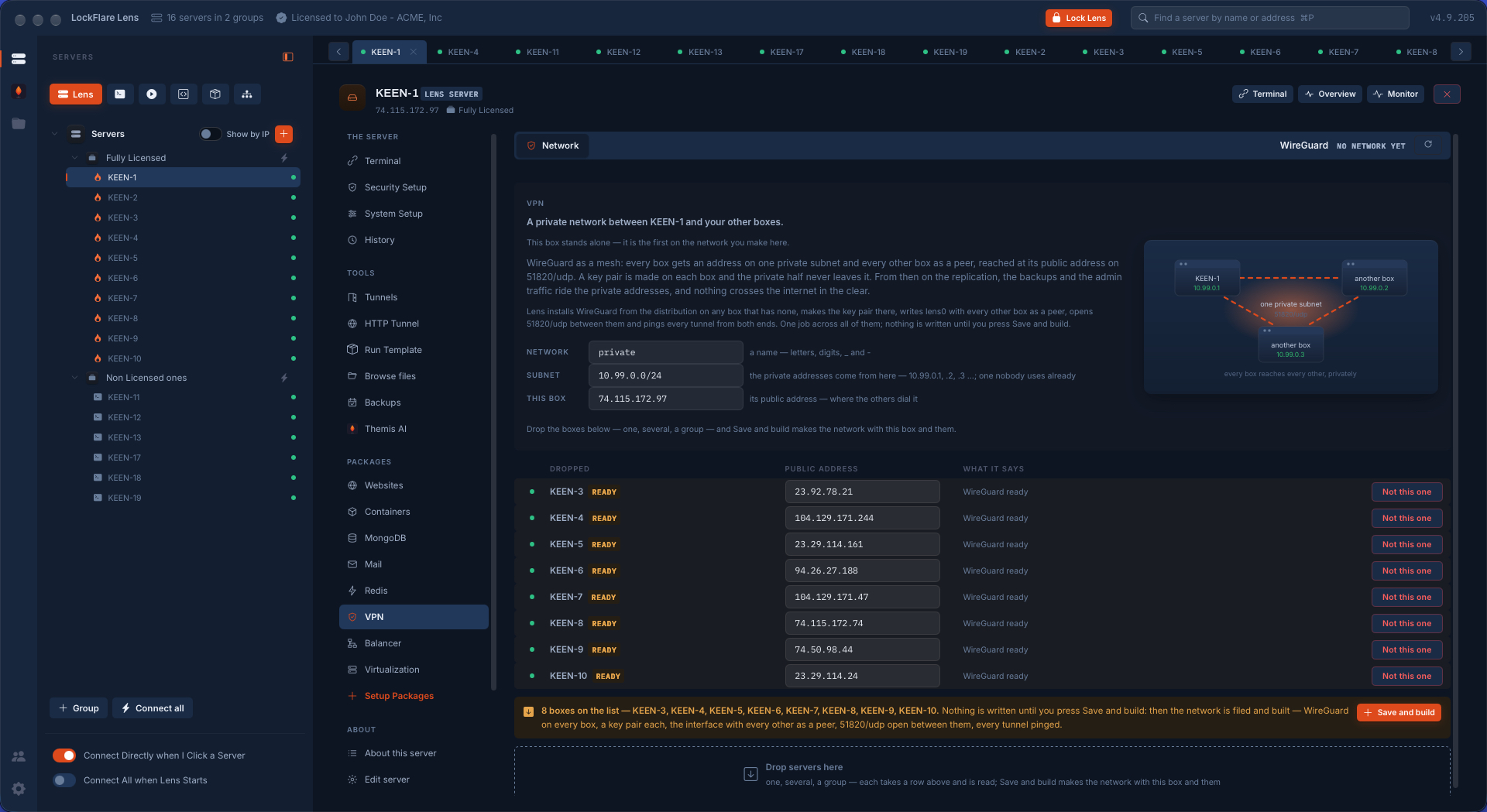
There is no peer list to type, no keys to paste between terminals, no file to keep in sync by hand. Eight boxes on the list and nothing has been touched yet: nothing is written until you press Save and build.
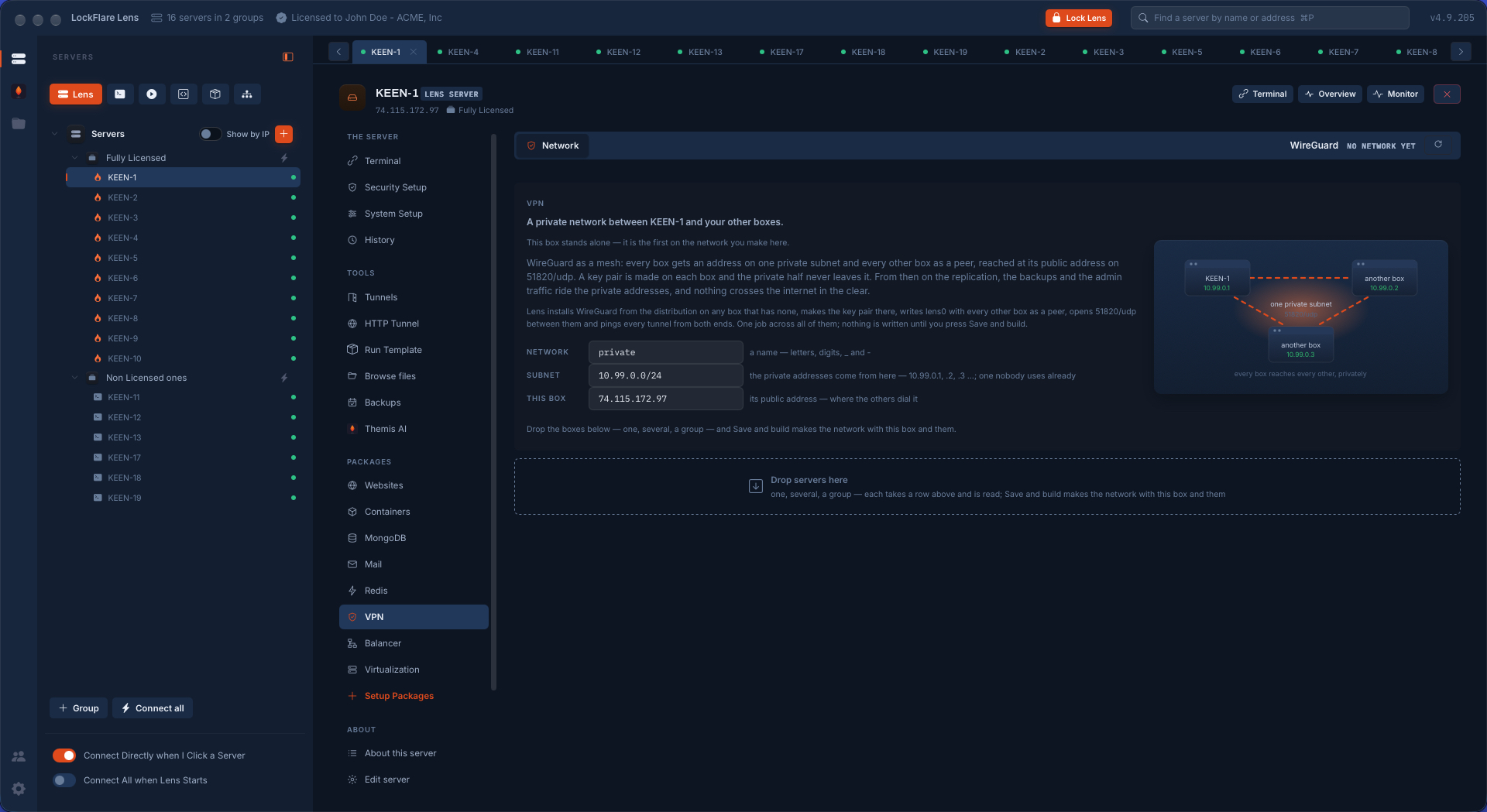
Starting a WireGuard private network in LockFlare Vigia: the network's name, its subnet 10.99.0.0/24, this server's public address, and the area where servers are dropped
A name, a subnet, this box's public address — and a place to drop the others.
Eight servers dropped into a new WireGuard network in LockFlare Vigia, each read as it landed and marked WireGuard ready, with Save and build waiting
Eight servers dropped from the tree, each read as it landed. Nothing written yet.

Every wire made at once, then proved

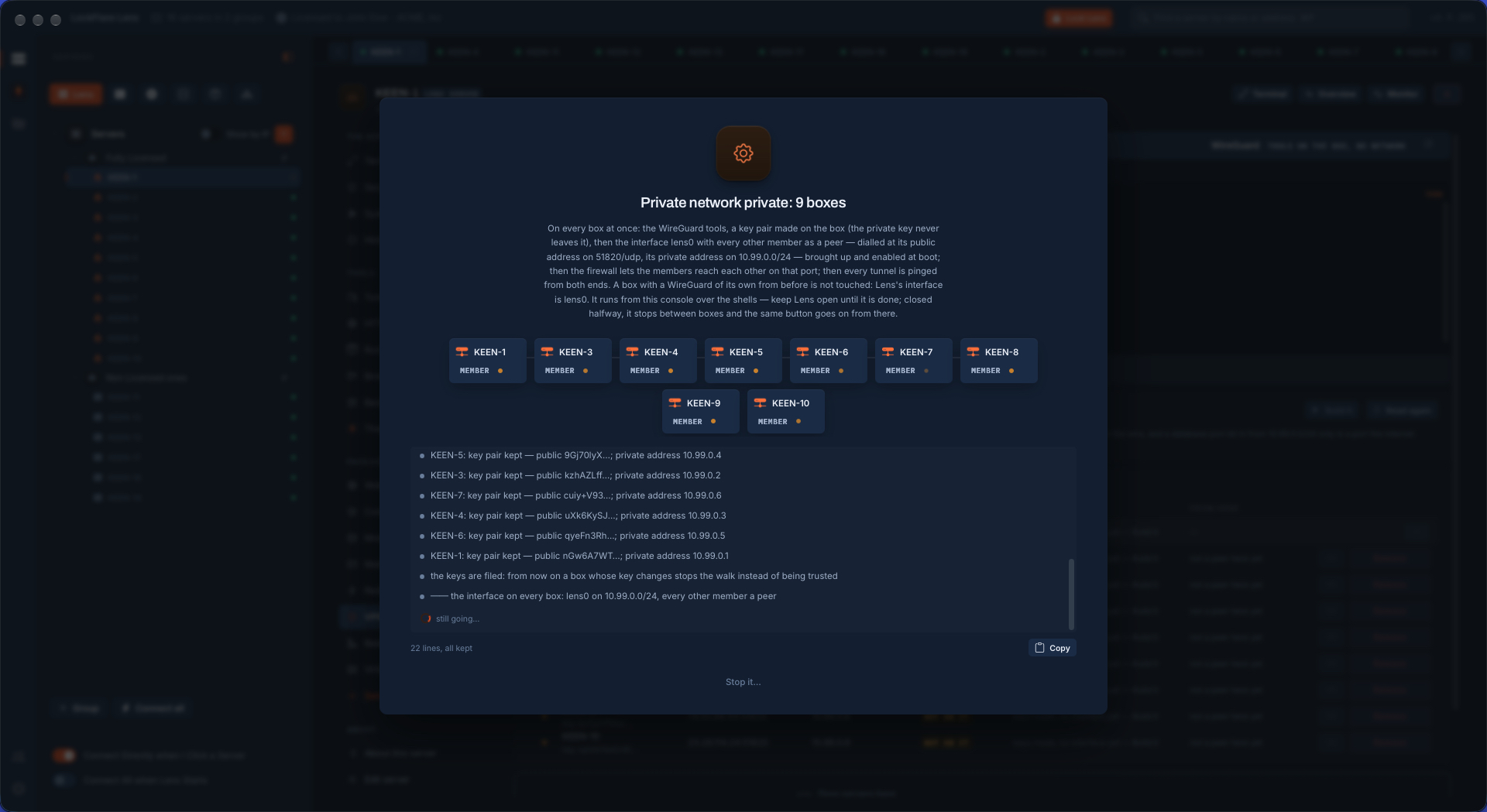
One job runs on every box at the same time. A key pair is made on each box and the private half never leaves it — Vigia does not read it, and it is not inside the configuration file either. The public halves are filed, and from then on a box whose key changes stops the job instead of being trusted. Then the interface, lens0, is written with every other member as a peer, brought up and enabled at boot; the firewall lets the members reach each other on 51820/udp; and every tunnel is pinged from both ends. "Done" means every one of them answered.

9servers, one private subnet
72tunnels answering, each proved from the box it starts at
43 sfrom Save and build to Done, timed

These nine boxes already had the WireGuard tools. A box that lacks them gets them installed from its own distribution by the same job, which adds the time its package manager takes. Every line the job said is kept, and can be copied or downloaded. Close Vigia halfway and it stops between boxes; the same button goes on from there.

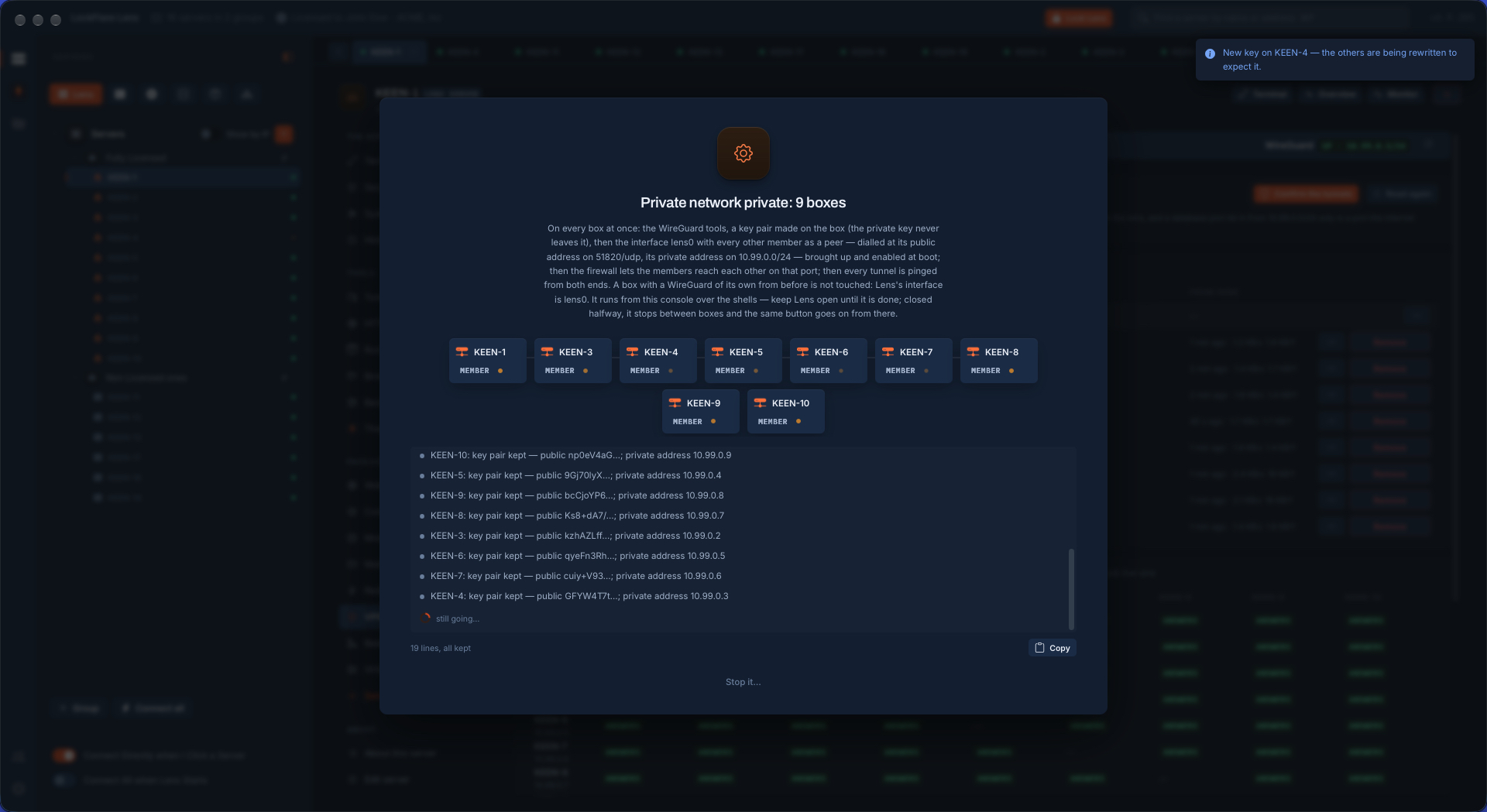
LockFlare Vigia building a WireGuard mesh on nine servers at once: each member's key pair and private address reported, then the lens0 interface written on every box
Nine boxes at once: keys, addresses, then lens0 with every other member a peer.
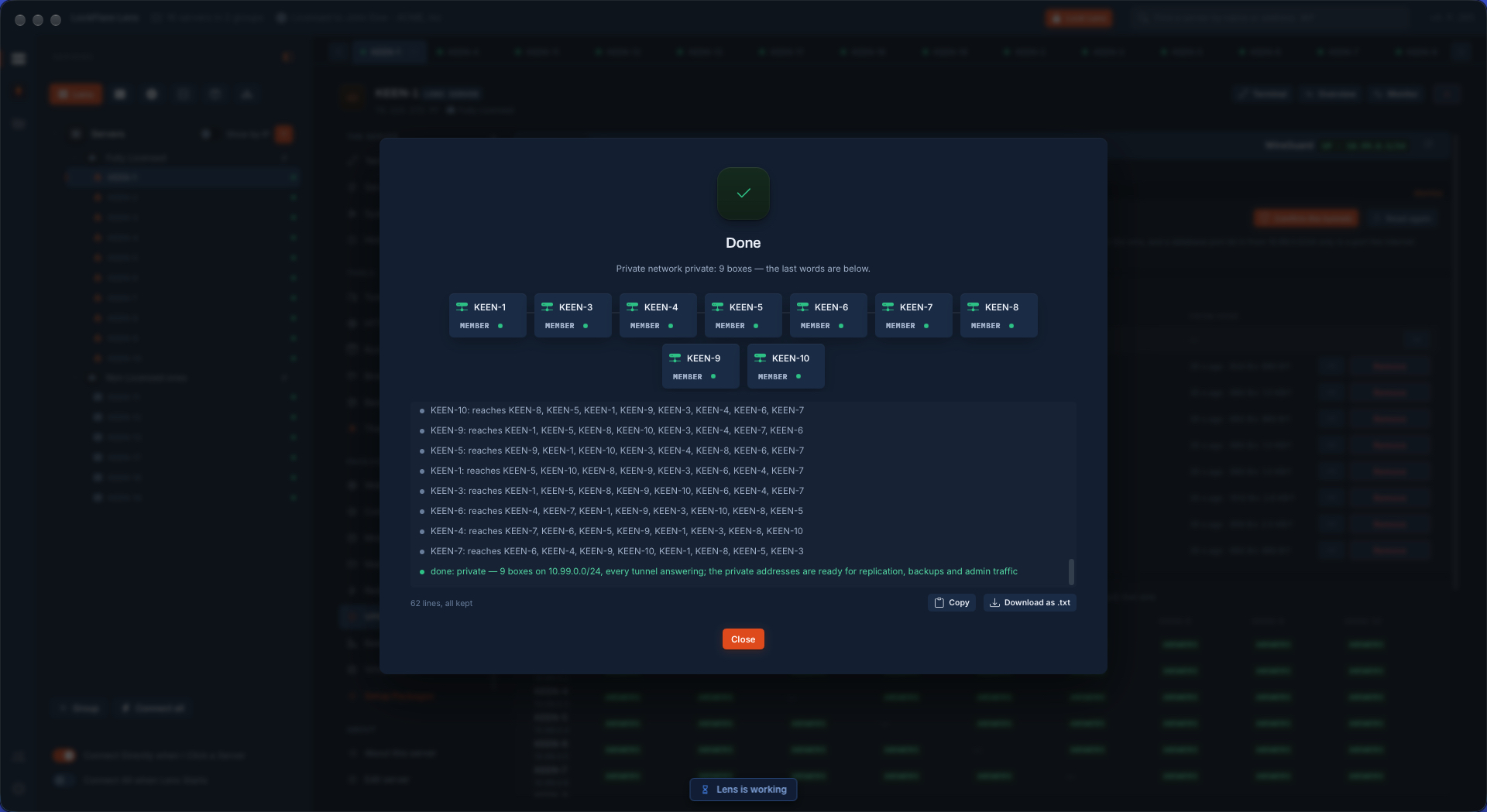
The WireGuard build finished in LockFlare Vigia: every one of nine servers reporting which other members it reaches, and the last line saying every tunnel is answering
Done: each box names the eight it reaches. Every tunnel answering.

The network, as it stands

Every member as it reports itself: the public address the others dial, its private address, the state of the interface, how many of its tunnels are alive, and from the box you are on, when each last shook hands and how much has crossed.

  • The matrix is the proof: a row is the box pinging, a column the box pinged, over the private addresses. Confirm the tunnels runs it again whenever you want to know.
  • Press any cell and Vigia walks that one wire, a question at a time: both on the network, each a peer of the other, the key on the box matching the key on file, a handshake, a ping across, a TCP connection across, and the largest packet the path carries — with the fix beside whichever one says no.
  • Each member learns the others by name — keen-7.lens — in a block of its own in /etc/hosts, so a connection string can say what it means.
  • Remove takes one box out and rewrites the others without it. Forget this filing leaves the tunnels up and only forgets the network on this computer; Take the network down brings the interface down on every box.
The WireGuard network page in LockFlare Vigia: nine members with public address, private address, state and tunnels alive, above a nine by nine matrix where every cell answers
Members above, the tunnels matrix below. Any cell can be walked.

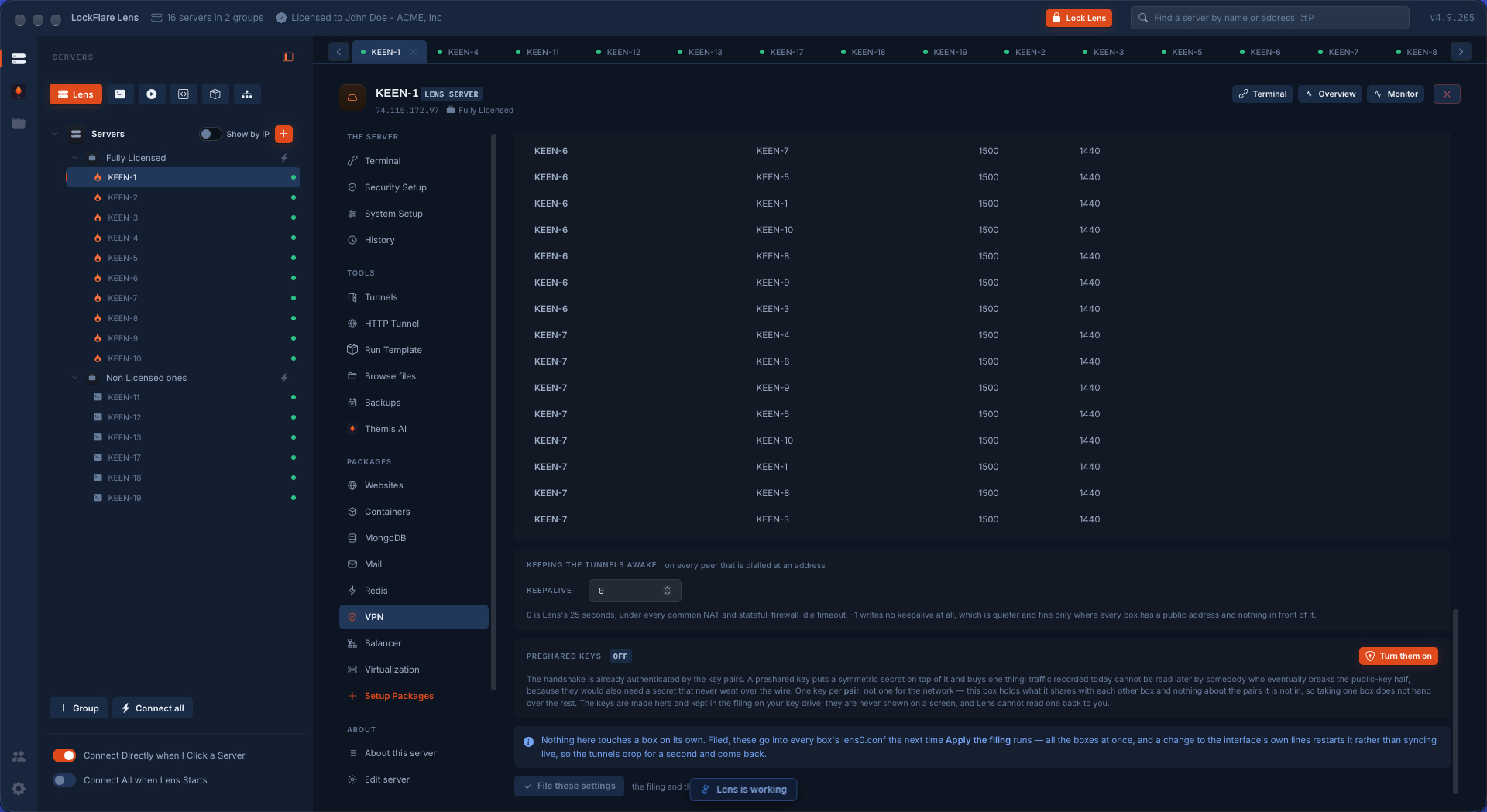
Private only: shut the ports the internet never needed

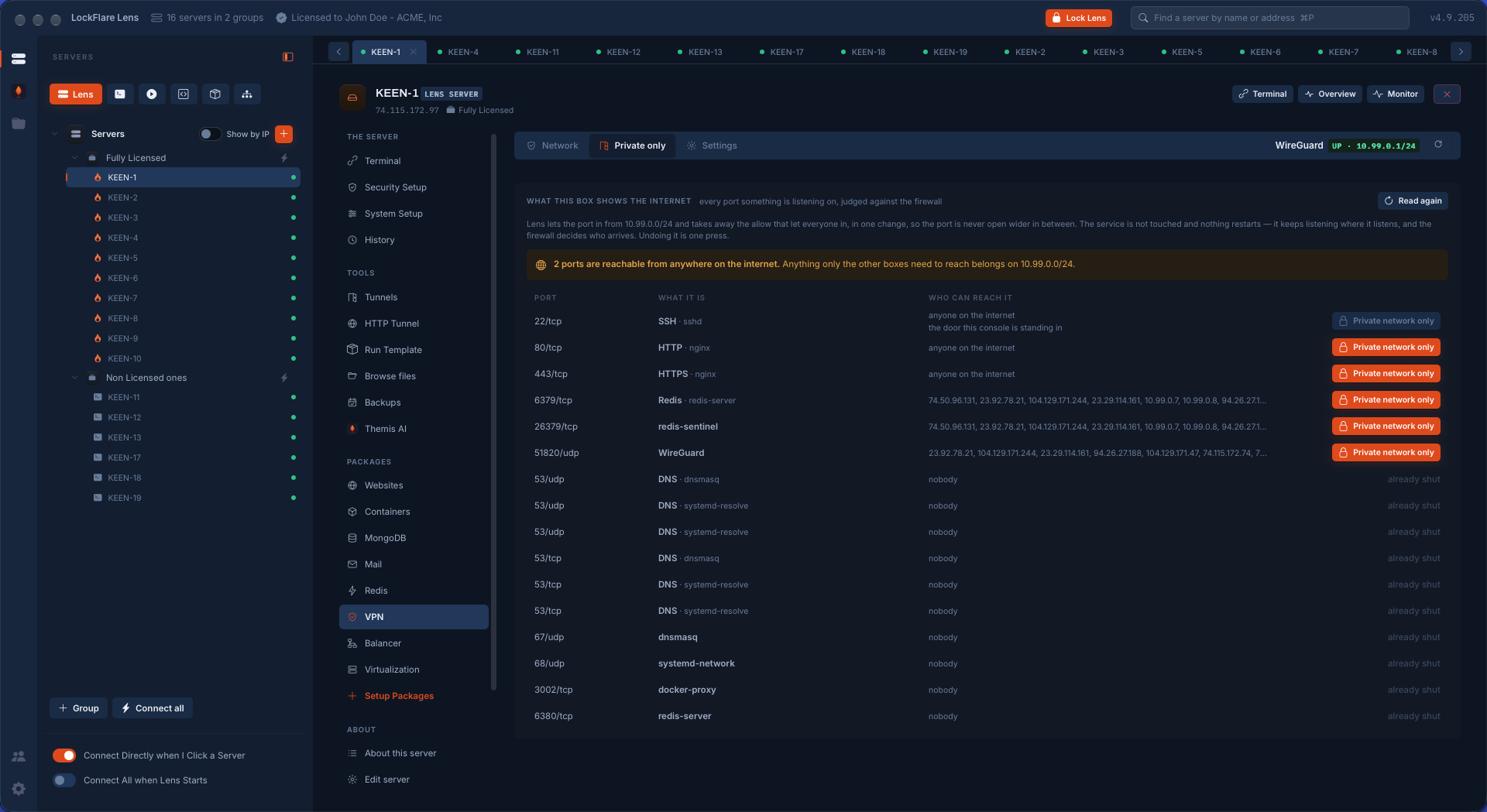
A private network is only worth having if the public doors get closed behind it. The Private only tab lists every port something is listening on, judged against the firewall: what it is, which service holds it, and who can reach it today — anyone on the internet, a list of addresses, or nobody.

One button per port. Vigia lets the port in from the private subnet and takes away the rule that let everyone in, in a single change, so the port is never open wider in between. The service is not touched and nothing restarts: it keeps listening where it listens, and the firewall decides who arrives. Undoing it is one press. The SSH row is guarded — that is the door the console is standing in.

The Private only tab of the WireGuard tool in LockFlare Vigia: every listening port on the server with who can reach it, and a Private network only button beside HTTP, HTTPS, Redis, Sentinel and WireGuard
Every listening port and who can reach it. Two are open to the whole internet; one press each closes them to everything but the private network.

The MTU, measured instead of guessed

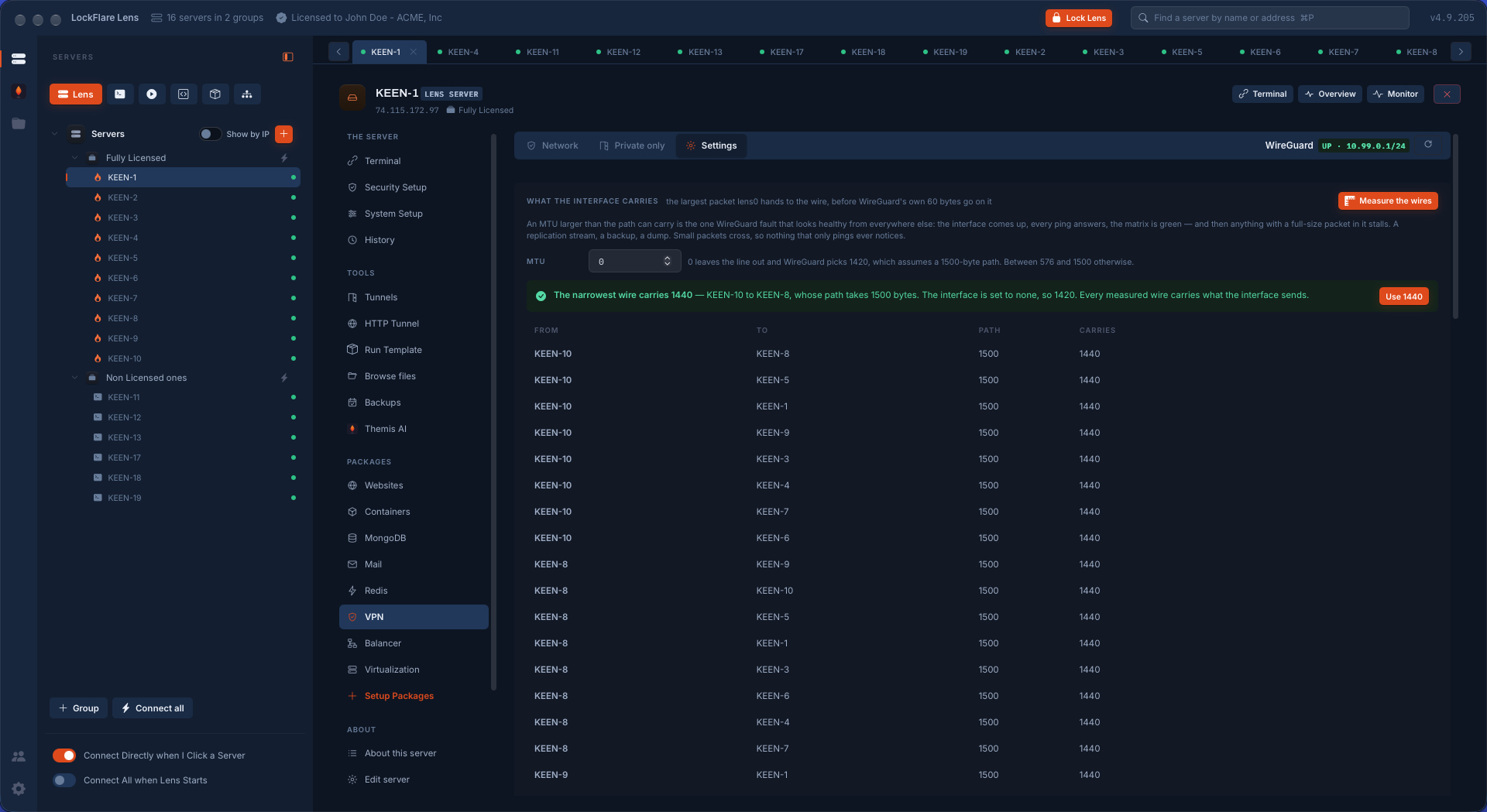
An MTU larger than the path can carry is the one WireGuard fault that looks healthy from everywhere else. The interface comes up, every ping answers, the matrix is green — and then anything with a full-size packet in it stalls: a replication stream, a backup, a dump. Small packets cross, so nothing that only pings ever notices.

Measure the wires sends real packets down every pair and reports what each path takes and what the tunnel can carry inside it. The narrowest wire sets the number, and one button uses it. The same tab holds the keepalive — 25 seconds unless you say otherwise, under every common NAT timeout — and preshared keys, one per pair rather than one for the network, so taking one box does not hand over the rest. Nothing here touches a box on its own: filed settings reach every lens0.conf the next time the filing is applied, all the boxes at once.

Measuring the MTU of a WireGuard mesh in LockFlare Vigia: every pair of servers with the size its path takes and the size the tunnel carries, and the narrowest wire named
Every pair measured. The narrowest wire carries 1440, and Vigia says which one it is.
WireGuard settings in LockFlare Vigia: the keepalive interval and preshared keys per pair of servers, with an explanation of what each one buys
Keepalive, and a preshared key per pair — each with what it buys, in words.

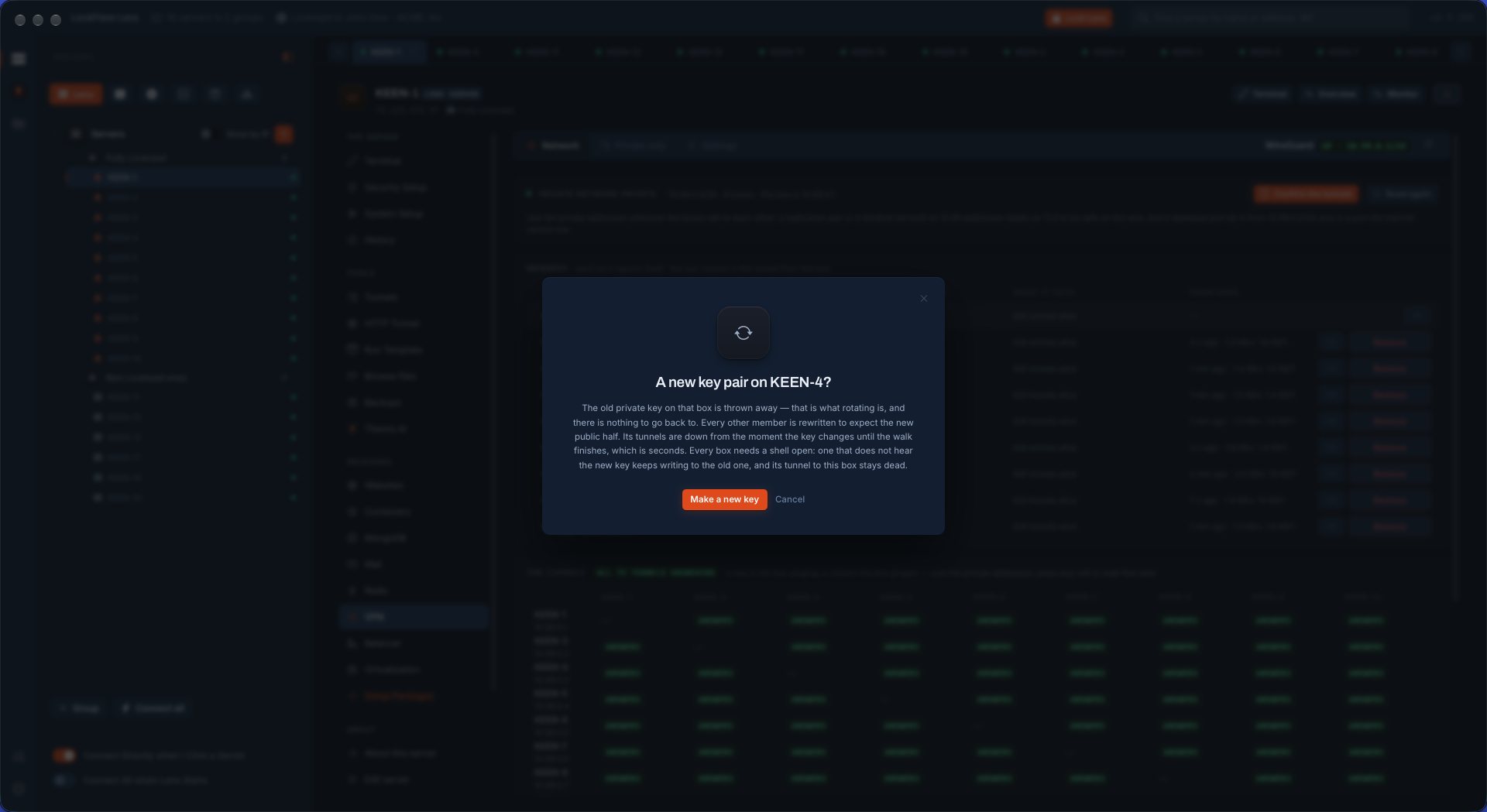
A new key on one box, and every other box told

Rotating a WireGuard key by hand means one command on the box and then an edit on every other member, in the right order, without a typo. In Vigia it is one press on the member's row. The old private key is thrown away — that is what rotating is — a new pair is made on the box, and every other member is rewritten to expect the new public half. That box's tunnels are down from the moment the key changes until the job finishes, which is seconds.

Rotating the WireGuard key pair of one server in LockFlare Vigia: the confirmation saying the old private key is thrown away and every other member is rewritten
What it costs, said before the button: seconds of downtime on that box's tunnels.
LockFlare Vigia rewriting all nine WireGuard members after one server's key was rotated, each box reporting its key and private address
The new key on KEEN-4, and the other eight rewritten to expect it.

What Vigia writes on each box

WireGuard's own tools from the distribution, three files, one firewall rule and a block of names. No agent, no daemon of ours, nothing listening for Vigia.

/etc/wireguard/lens-private.keyMade on the box, mode 600, and never read by Vigia. The interface loads it from this file, so it is not inside the configuration either.
/etc/wireguard/lens-public.keyIts public half: the only part of the pair the other members, and Vigia, ever see.
/etc/wireguard/lens0.confThe interface and its peers, Vigia's file whole. It is lens0, not wg0: a box with a WireGuard of its own from before keeps it, untouched.
51820/udp, between membersOne rule in the box's own firewall so the members reach each other. The mesh adds one interface and one address; the box's real network is not rerouted.
/etc/hosts, one blockThe other members by name, under .lens — local to each box, never resolved off it.

What rides it

Replication and Sentinel

Build a MongoDB set, a PostgreSQL or MariaDB pair, or a Redis Sentinel set between members and the private addresses are what Vigia offers first. A database port let in from 10.99.0.0/24 only is a port the internet cannot see.

MongoDB, end to end

Backups and admin traffic

A backup pushed to another server, a dump pulled across, an admin panel that should never have been public: all of it between private addresses, encrypted on the wire by WireGuard whether or not the service speaks TLS.

Databases

Your own machine as a peer

Add my machine makes a key pair on your computer, gives the public half to every box, and writes the private half once into a file you import into the WireGuard app — on this computer or a phone. Vigia keeps no copy. Every box is then reachable at its private address from wherever you are.

A cache that was never public

Redis bound and passworded from the first minute, and its port let in from the private network only: one press on the Private only tab, no restart.

Redis and Sentinel

Questions people ask

Does Vigia install an agent to run the VPN?

No. Vigia installs WireGuard's own tools from the server's distribution and writes three files under /etc/wireguard, one firewall rule and a block in /etc/hosts. The network runs on WireGuard alone; nothing of Vigia runs on the box, and the tunnels stay up with Vigia closed.

Where do the private keys live?

On the box each one was made on, in a file only root can read. A private key never leaves its server: Vigia does not read it, does not store it and does not put it in the configuration file. Only public keys are filed on your computer.

I already run WireGuard on a server. Will Vigia touch it?

No. Vigia's interface is lens0, with its own key files and its own configuration. An existing wg0 — or any other WireGuard interface — is shown in the reading and left exactly as it is.

How long does it take to build a mesh?

Nine servers that already had the WireGuard tools were wired into a full mesh, with all 72 tunnels answering, in 43 seconds, timed. A server without the tools gets them installed by the same job, which adds the time its package manager takes.

Can I close my database ports to the internet afterwards?

Yes, from the Private only tab: every listening port with who can reach it, and one button that lets the port in from the private subnet and removes the rule that let everyone in, as a single firewall change. The service is not restarted, and undoing it is one press.

Which servers can join?

Any Vigia server you can already log in to over SSH — Debian, Ubuntu, AlmaLinux or Rocky Linux — with a public address the others can dial on one UDP port. The first 10 Vigia servers are free.

Wire your own boxes together

Vigia is free for 10 servers. Nothing is installed on them to try it.

Download Vigia