LockFlare

This is the mail server behind lockflare.com. We run it from Vigia.

Every screen on this page is our own box: mail.lockflare.com, the server that sends and receives our mail. Nothing here is a demo. Mail is thirty percent software and seventy percent reputation, so Vigia does not stop at installing Postfix — it reads the box the way a receiving server does, says each fact in words, and hands over the exact DNS records to copy until every one of them is green.

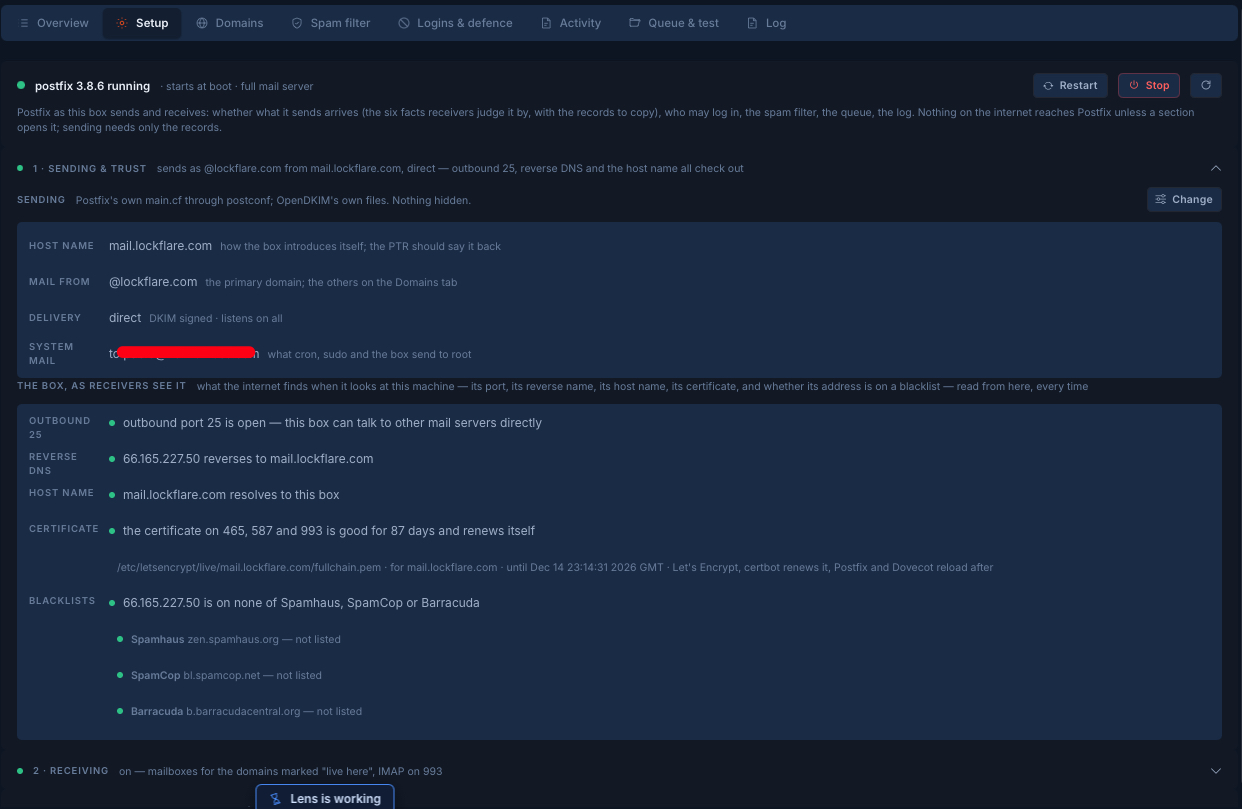
The mail setup of mail.lockflare.com in LockFlare Vigia: Postfix running, the host name and sending domain, and the box as receivers see it — outbound port 25 open, reverse DNS matching, a valid certificate, and on no blacklist
Our mail server, as the internet sees it: read from the box, every time.

The box, as receivers see it

Whether your mail arrives is decided by strangers' servers, and they judge the machine before they read the message. Can it reach other mail servers on port 25 at all. Does its address reverse to the name it introduces itself with, and does that name resolve back to it. Is the certificate on its doors good. Is the address on a blacklist. Vigia asks all of it from the box itself, each time you look, and says the answer in a sentence — with the three lists it checked named, so "not listed" means something.

Everything it sets is Postfix's own configuration through postconf, and OpenDKIM's own files. Nothing is hidden in a layer of ours: postconf in a terminal still tells the truth. And nothing on the internet reaches Postfix until a section opens it — sending needs only the records.
6facts a receiver judges a box by, each read and said in words
3blacklists checked by name: Spamhaus, SpamCop, Barracuda
87 daysleft on our certificate the day this was taken — it renews itself

A domain is a card, and its records are there to copy

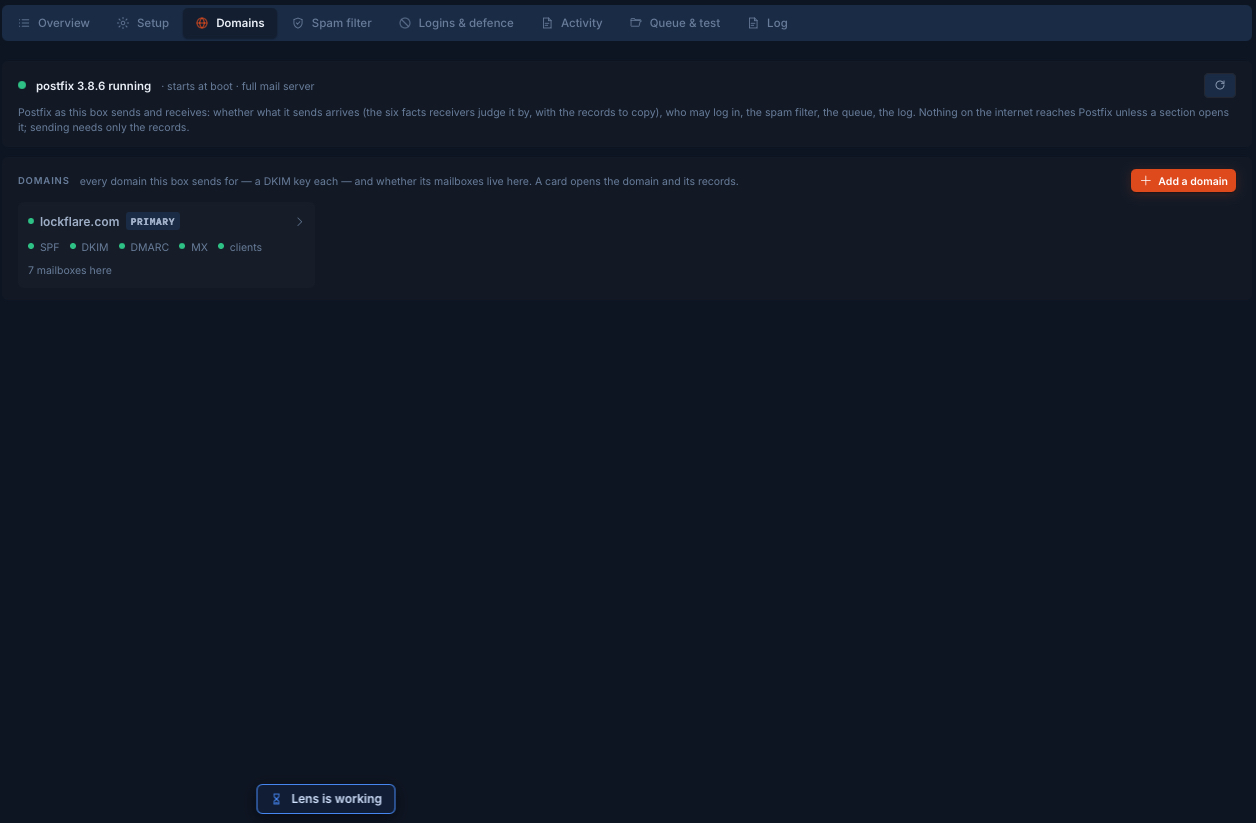
Every domain the box sends for has a DKIM key of its own and says whether its mailboxes live here or somewhere else. Open one and Vigia reads what receivers check before they trust mail from it — SPF, DKIM, DMARC, MX — straight from DNS.

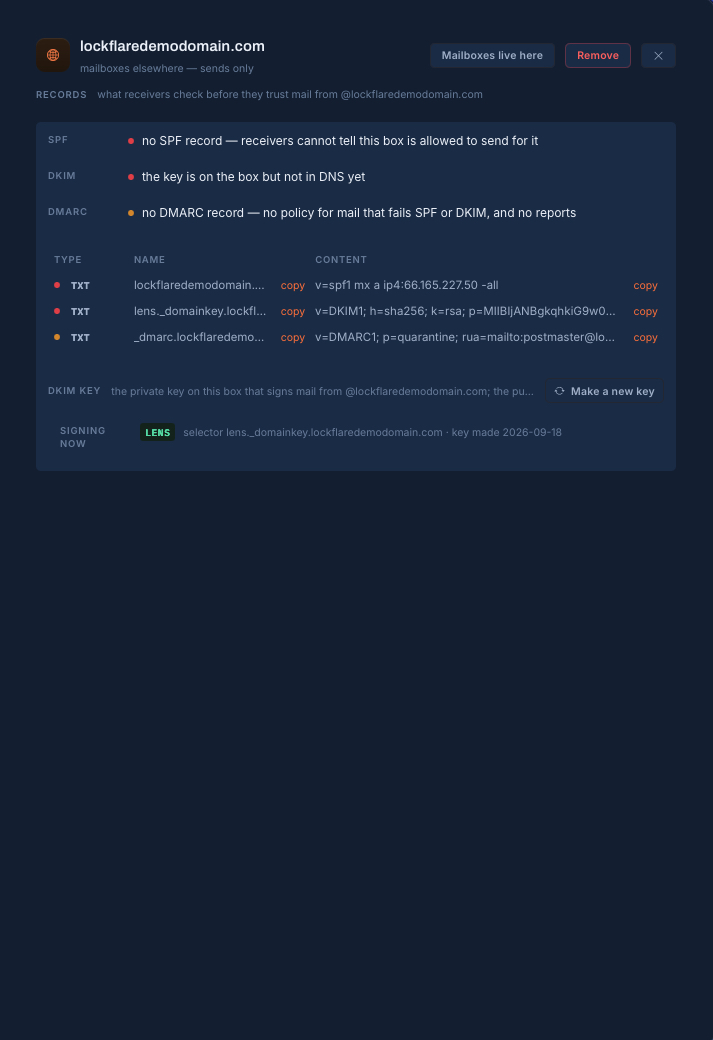
  • What is missing is said as a consequence, not a code: "no SPF record — receivers cannot tell this box is allowed to send for it".
  • Under it, the exact records to publish, as a table, with a copy button on the name and another on the content. Paste them at your DNS host and the dots turn green on the next look.
  • A domain can send only — for an app, a WordPress, an n8n — or have its mailboxes here, with Dovecot on 993.
A domain just added to the mail server in LockFlare Vigia: no SPF, DKIM not in DNS yet and no DMARC, each said in words, with the three TXT records to publish and a copy button on every name and content
A domain just added: what is missing, in words, and the three records to copy.

Our own domain, fully set up

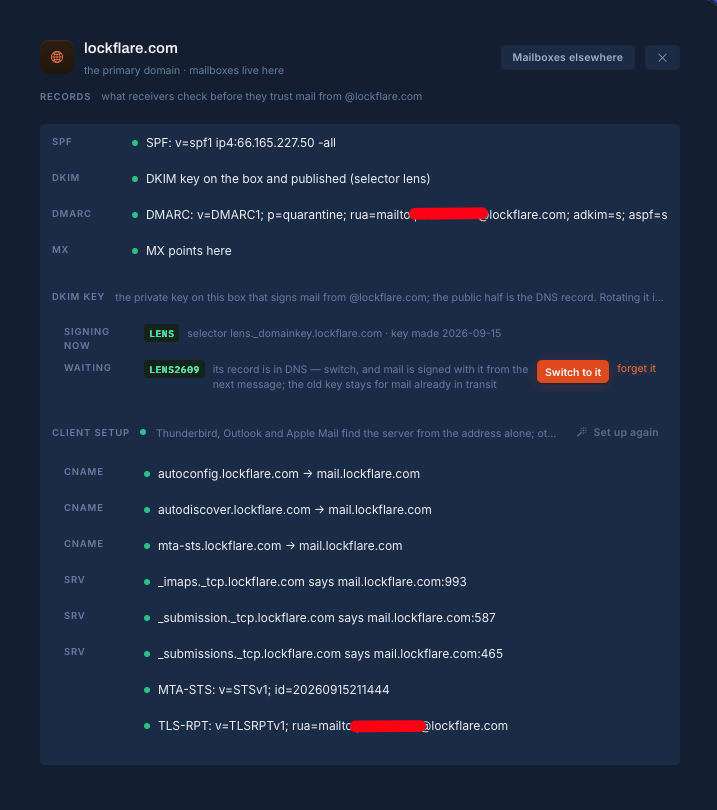
This is lockflare.com as it stands today. SPF ends in -all. DMARC is at quarantine with strict alignment. Vigia can read the reports it asks for, too: a collector mailbox per domain, the daily XML from Google, Microsoft, Yahoo and Apple folded by sending address, each named in words — the only place a domain owner sees who else is sending as them.

The DKIM key is rotated the way it should be and almost never is: the next key is made and its record published while the current one goes on signing; when DNS has it, one button switches, and mail is signed with the new key from the next message while the old one stays for mail already in transit. And mail programs set themselves up: the autoconfig and autodiscover names, the SRV records for IMAP and submission, MTA-STS and TLS reporting are all read and shown green — Thunderbird, Outlook and Apple Mail find the server from the address alone.

lockflare.com's mail records in LockFlare Vigia: SPF, DKIM, DMARC and MX green, a second DKIM key waiting to be switched to, and the client setup records — autoconfig, autodiscover, SRV, MTA-STS and TLS-RPT — all in place
Records green, the next DKIM key waiting for its switch, and every client-setup record in place.
The Domains tab of the mail server in LockFlare Vigia: lockflare.com as the primary domain with SPF, DKIM, DMARC, MX and client setup all green, and seven mailboxes living on the box
The domains this box sends for. Ours: five green dots and seven mailboxes.

A spam filter that learns from your Junk folder

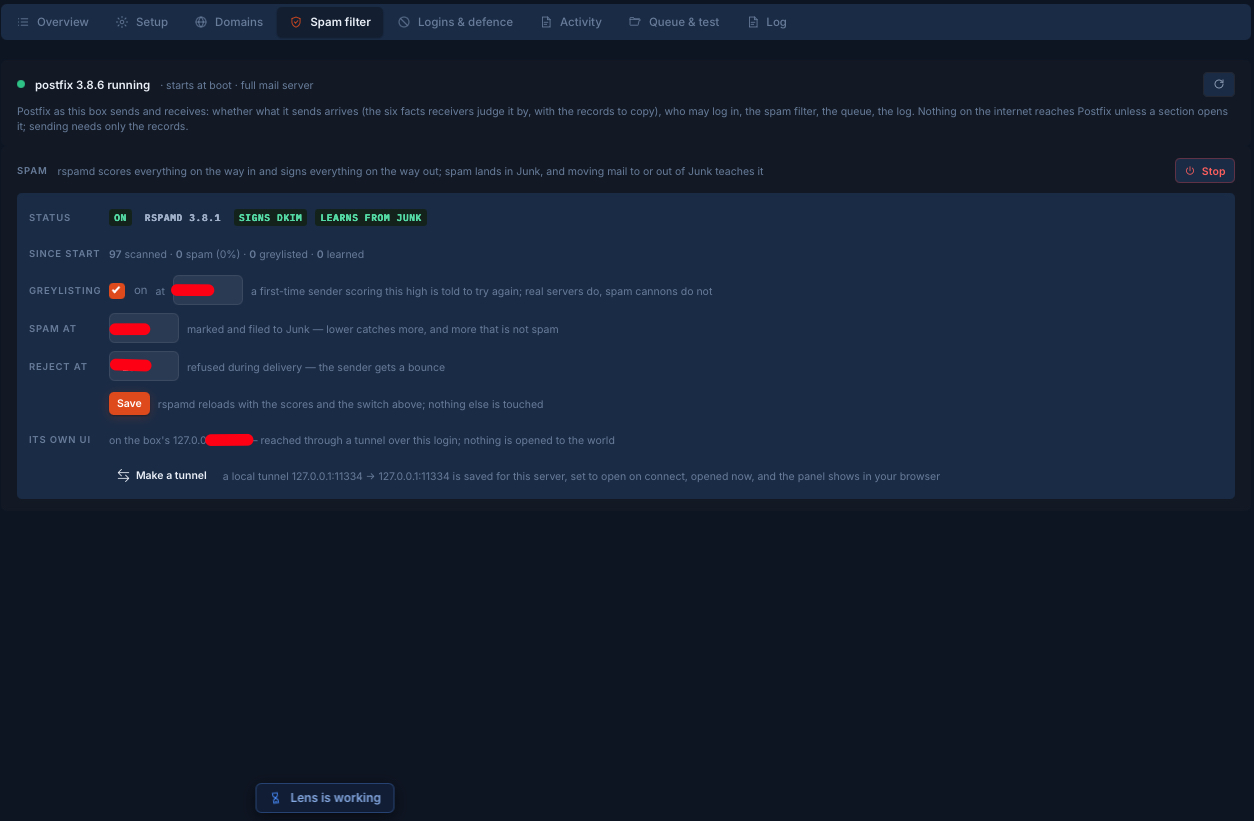
rspamd scores everything on the way in and signs everything on the way out. Spam lands in Junk, and moving a message into Junk or out of it teaches the filter — no separate training step, no console. Three numbers decide what happens to a message: the score at which a first-time sender is told to try again (real servers do; spam cannons do not), the score at which it is marked and filed to Junk, and the score at which it is refused during delivery so the sender gets a bounce. Each is a field with what it costs to move it said beside it.

rspamd's own panel stays on the box's loopback. Vigia reaches it through a tunnel over your login, saved for that server and opened on connect — nothing is opened to the world to look at a spam filter.

The spam filter tab of the mail server in LockFlare Vigia: rspamd on, signing DKIM and learning from Junk, with the greylisting, spam and reject scores, and its own panel reached through a tunnel
rspamd on our box: scanning, signing, learning from Junk. Its panel is reached through a tunnel, never opened to the internet.

Who may log in, and what happens to whoever guesses

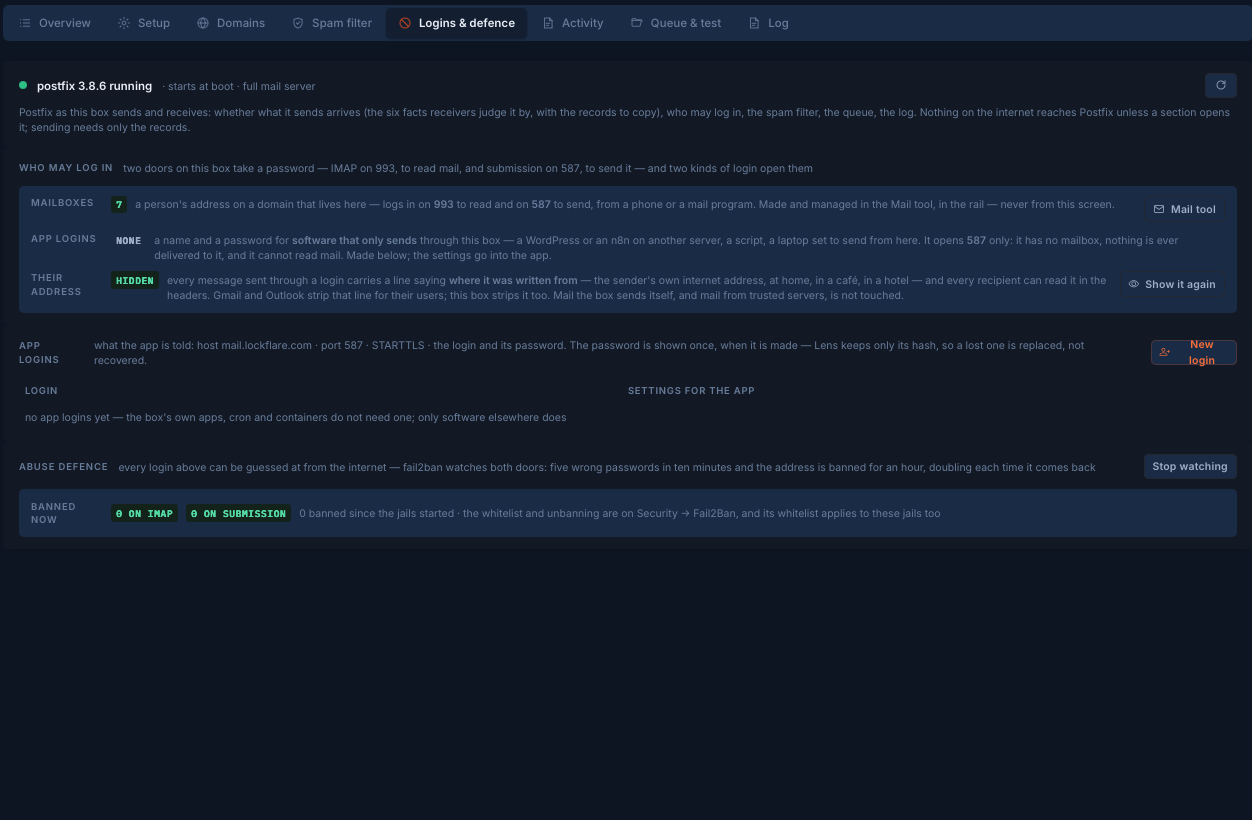
Two doors on a mail server take a password — IMAP on 993 to read, submission on 587 to send — and two kinds of login open them.

  • Mailboxes: a person's address on a domain that lives here, from a phone or a mail program.
  • App logins, for software that only sends through this box — a WordPress or an n8n on another server, a script. They open 587 only: no mailbox, nothing ever delivered to them, and they cannot read mail. The password is shown once, when it is made; Vigia keeps only its hash, so a lost one is replaced, not recovered.
  • The sender's own address, hidden. Every message sent through a login carries a header saying where it was written from — at home, in a café, in a hotel — and every recipient can read it. Gmail and Outlook strip that line for their users; this box strips it too.
  • fail2ban watches both doors: five wrong passwords in ten minutes and the address is banned for an hour, doubling each time it comes back.
Logins and defence on the mail server in LockFlare Vigia: seven mailboxes, app logins for software that only sends, the sender's address hidden from message headers, and fail2ban watching the IMAP and submission doors
Seven mailboxes, send-only logins for apps, the writer's address kept out of the headers, and both doors watched.

What happened to a message, in words

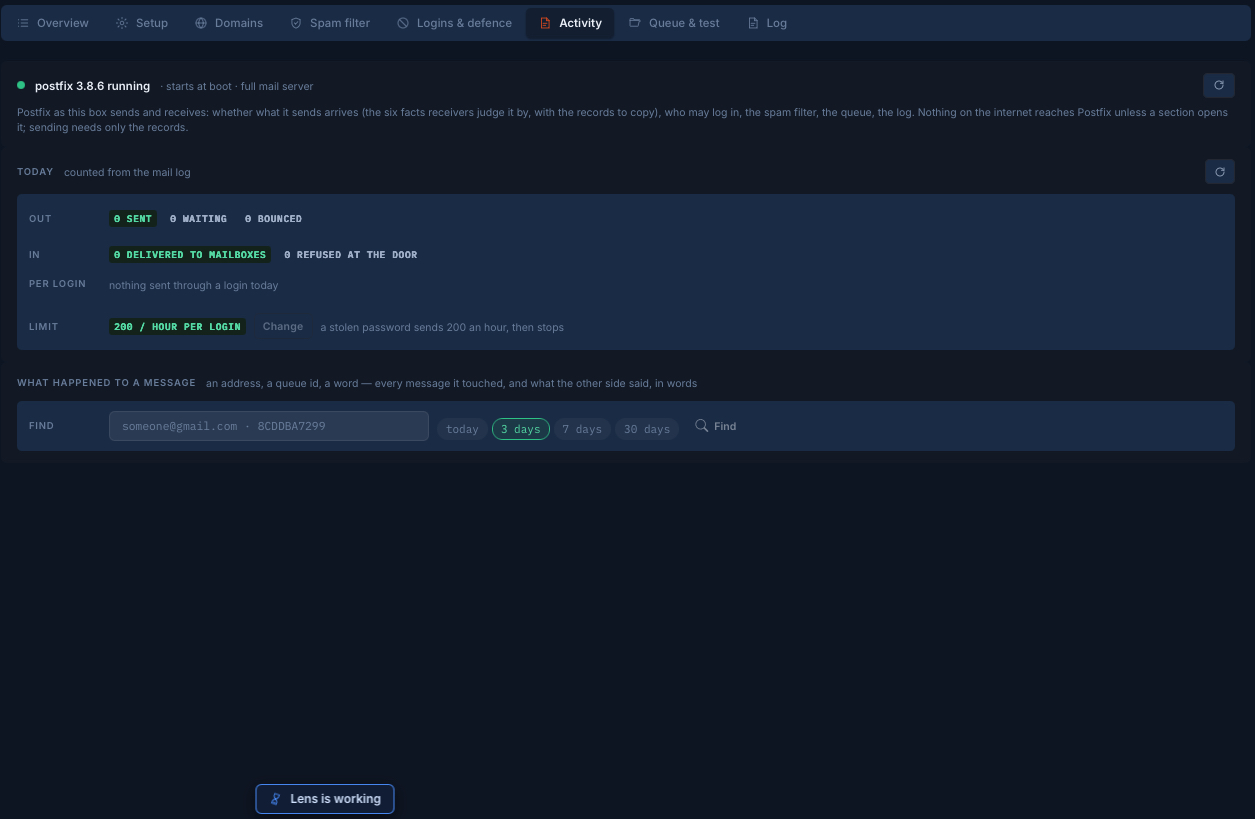
The day, counted from the mail log: sent, waiting, bounced; delivered to mailboxes, refused at the door; and how much each login has sent. A limit per login — two hundred an hour unless you change it — is the difference between a stolen password and a blacklisted server: a stolen password sends two hundred an hour, then stops.

And the question every mail admin is asked: "did my message arrive?" Type an address, a queue id or a word, pick how many days back, and Vigia finds every message it touched and what the other side said about it — in words, not in log lines. The queue and the raw log are a tab away when you want them.

The Activity tab of the mail server in LockFlare Vigia: today's sent, waiting, bounced and delivered counts from the mail log, the limit of 200 messages an hour per login, and a search for what happened to a message
Today from the mail log, a sending limit per login, and a search that answers "did it arrive?".

The rest of a mail server's life

Send only, for an app server

Postfix on loopback, DKIM signing, direct delivery or a relay — SES, Mailgun, Postmark, your own server. What a box that only needs to send should be, with nothing on the internet able to reach it. Who may send: its containers, other servers by address, logins on 587 behind TLS.

Mailboxes, aliases, a catch-all

The Mail tool in the rail, apart from the setup: people and their mailboxes, aliases, a catch-all. Mailboxes backed up, moved to another server, migrated in from wherever they were.

The certificate on every door

One Let's Encrypt certificate for 465, 587 and 993, renewed by certbot, with Postfix and Dovecot reloaded after. Vigia says how many days it has left, and which file it is reading that from.

Certificates and the vault

Nothing of ours on the box

Postfix, Dovecot, OpenDKIM, rspamd and fail2ban, installed as the ordinary packages they are and each configured through its own files. Vigia is not in the path of a single message, and the server goes on working with Vigia closed.

The other packages

Questions people ask

Is this really your own mail server?

Yes. Every screenshot on this page is mail.lockflare.com, the box that sends and receives LockFlare's mail, set up and run from Vigia. A few values are blanked out — addresses and scores we would rather not publish — and one demo domain was added to show what a new domain looks like before its records exist.

Will my mail land in the inbox?

Vigia cannot promise that, and nobody honestly can: receivers decide. What it does is read the facts they decide by — outbound port 25, reverse DNS, the host name, SPF, DKIM and DMARC, the certificate, the blacklists — say each in words, and give you the exact records to publish until they are all green.

Does Vigia sit in the path of my mail?

No. Postfix, Dovecot, OpenDKIM, rspamd and fail2ban are installed as ordinary packages and configured through their own files. Vigia reads and writes over your SSH login; no message passes through it, and the server runs the same with Vigia closed.

Can a server only send, without mailboxes?

Yes. Send only keeps Postfix on loopback, signs with DKIM and delivers direct or through a relay. A domain can also send from this box while its mailboxes live elsewhere, and software on other servers can send through it with an app login that opens port 587 only.

How are DKIM keys rotated?

In steps, without a gap: the next key is made and its DNS record published while the current key goes on signing; when the record is visible, one button switches and mail is signed with the new key from the next message, while the old one stays published for mail already in transit.

What stops a stolen password from getting the server blacklisted?

A sending limit per login — two hundred messages an hour unless you change it — so a stolen password sends two hundred an hour and then stops, and fail2ban on both login doors, banning an address for an hour after five wrong passwords in ten minutes and doubling each time it returns.

Run your own mail, and see what receivers see

Vigia is free for 10 servers. Nothing is installed on them to try it.

Download Vigia